DIY ICA Passport Photos 2026: From Newborns to Seniors
ICA passport photo requirements explained: 400x514 px specs, lighting and newborn photo tips to help you avoid application delays.
If you've tried to renew your Singapore passport online recently, you've likely felt the frustration. You spend twenty minutes getting the light right, upload the photo with a sense of relief, and—ping—the ICA system rejects it. Maybe the background wasn't 'white enough.' Maybe there was a faint shadow behind your ear. Often, the system just says 'image quality unsatisfactory' without telling you what went wrong. To avoid these issues, using the ic photo singapore app can ensure your submission meets all technical standards on the first try.
I've seen this play out countless times on local forums and in family group chats. The truth is, the Immigration & Checkpoints Authority (ICA) uses sophisticated biometric software that doesn't just look at your face; it's scanning for pixel density, precise geometry, and light ratios that the human eye misses.
This guide is designed to help you bypass that frustration. Whether you're taking a photo for a squirmy newborn, a senior with limited mobility, or just yourself, here is how you get it right on the first try in 2026.
The Silent Rejection: Why ICA Standards Are Harder Than Ever
There was a time when you could walk into a neighborhood 'Kodak shop,' get a stack of physical photos, and they'd almost certainly pass. But as Singapore shifted to the Singapore MyICA portal, the goalposts moved.
The Algorithm Behind the Screen
When you upload a photo to the ICA portal, it isn't a human officer looking at it first. It's an algorithm. This software checks for very specific markers defined by international biometric standards like ICAO Doc 9303. The system verifies the distance between your pupils, the width of your nose, and the vertical alignment from your chin to your forehead.

If there's a shadow—even a tiny one—under your nose or behind your ears, the software can't 'map' your face accurately. This leads to an instant rejection. According to official ICA guidelines, photos must be taken within the last three months, but even 'fresh' photos fail if the lighting is flat or the digital compression is too high.
The Logistics of a Failed Photo
It’s not just about the S$10 lost at a booth. A rejected photo can push your passport issuance back by two to four weeks. As reported by The Straits Times, surges in application volume mean that any error can lead to significant travel disruptions. If you've got a flight booked for the June holidays or a business trip, that delay is a nightmare.
Mastering the Technical Specs: 35x45mm and the Pixel Trap
Let’s look at the hard numbers. If these are off, the rest of your work won't matter. ICA is very strict about two sets of measurements: physical dimensions for prints and pixel dimensions for digital uploads.
Dimensions vs. Pixels: The 1:1.285 Ratio
For the ica passport photo requirement, the physical size is 35mm wide by 45mm high. However, since most applications are now online, the digital specs are what trip people up. Your image must be exactly 400 by 514 pixels.
| Feature | Requirement |
|---|---|
| Physical Size | 35mm x 45mm |
| Digital Dimensions | 400 x 514 Pixels |
| File Format | jpg, jpeg, heic, heif or png |
| File Size | 8MB or less |
| Head Height | 25mm to 35mm (Crown to Chin) |
This specific 1:1.285 aspect ratio ensures your face takes up the correct amount of space. If you upload a standard photo from your phone, the ICA system will try to crop it automatically, which often leads to errors.
File Compression and Quality Limits
Your file must be 8MB or less. But don't just use a basic 'resize' app. Manual resizing often introduces 'noise' or jagged edges. ICA’s AI scans for this; if the edges of your face look pixelated, it’ll be flagged as a low-quality image, even if the pixel count is correct.
The Lighting Blueprint: Avoiding Shadows at Home
Lighting is where 90% of home attempts fail. Most people think they need a bright flash. Actually, a flash is your worst enemy. It creates 'hot spots' on your forehead and harsh shadows on the wall behind you.
Using Natural Light Without the Glare
Instead of a flash, find a large window during the day (9:00 AM to 11:00 AM is usually best). Stand so the window is at a 45-degree angle to your face. This lights up your features without washing you out.
The Two-Step Shadow Fix
ICA explicitly forbids using software to digitally remove shadows. If their system detects a 'cut-out' background, it's an automatic fail. To fix this physically, stand about 50cm to 100cm away from the white wall. This distance lets the light fall behind you, minimizing the shadow your body casts on the background.
Newborn Passport Photos: The Stress-Free Method
Getting a newborn passport photo is one of the most stressful tasks for new parents. How do you get a two-week-old to look at a camera and stay still?
The Floor-and-Sheet Technique
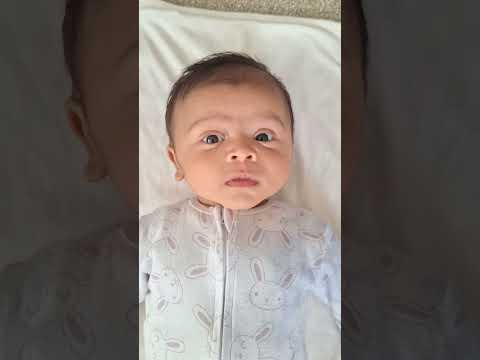
Don't try to hold the baby up. Instead, lay a crisp, white bedsheet on the floor near a bright window. Lay the baby down on the sheet. This gives you a natural, compliant background without the struggle of supporting their head. Stand directly over them to take the photo.
ICA Leniency for Infants
There's a bit of relief here: ICA is slightly more flexible with infants. While adults must have their mouths closed and eyes on the lens, for babies under one year, the eyes don't have to be perfectly open, and the mouth doesn't have to be fully closed. However, you still can't have hands, pacifiers, or toys in the frame.
What to Wear: Avoiding the 'Floating Head' Effect
I often see people wearing their best white business shirt for their passport photo. While it looks sharp in person, it's a disaster for the ICA system.
Contrast is Everything
Because the background must be white, a white shirt makes you look like a 'floating head' to the AI. There isn't enough contrast for the software to find your shoulders. Always wear a dark-colored shirt—navy, black, or dark charcoal. This creates a sharp silhouette that the system can easily process.
Glasses and Accessories in 2026
In 2026, the rules for glasses are even tighter. While they are technically allowed, they cannot have tinted lenses, and the frames must not cover any part of your eyes. My advice? Just take them off. It's the simplest way to avoid a rejection for 'lens glare.'
Applying for Malaysia? Key Differences You Should Know
Many Singapore residents hold Malaysian citizenship or dual residency. Don't assume the rules are identical. While the malaysia passport photo requirement also calls for a white background, the sizing for physical applications is often 35x50mm rather than 35x45mm.
Also, the Malaysian Immigration Department is famously strict about hair. For women, hair must be tucked behind the ears, and the forehead must be completely visible. If you're using the ic photo singapore app, you can toggle between these different country requirements to ensure you're getting the specific dimensions for a passport size photo malaysia versus Singapore.
How IC Photo Singapore Mirrors the ICA Engine
If this sounds like a lot to manage, that’s why we built the ic photo singapore app. We wanted to remove the guesswork.
AI Validation in Seconds
When you upload a photo to our app, it does more than just crop it. Our AI runs a series of checks that mimic the ICA’s own biometric engines. We verify:
- Face Centering: Ensuring the crown-to-chin ratio is exactly within the required range.
- Background Uniformity: Cleaning the background to pure white without digital artifacts.
- Lighting Balance: Analyzing for harsh shadows or overexposure.
The Guarantee Against Rejection
We're so confident in our compliance engine that we offer a lifetime remake guarantee. If ICA rejects a photo processed through our professional service, we'll help you fix it or provide a remake at no cost.
Frequently Asked Questions
What is the sg passport photo size?
The standard sg passport photo size is 35mm by 45mm for physical copies and 400x514 pixels for digital submissions to the MyICA portal.
Can I use a photo booth for my passport photo?
Yes, you can use a passport photo booth or passport photo machine, but many of these older machines do not provide the exact 400x514px digital file required for the best results on the MyICA portal.
What are the passport size photo dimensions for Malaysia?
The passport size photo dimensions for Malaysia are 35mm wide by 50mm high, which is slightly taller than the Singapore requirement.
Your 60-Second Final Checklist
Before you hit 'submit' on the MyICA portal, run this scan:
- Dimensions: Is it exactly 400x514 pixels?
- Format: Is it a jpg, jpeg, heic, heif or png file?
- Recency: Was this taken in the last 3 months?
- Background: Is it pure white with no patterns?
- Clothing: Are you wearing a dark shirt?
- Eyes: Are your eyes open and looking at the lens?
- Mouth: Is your mouth closed (no teeth showing)?
- Shadows: Are there zero shadows on your face or the wall?
The Bottom Line
Getting your passport photo right is about being 'machine-readable.' In 2026, your photo is data before it's an image. By getting the geometry and lighting right, you save yourself hours of hassle.
If you want to skip the trial and error, the ic photo singapore app is here to do the heavy lifting. Upload your photo here and let our AI handle the compliance while you focus on your travel plans.
Ready to Create Your Photo?
Get your perfect passport, IC, or visa photo in minutes. AI-powered, ICA-compliant, instant download.
Create Your Photo Now