ICA-Compliant DIY Passport Photos from Your Smartphone
ICA's technical requirements for digital passport and IC photos, with home lighting setups, newborn tips and how AI photo tools can help.
If you’ve ever sat in front of your laptop, refreshing the ICA MyICA portal only to see the word "Pending" for two weeks, you know the frustration. Usually, this happens because of a technicality easily solved by a professional passport photo maker. Then comes the email you've been dreading: "The photo submitted does not meet the requirements."
It’s a common headache because a passport photo seems deceptively simple. However, today, the Immigration & Checkpoints Authority (ICA) isn't just checking your photo with human eyes; they're running it through biometric software that maps your facial landmarks. This system doesn't care if you look "good"; it cares if the distance between your pupils, the curve of your chin, and the visibility of your hairline are perfectly readable for Changi’s automated gates.
Most rejections happen because of technical execution, not looks. A faint shadow behind your ear or a smartphone lens that makes your nose look 20% larger than it is can trigger a fail. This guide will help you bridge that gap, turning your HDB living room into a professional-grade studio using nothing but a phone and some sunlight.
The High Cost of a 'Pending' Status
Singapore is a world leader in digital identity. With the shift toward seamless, passport-less travel at our borders, the photo you upload for your passport or IC is actually a data set. When you walk through an automated lane, the system compares your live face to the mathematical map created from your uploaded photo.
Why 'Good Enough' Doesn't Cut It Anymore
If your photo has "noise"—like reflections on your forehead or a background that isn’t pure white—the map fails. The ICA isn't being difficult for the sake of it; they're making sure the technology that keeps Singapore travel efficient actually works. Biometric accuracy is the standard, and even a slight head tilt can invalidate the image.
The ICA Blueprint: Essential SG Passport Photo Size & Dimensions
While the physical size is standard, DIY attempts usually fail because they ignore the internal geometry required by the ICA’s official photo guidelines.
| Requirement | Specification |
|---|---|
| Physical Size | 35mm wide by 45mm high |
| Face Height | 25mm to 35mm (chin to crown) |
| Digital Resolution | Minimum 400 x 514 pixels |
| File Format | JPEG (.jpg) |
| File Size | Max 8MB |
The 25mm to 35mm Rule (The Head Ratio)
According to biometric standards, your head must take up between 25mm and 35mm from the chin to the crown. If your face is too small, the software can’t grab enough detail. If it’s too large, your features might be distorted by the lens curvature. You also need a buffer—at least 5mm to 10mm of space between the top of your hair and the edge of the frame. This ensures compliance with International Civil Aviation Organization (ICAO) Biometric Standards.
Digital Specifications: Pixels, DPI, and File Size
When you're uploading to the MyICA portal, focus on the digital specs:
- Aspect Ratio: 1:1.285.
- Color Space: 24-bit sRGB.
- Quality: Avoid using random online compressors. The ICA system will reject photos with heavy compression artifacts because they blur the edges of your facial features.
The DIY Home Studio: Lighting Your Passport Photo Maker Setup
Shadows are your biggest enemy—specifically those on the background and those under your nose or chin. You don't need expensive gear; you just need to understand light placement.
The North-Facing Window Strategy
Natural light is best because it’s "diffused." Direct sunlight is too harsh, causing deep shadows and making you squint. Find a window during the day that doesn't have the sun blasting directly through it. North or South-facing windows in Singapore are your gold standard. Stand about 1 to 1.5 meters away from a white wall, facing the window.
Killing the 'Shadow Ghost': How to Handle Backgrounds
If you stand directly against the wall, you'll cast a shadow on it. This is an instant rejection.
The Fix: Step about 50cm away from the wall. This allows light to wrap around you and illuminate the background independently. If the wall still looks a bit grey, place a small desk lamp on the floor behind you, pointing up at the wall. This "backlight" creates that crisp, professional white background the ICA demands.
Smartphone Mastery: Avoiding the 'Wide-Angle' Trap
Modern phones use wide-angle lenses for their primary cameras. If you hold the phone too close for a selfie, your features will distort, making it impossible for a passport photo app to align your features correctly.
The 1.5-Meter Rule for the Best Passport Photo App Results
- Skip the selfie camera: It's lower quality and has more distortion.
- Have a partner take the photo: Or use a tripod.
- Stand 2 meters away: Use the 2x or 3x optical zoom. This mimics a portrait lens, flattening your features so they look natural and proportional. This is essential for both Singapore and the passport size photo malaysia requirements.
The Newborn and Toddler Masterclass
Getting a compliant photo of a two-week-old is an Olympic sport. They can’t hold their heads up, and the ICA Infant Passport Application Details are very specific about facial clarity.
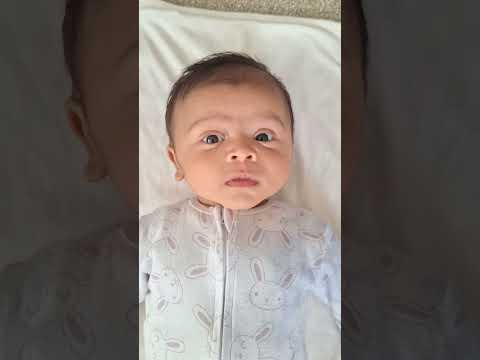
The White Sheet Hack
Don't try to hold the baby up against a wall. Your hands will end up in the frame. Instead, lay a crisp white bedsheet on the floor near a bright window. Lay the baby down on the sheet and take the photo from above. This ensures the background is flat white and no hands are visible.
Managing Toddlers: The Two-Person Technique
You need a "Photographer" and a "Clown." The Photographer focuses on the frame, while the Clown stands directly behind the camera making funny faces. Toddlers must have a neutral expression with eyes open. You might need to take 50 shots to get that one split second where their mouth is closed and they are looking at the lens.
Common Rejection Pitfalls and How to Fix Them
Eyebrows and Hairlines: The Visibility Mandate
The ICA is strict about hair. Your eyebrows must be visible. If you have long bangs, pin them back. The distance between your eyebrows and other facial landmarks is a key biometric marker. If your hair covers your brows, the system can’t verify who you are.
The Specs Dilemma: Glare and High-Index Lenses
ICA’s advice on spectacles is to wear them only if you must. They cannot have tinted lenses or frames that obscure your eyes. The real killer is specular reflection—that white glare on the glass that hides your pupils. If you can't get rid of the glare by tilting your head slightly, just take the glasses off.
Navigating Religious and Cultural Requirements
Religious headgear like the hijab, turban, or habit is permitted, but there are rules:
- The Face Frame: The headgear must not cast a shadow on your face.
- Full Visibility: Your face from the bottom of your chin to the top of your forehead, and both edges of your face, must be shown clearly.
- Contrast: Ensure there is enough contrast between your headgear and the white background.
AI vs. Manual: Why Your Old Passport Size Photo Editor is Failing You
Many people try to use basic phone apps to crop their photos to 35x45mm. The problem? Most of us are bad at estimating that 25mm–35mm head-to-frame ratio.
This is where an AI-powered passport photo maker like IC Photo Singapore changes the game. Instead of you guessing, an algorithm trained on thousands of successful submissions scans your photo, ensuring every ICA Digital Photo Requirement for Passports is met automatically.
The Geometry of Compliance
AI doesn't just crop; it validates. It detects if your head is tilted by even 2 degrees, if your shoulders are uneven, or if the background isn’t a "true" white. Using a specialized tool provides a layer of insurance that a generic editor can't offer.
Frequently Asked Questions
Can I smile in my Singapore passport photo?
No. The ICA requires a neutral facial expression with the mouth closed. Grinning or showing teeth can alter your biometric facial map, leading to rejection.
What color should I wear for a passport photo?
Since the background must be white, avoid wearing white or very light-colored clothing. Darker colors like navy blue, black, or dark grey provide the best contrast for biometric systems.
Is the passport size photo malaysia the same as Singapore?
They are very similar (35mm x 50mm vs 35mm x 45mm), but Malaysia often requires a specific background color for physical submissions. However, for digital Malaysian passports, the standards align closely with ICAO biometric guidelines.
Final Check: Before You Upload
- Zoom in on the eyes: Are the pupils sharp and free of red-eye?
- Check the background: Is it pure white, or does it look slightly blue or grey?
- The Eyebrow Test: Are both brows fully visible and not tucked under hair?
- Lighting Balance: Is the left side of your face as bright as the right?
By following these steps and using a reliable passport photo maker, you turn a stressful task into a five-minute errand from your sofa. Professional quality is now accessible to anyone with a smartphone.
Ready to Create Your Photo?
Get your perfect passport, IC, or visa photo in minutes. AI-powered, ICA-compliant, instant download.
Create Your Photo Now