2026 Singapore ID Photo Guide: Beat the ICA Rejection Bot
How ICA's automated photo checks work in 2026, how booths compare with phone photos, and how to avoid the most common rejection reasons.
The 'Submit' button on the MyICA portal is arguably the most stressful part of any Singaporean’s week. You’ve navigated the forms and double-checked your IC number, but then comes the photo upload. You pick a decent-looking selfie or a crop from a recent wedding, hit 'Submit,' and—rejected. In 2026, the shift towards a digital-first identity means using a professional passport photo app is no longer just a luxury; it is a necessity to navigate the rigorous automated checks used by GovTech and the ICA.
By 2026, the Singapore Immigration & Checkpoints Authority (ICA) has largely removed human subjectivity from the process. Instead, a sophisticated, cold-blooded algorithm—the 'Rejection Bot'—scans your image for hundreds of biometric data points. If your eyebrows are a fraction obscured or your background is 'eggshell' instead of 'pure white,' the system bounces your application instantly. A rejected photo isn’t just a hit to your ego; it delays your travel and wastes hours of your time. This guide covers exactly what the ICA wants, so you can get approved on the first try.
The Anatomy of an ICA-Compliant Photo
To beat the system, you have to understand the specs. ICA’s requirements are strict because they feed directly into the facial recognition gates at Changi Airport. If the photo in the database is flawed, that biometric gate won't open when you're rushing for your flight. Following the official ICA Photo Guidelines is critical for success.
Dimensions and Pixels: More Than Just 'Passport Size'
The standard sg passport photo size is 35mm wide by 45mm high. However, for digital uploads, the pixel count is the real gatekeeper. Your image should be at least 400 x 514 pixels. Most people fail on the 'Head-to-Body' ratio. ICA requires your face (from chin to the crown of the head) to occupy between 25mm and 35mm of the vertical height. If you're too far away, the resolution on your features isn't high enough.
The 'Pure White' Background Rule
This is the single most common reason for rejection. The ICA explicitly states the background must be white. They don't mean 'whitish.' They mean Hex Code #FFFFFF. If you take a photo against a white wall in a room with warm yellow lights, your background looks cream or off-white to the computer. If there are shadows behind your ears, the bot sees them as 'artifacts' and rejects the image. This aligns with international biometric standards like ISO/IEC 19794-5, which mandate neutral backgrounds for clear identification.
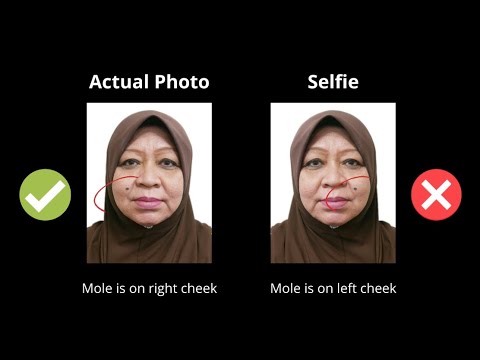
The 'Rejection Bot' Logic: How ICA Sees Your Face
Why does the ICA care if a few strands of hair touch your eyebrows? It’s not about fashion. The supraorbital ridge (the bone structure of your eyebrows) is a key anchor point for facial recognition software. Modern digital identity initiatives, as outlined by GovTech Singapore, rely on these precise landmarks to ensure secure and seamless authentication.
The Eyebrow Rule and Facial Landmarks
Your hair must be tucked behind your ears or styled so your entire face is visible. The bot needs to see the distance between your eyes, the bridge of your nose, and the edges of your forehead. If you have a 'fringe' that covers your eyebrows, you're hiding 20% of the data the bot needs to verify your identity. Even a stray hair crossing an eye can trigger a manual review flag, adding weeks to your application time.
Neutral Expression: Why You Can’t Smile
A smile changes the geometry of your face. It lifts your cheeks, narrows your eyes, and alters the distance between your nose and mouth. For a biometric system to be 99.9% accurate, it needs your face in its 'resting' state. Keep your mouth closed and eyes open. A 'neutral expression' means no squinting and no frowning.
Where to Take Your Photo: The 2026 Cost-Benefit Matrix
You have three main options in Singapore, each with a different risk profile for satisfying the ica passport photo requirement.
1. Self-Service Booths (The MRT Staple)
- Cost: S$8 - S$12
- The Pro: Fast physical prints.
- The Con: Lighting is often harsh and fixed. If you’re the 'wrong' height for the stool, your head-to-body ratio will be off. The digital copy via QR code from a passport photo machine is often compressed, which can lead to pixelation rejections.
2. Professional Photography Studios
- Cost: S$25 - S$50
- The Pro: A human ensures your hair and lighting are perfect.
- The Con: Expensive and requires a trip to the mall. Searching for a "passport photo shop near me" can lead to high costs for a simple 10-minute task.
3. AI Online Editors: The Modern Passport Photo App
- Cost: Free to S$10.
- Platform: IC Photo Singapore.
- The Pro: Take the photo at home. The AI automatically removes the background, fixes lighting, and crops to the exact 35x45mm spec. It offers the precision of a studio with the convenience of your living room.
- The Con: Requires a decent smartphone and natural light.
The DIY Home-Studio Masterclass
If you choose to make passport size photo online free or use a premium tool, follow these steps for a successful DIY session.
Lighting Hacks: The Window-Facing Method
Forget ceiling lights; they create 'raccoon eyes' (shadows in your eye sockets). Instead, find a large window during daylight hours. Stand facing the window about one meter away. Natural, diffused light fills in your facial features without harsh shadows. Have a friend hold the phone; your front-facing 'selfie' camera usually distorts features.
Camera Setup: The 'No Zoom' Rule
Don’t use digital zoom; it introduces 'noise' or graininess. Instead, have your friend stand about 2 meters away and move the phone physically closer until your head and shoulders are in the frame. Leave plenty of space around your head; it’s easier to crop down than to add space later.
Niche Challenges: Babies, Elderly, and Religious Headgear
Newborn Passport Photos: The 'Bedsheet Method'
Getting a newborn to sit upright is impossible. Lay a white bedsheet on a firm mattress and lay the baby on their back. Stand over them (safely!) and take the photo from above. This ensures a white background and a comfortable baby. For infants under one, ICA rules are slightly more flexible regarding open eyes, though it is still preferred.
Spectacles and Religious Attire
ICA now strongly recommends removing glasses. The risk of lens flare or frames obscuring your eyes is too high. For religious headgear like hijabs or turbans, the rule is simple: the headgear must not cover any part of your face. The entire 'face oval' must be visible from the chin to the top of the forehead and edge to edge.
Regional & Global Standards: Beyond Singapore
The US Visa 2x2 Challenge
The US requires a 2x2 inch (51x51mm) photo. They are much stricter about head size—it must be between 1 and 1 3/8 inches. Check the US Department of State specs first, as an SG-sized photo will be rejected.
Malaysia Passport Requirements
Malaysia moved to a white background standard several years ago, but their 'head room' requirements differ from Singapore’s. If you are a Malaysian PR in Singapore, check the Malaysia Immigration Department guidelines to ensure your passport size photo malaysia meets their specific vertical face percentage.
Frequently Asked Questions
What is the exact sg passport photo size?
The required dimensions are 35mm (width) by 45mm (height). For digital uploads, ensure the resolution is at least 400x514 pixels.
Can I use a free passport photo app for my ICA application?
Yes, you can use a free passport photo app, but ensure it includes an AI compliance check. Tools like IC Photo Singapore provide an automated check against ICA standards to prevent rejection.
Why was my passport photo background rejected?
The background must be plain white with no shadows. Even a light grey or off-white wall can lead to rejection by the automated system.
Do I need to remove my glasses for a Singapore passport photo?
While not strictly forbidden if there is no glare, ICA strongly recommends removing them to avoid any chance of rejection due to obscured eyes or reflections.
Conclusion: Your Checklist for Success
Using a modern passport photo app like IC Photo Singapore streamlines the renewal process significantly. Before you hit upload, verify that your background is pure white (#FFFFFF), your eyebrows are fully visible, and your expression is neutral. By following these technical steps, you can bypass the 'Rejection Bot' and ensure your travel documents are processed without delay. Whether you use a professional studio or a passport size photo editor at home, compliance is the ultimate life hack for a stress-free application.
Ready to Create Your Photo?
Get your perfect passport, IC, or visa photo in minutes. AI-powered, ICA-compliant, instant download.
Create Your Photo Now