ICA Digital Photos for Singapore Passport, IC and PR
A practical guide to MyICA photo requirements for Singapore passport, IC and PR applications: pixel specs, file sizes and common rejections.
If you’ve ever sat in front of your laptop, staring at the MyICA portal with a "Photo Rejected" notification flashing in red, you know that sinking feeling. It’s not just about the ten dollars you spent at a neighborhood booth—it’s the delay. Whether you’re renewing a Singapore passport, applying for Permanent Residency (PR), or sorting out your child’s first IC, the photo is the single most common bottleneck. Finding a reliable passport photo app can save you hours of frustration and ensure your submission meets the rigorous ICA Official Photo Guidelines.
In 2026, the Immigration & Checkpoints Authority (ICA) doesn’t just look at your photo to see if it "looks like you." They use sophisticated neural networks and biometric AI to map your face. This software is incredibly efficient but also incredibly pedantic. It doesn't care if you think your hair looks great; it cares that your left eyebrow is 15% obscured by a stray lock of hair. This is why using a precise passport photo maker is often safer than a manual DIY approach.
The Algorithm’s Gaze: How ICA Actually Evaluates Your Photo
When you upload a photo to the MyICA portal, the first gatekeeper isn’t a human—it’s an automated validation system. This system ensures that the image meets ISO/IEC 19794-5 standards, which are the international benchmarks for biometric identification.
Biometric Landmarks and Facial Mapping
The AI looks for "landmarks." It measures the inter-pupillary distance, the width of your nose, and the precise distance from your chin to your forehead. If these points are obscured by shadows, hair, or glare, the system can't "lock on."
This is why the ICA is so insistent on a neutral expression. A wide smile changes the shape of your cheeks and the position of your eyes, which can throw off the biometric mapping. If the AI can’t verify your identity against the database in under a second, it flags the photo for manual review—or a flat rejection. For those wondering where to take passport photo Singapore that passes these tests, digital tools that specialize in biometric checks are becoming the gold standard.
The 'Halo Effect': Why DIY Background Removal Fails
Many people try to take a photo against a beige wall and then use a generic passport size photo editor to turn it white. Here’s the problem: basic AI background removers often leave a "halo" or jagged edges around your hair and shoulders.
When the ICA software analyzes the image, it sees these artifacts as "noise." If the contrast between your hair and the background isn’t clean, the photo is often rejected because the software can’t determine the exact outline of your head. Professional tools like those used by IC Photo Singapore are specifically trained for Singaporean ID requirements to avoid this.
Troubleshooting the 'Real' Rejection Reasons
After analyzing thousands of data points, we’ve identified the most frequent causes of frustration. Understanding the ica passport photo requirement list is the first step toward approval.
1. The Eyebrow Rule: Visibility is Non-Negotiable
This is perhaps the most frequent cause of rejection in Singapore. ICA guidelines state that your eyebrows must be clearly visible. If you have bangs or a fringe, they cannot touch your eyebrows. Even a few strands crossing the brow line can trigger a rejection.
2. Spectacle Glare and Frame Shadows
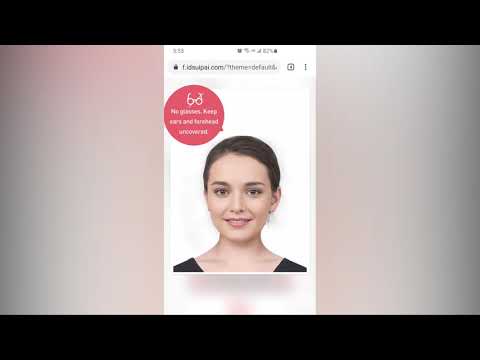
While you’re technically allowed to wear glasses, the ICA generally prefers you don't. Glare on the lenses can hide your eyes, and thick frames can obscure the edges of your eyes—both of which are critical biometric markers. If you are also managing applications for neighbors, note that the malaysia passport photo requirement also has strict rules regarding eyewear.
3. The 'Beauty Mode' Trap: Computational Photography Rejections
Modern smartphones use heavy computational photography. Features like "Portrait Mode" or "Face Smoothing" are the enemy of an ICA-compliant photo. These filters blur natural skin texture, which the ICA's AI detects as "image tampering." To make passport size photo online free of these artifacts, always use the standard camera mode with no filters.
The Newborn Masterclass: Photographing Your Baby at Home
Taking a newborn passport photo at a studio is a recipe for stress. The ICA is slightly more lenient with infants regarding eyes being perfectly open, but the photo quality must still be high.
The 'White Sheet' Strategy and How to Fix It
The most common DIY method is laying the baby on a white bedsheet. The problem? The baby’s head sinks into the sheet, creating shadows.
- Expert Strategy: Place the baby on a firm, flat surface covered with a taut white sheet.
- Lighting: Use natural light from a large window.
- Shadow Control: Have someone hold a white piece of cardboard just out of frame to bounce light back up under the chin.
For more on specialized requirements for work-related passes, you can reference the Ministry of Manpower (MOM) Photo Guidelines.
Technical Deep-Dive: Pixels, Ratios, and Metadata
When you're uploading to the MyICA portal, physical measurements like "35mm x 45mm" are less important than the digital specs.
| Feature | Requirement |
|---|---|
| sg passport photo size | 400 x 514 pixels |
| File Format | jpg, jpeg, heic, heif or png |
| Maximum File Size | 8MB for passport and IC (PR application forms: 1MB) |
| Preferred File Size | 500 KB - 1 MB |
| Color Space | sRGB |
If you use Adobe RGB (common in professional cameras), the colors may shift when uploaded, making your skin tone look unnatural to the ICA server. For those also handling regional documents, ensure you check the passport size photo malaysia specs as they differ slightly in pixel dimensions.
Studio vs. Photo Booth vs. AI Apps: A 2026 Cost-Benefit Analysis
- The Traditional Studio ($30 - $60): Great lighting, but expensive and inconvenient.
- The Neighborhood Photo Booth ($10): Often has outdated cameras and harsh lighting. Rejection rates for digital uploads are notoriously high.
- AI-Powered Apps ($0 - $20): You can take unlimited retakes at home. A free passport photo app might offer the basics, but a dedicated tool like IC Photo Singapore analyzes your photo against ICA’s latest 2026 requirements before you submit.
As reported by The Straits Times, Singapore's move toward more advanced biometric technology means your photo quality matters more than ever for seamless border clearance.
Cultural and Religious Considerations: Hijabs, Turbans, and Habits
Singapore’s guidelines are inclusive but strict on visibility:
- Hijabs and Turbans: Perfectly acceptable, but they must provide a clear contrast against the background. Avoid white headgear if possible.
- Visibility: The entire face—from the chin to the top of the forehead—must be visible.
Frequently Asked Questions
What is the Singapore passport photo size in pixels?
The required dimensions are exactly 400 pixels wide by 514 pixels high for digital uploads to the MyICA portal.
Can I use a free passport photo app for my PR application?
Yes, but ensure the app is specifically updated for Singapore's 2026 biometric standards. PR applications face higher scrutiny, so precision is key.
Where is a passport photo shop near me in Singapore?
While many shops exist in HDB hubs, most residents now prefer using a digital passport photo maker from home to avoid travel and ensure they can take multiple retakes until the photo is perfect.
Final Checklist: Your 100% Acceptance Roadmap
- Contrast: Wear a dark shirt (navy or black) to stand out against the white background.
- Hair: Tuck it behind your ears and keep the fringe away from your eyebrows.
- Eyes: Look directly at the lens; ensure there is no "red-eye" or squinting.
- Lighting: Check for "ear shadows" or shadows on the wall behind you.
- Focus: Ensure the photo is sharp. If you zoom in on your pupils and they are blurry, retake the photo.
Navigating the MyICA requirements doesn't have to be a gamble. By treating your photo as a technical data set rather than a portrait, you can ensure your application moves through the system smoothly. Whether you need an ICA-compliant passport photo or help with newborn photos, doing it right the first time is the best policy.
Ready to Create Your Photo?
Get your perfect passport, IC, or visa photo in minutes. AI-powered, ICA-compliant, instant download.
Create Your Photo Now