Singapore ICA Biometric Photo Guide for Passport and IC
ICA biometric photo standards for Singapore passports and ICs: 400x514 pixel specs, common AI rejections and tips for newborn photos.
If you’ve ever sat in a cramped, dimly lit photo booth at a bus interchange, praying the plastic stool doesn't wobble while you align your eyes with a flickering green dot, you know the specific stress of passport photos. You wait for the printout, look at the result, and wonder: Is my forehead too shiny? Is that a shadow behind my ear? Will the ICA actually accept this?
In 2026, that uncertainty isn’t just an annoyance—it’s a logistical risk. The Immigration & Checkpoints Authority (ICA) has fully transitioned into an era of automated, AI-driven digital identity. When you upload your photo to the MyICA portal, it’s no longer just a human officer glancing at your face. It’s a sophisticated suite of biometric algorithms checking for facial landmarks, pixel-perfect ratios, and light-level consistency.
Using a professional passport photo app is the most reliable way to ensure your digital file meets the technical gatekeepers of the MyICA portal. If the AI finds a single discrepancy, your application is flagged. Best case? You have to resubmit and wait another week. Worst case? Your travel plans are derailed because your photo didn’t meet a technicality you didn't even know existed.
The New Era of MyICA: Why 'Good Enough' Isn't Good Enough in 2026
Singapore has always been at the forefront of digital governance, and the MyICA portal is the crown jewel of that effort. However, the efficiency of the system relies on the quality of the data we feed it.
The Rise of the Machines: How ICA Screens Your Photo
ICA’s biometric engines are designed to create a digital map of your face. They look for the distance between your pupils, the width of your nose, and the specific curvature of your jawline. This data is what allows you to breeze through automated lanes at Changi Airport.
When you upload a photo, the system runs an immediate validation check based on global Biometric Standards (ISO/IEC 19794-5). It’s looking for "biometric viability." If the lighting is uneven, the AI can’t accurately map your features. If your hair covers your eyebrows, a key landmark is lost. The system is programmed to be conservative—if there is any doubt about the accuracy of the biometric data, it will reject the photo.
The Cost of Rejection: More Than Just Time
I’ve spoken to many residents who thought they could save a few dollars by using a standard selfie against a bedroom wall. They ended up spending weeks in a loop of "Application Clarification Required" emails. In a year where travel demand is at an all-time high, a rejected photo can mean missing a flight or a crucial business trip. The goal isn’t just to get a "nice" photo; it’s to get a compliant one on the first try via the official MyICA Portal.
Anatomy of a Biometric Photo: Breaking Down the 35x45mm Specs
Most people know the basic dimensions—35mm wide by 45mm high—but that’s only the beginning. The ICA is far more concerned with what’s happening inside those dimensions, following ICAO Document 9303 protocols.
The Crown-to-Chin Ratio: The Secret Math of ID Photos
This is where 90% of DIY photos fail. The ICA requires that your head (from the crown of the head to the chin) occupies between 25mm and 35mm of the vertical space.
Think about that: if your head is 24mm high, it’s too small. The AI can’t see enough detail. If it’s 36mm, it’s too large, and there isn’t enough "buffer" for the software to identify the top of your head. This isn’t a suggestion; it’s a hard technical requirement for facial recognition mapping.
The Eye-Line Positioning: Why Centering Matters
Your eyes need to be positioned within a specific horizontal band. Specifically, the distance from the bottom of the photo to the center of your eyes should be between 20mm and 30mm. If you’re tilted even slightly, or if the camera was held too high (the classic selfie angle), the AI will struggle to verify your identity against existing records.
The 15 'Hidden' Reasons for Photo Rejection
You’ve checked the size. You’ve checked the background. You’re good, right? Not necessarily. Here are the subtle issues that trigger the MyICA rejection bot:
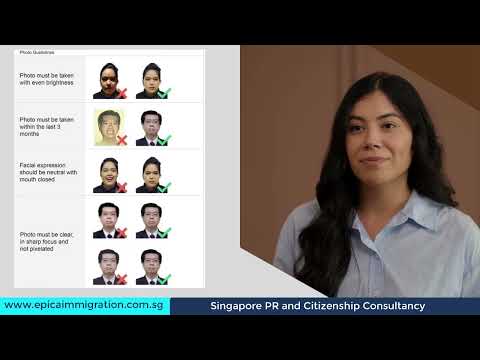
- Shadows Behind the Ears: If your lighting comes from only one side, you’ll cast a shadow. The software often mistakes these for hair or a head covering, throwing off the biometric silhouette.
- The 'Halo' Effect: Many people try to use manual background removal tools. If the tool leaves a jagged white "halo" around your hair, the AI flags it as a potential composite image.
- Panda Eyes: Harsh overhead lighting, common in HDB corridors or offices, creates shadows in your eye sockets. If the AI can’t see your pupils, it’s an automatic fail.
- Visible Teeth: ICA requires a neutral expression. Even a tiny smirk that reveals teeth changes the shape of your jawline, which interferes with biometric matching.
- Hair Over Eyebrows: This is a big one. Your eyebrows are major anchor points for facial recognition. If your fringe is too long, tuck it back.
- Over-Exposure: If your face is too bright, the software can’t find the "valleys" of your facial structure, like the bridge of your nose.
- Compression Artifacts: Saving a photo as a low-quality JPEG can create "blocky" pixels. If the AI sees blocks instead of skin texture, it rejects the file.
The Spectacles Dilemma: Why You Should Probably Take Them Off
This is the most common question I get: "Can I wear my glasses?"
The Official ICA Photo Guidelines state that you can wear them if you do so habitually, but they must not have tinted lenses or thick frames that cover any part of your eyes.
My professional advice for 2026: Take them off.
Why? Because even the most expensive anti-reflective coating can catch a tiny bit of glare from a flash or a window. To a human, it’s just a white dot. To the ICA’s AI, that glare is a blockage of the ocular data. Taking your glasses off for 30 seconds is the easiest way to guarantee you won’t face a rejection for "obscured eyes."
Newborn & Infant Photography: The 'Blanket Hack' Masterclass
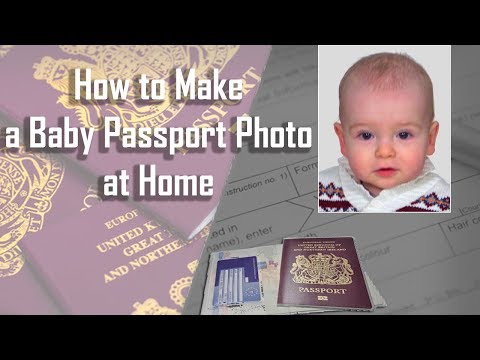
Taking a newborn passport photo of a three-month-old is an Olympic-level challenge. They won’t sit still, they won’t look at the camera, and they certainly don't understand a "neutral expression." You don't need to struggle with a screaming baby in a photo booth. Here is the Blanket Hack used by pros:
- The Setup: Lay a pure white, matte sheet or blanket on the floor in a room with plenty of natural light—but avoid direct sunlight which causes squinting.
- The Positioning: Lay your baby on the sheet. This is much easier than trying to hold them up, which usually results in a parent’s hand being visible in the frame (a common rejection reason).
- The Lighting: Ensure the light comes from the foot of the baby or evenly from the sides. If light comes from the top of their head, you’ll get those "panda eye" shadows.
- The Engagement: Use a squeaky toy held directly behind the camera lens to get their eyes to open and look toward the lens.
- The Neutrality: ICA is more lenient with infants, but their eyes must be open, and they cannot have a pacifier in their mouth.
Technical Troubleshooting: Resolution, DPI, and the MyICA Portal
ICA requirements for online submission are very specific to ensure compatibility with Singapore Government Digital Services:
- File Format: JPEG (.jpg or .jpeg)
- File Size: 8MB or less
- Dimensions: 400 x 514 pixels
400x514 Pixels: Why Resolution Isn't Just a Suggestion
If you upload a photo that is exactly 35x45mm but has a low resolution (72 DPI), it will look blurry to the system. ICA's software expects a higher pixel density. When editing, a dedicated passport size photo editor ensures your canvas is set to 400x514 pixels. This provides the exact aspect ratio and clarity the portal needs.
Bit-Depth and Compression: Stop the Artifacts
When you save your JPEG, don't crank the quality slider down to meet size limits. A 400x514 pixel photo should naturally be well under ICA's 8MB limit even at high quality. Aim for a file size between 100KB and 500KB. This is the sweet spot for clarity without introducing the "noise" that triggers AI rejections.
Religious Headgear and Cultural Requirements
Singapore is a multicultural society, and the ICA guidelines reflect this. Religious headgear like the hijab, turban, or songkok is perfectly acceptable, but the facial requirements remain non-negotiable. Your headgear must not cast a shadow on your forehead or face. More importantly, it must not cover your eyebrows or the edges of your face.
The AI Advantage: Why Photo Booths are Obsolete
Traditional photo booths are a relic. They use fixed lighting that doesn’t account for different skin tones and they don't provide a digital validator to tell you if you've failed before you pay. Using an AI-powered online passport and ID photo editor changes the game. Our system mimics the ICA’s own validation logic. We check the crown-to-chin ratio, eye-line positioning, and the background HEX code (#FFFFFF) before you ever hit "submit."
Frequently Asked Questions
What is the sg passport photo size?
The physical dimensions are 35mm wide by 45mm high. For digital submissions via MyICA, the image must be 400x514 pixels in JPEG format.
Where can I find a passport photo shop near me?
While physical shops exist, you can now use a free passport photo app or online service to take a compliant photo from home, saving you a trip to a physical studio.
What are the ica passport photo requirements for babies?
Babies must have their eyes open and mouths closed, with no hands or toys visible in the frame. Using a white blanket as a background is the most effective home method.
The 'One-Submit' Checklist for Success
Before you upload, run through this final list:
- Is the background pure white? No cream, no light grey.
- Are your eyes open and looking at the lens? No looking off to the side.
- Is your mouth closed? Keep it neutral.
- Are your eyebrows visible? Move your fringe if necessary.
- Have you removed your glasses? It’s the safest path to approval.
- Is the photo sharp? If it looks grainy on your phone, it’s a fail.
- Is the file 400x514 pixels? Don't let the portal's auto-crop tool ruin your composition.
Applying for a passport or IC is the start of a journey. Don't let a photo rejection stand in your way. By understanding the biometric logic and using ICA-compliant passport, IC, visa, and newborn photos, you ensure your first submission is the only one you'll need to make.
Ready to Create Your Photo?
Get your perfect passport, IC, or visa photo in minutes. AI-powered, ICA-compliant, instant download.
Create Your Photo Now