Why DIY ICA Passport Photos Fail and How to Avoid It
Why DIY passport photos fail the ICA portal's checks, the technical biometric requirements behind them, and how to avoid a rejection.
It’s 11:30 PM. You’re finally sitting down to finish your Singapore passport renewal before a trip. You’ve taken a photo against the white wall in your hallway, and it looks fine to you. You upload it to the Immigration & Checkpoints Authority (ICA) portal, only to be met with a generic error: "The photo does not meet the requirements."
No explanation. Just a red box and the realization that you’re stuck. You might even consider searching for a passport photo app to fix the issue, but which one can you trust with Singapore's strict standards?
I’ve spent years analyzing why these digital submissions fail. Most people assume the rejection is subjective—that a human officer didn't like the look of the photo. In reality, the ICA portal isn't a human judge; it’s a biometric gatekeeper powered by an algorithm. If your photo fails to hit specific mathematical markers—even by a fraction of a millimeter—it gets kicked back.
This guide is about beating that system. We’re moving past the basic lists of dimensions to look at the physics of light, the mathematics of facial ratios, and the practical hacks you can use at home to ensure your photo is accepted on the first try in 2025.
The High Stakes of the 'Red Box': Why the ICA Portal is So Picky
Singapore’s passport is one of the world's most powerful, and its security relies on strict biometric data standards set by the International Civil Aviation Organization (ICAO). When you upload a photo, it’s the first line of defense in identity verification.
The Evolution of Biometric Screening
When you upload a file, the ICA’s software doesn't "see" you in the way a person does. It maps "nodal points" on your face: the exact distance between your pupils, the width of your nostrils, the depth of your eye sockets, and the precise curve of your jawline. These points are converted into a unique mathematical code.
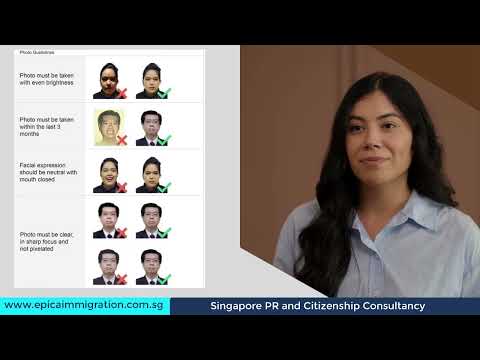
If your lighting is uneven, the software might interpret a shadow as the edge of your face. If your hair obscures your eyebrows, a critical biometric landmark is lost. To understand exactly how these requirements differ at various stages of the application, watch the breakdown below:
The Anatomy of a Rejection: The 7 Technical Sins of DIY Photos
Most home-taken photos fail because they are visually acceptable but technically sterile. Here are the specific reasons the algorithm flags your submission.
1. Shadows: The Biometric Dealbreaker
Shadows are the primary cause of rejection. Shadows under the eyes, the nose, or across one side of the face create "false edges." If a shadow falls across your jaw, the AI might think your face is a different shape than it actually is.
2. The 'Mottled' Background Mystery
You might think your wall is white. However, digital camera sensors often pick up "sensor noise" or tiny textures that create a mottled look. The ICA requires a pure, even, white background. If the background isn't uniform, the system can't accurately distinguish the edge of your features.
3. Hair Obscuring the Eyebrows
Your eyebrows are vital for facial recognition because they are one of the most stable features of the human face. Even if your fringe is part of your look, if it touches or covers your eyebrows, the photo will likely be flagged.
4. Glare on Eyeglasses
The ICA allows glasses, but the lenses must be crystal clear with no reflection. Glare obscures the eyes, which are the most critical biometric points. Many people tilt their heads to avoid glare, but that creates a "head tilt" error.
5. Incorrect Head-to-Frame Ratio
There is a specific "Goldilocks" zone for head size. According to ICA standards, your head must measure between 25mm and 35mm from the chin to the crown.
6. Mouth Open or Extreme Expressions
Biometrics require a "neutral expression." This means no smiling and definitely no showing teeth. A smile changes the distance between your nose and mouth, throwing off the mapping.
7. Resolution and 'Interpolation' Artifacts
If you take a photo from far away and crop it down on your phone, you lose pixel density. The ICA needs a sharp image. This is why a dedicated passport size photo editor is superior to generic phone gallery tools.
The Physics of Lighting at Home: Beyond the Flash
Your first instinct might be to use the camera flash. Don't. Flash creates "specular highlights" and harsh shadows. You need "diffused" light instead.
The Window-Facing Strategy
The best light source in most Singaporean homes is a large window during the day—but not in direct sunlight.
- Face the window directly. Do not have the window to your side.
- Stand about 1 to 2 meters away from a white wall. This prevents your own shadow from falling onto the wall.
The 'Reflector' Hack for Shadowless Chins
Hold a large piece of white cardboard at chest level (just out of the camera frame). This bounces light back up onto your neck, smoothing out the shadows that often trigger ICA rejections.
Demographic Deep-Dives: Solving the Hard Cases
Newborns: The 'Floor Method' for Compliance
Holding a newborn upright is nearly impossible. Their heads flop, and your hands usually end up in the shot—which is an automatic rejection.
The Fix: Lay a white bedsheet on the floor. Lay the baby down and take the photo from above. This ensures a clean background and no hands in the frame.
The White Hair Paradox: Creating Contrast
For elderly residents with white hair, the "white background" requirement is difficult. To fix this, increase the "rim lighting" by positioning a lamp slightly behind the person to create a subtle highlight on the edge of the hair, allowing the AI to see the head shape.
The 'Wide-Angle' Trap: Why Selfies Are Prohibited
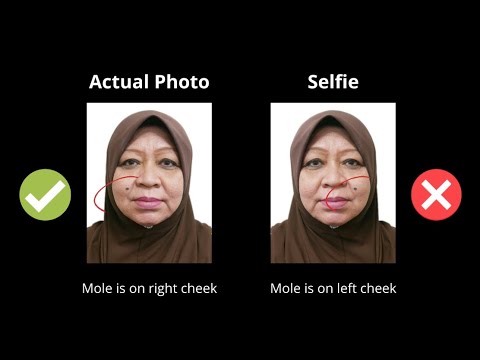
Never use the front-facing "selfie" camera. Most smartphone selfie cameras use a wide-angle lens (around 24mm). When you hold it close, it causes perspective distortion, making your nose look larger and your ears disappear. This changes your biometric ratios.
The Solution: Have someone else take the photo using the rear camera lens from at least 1.5 meters away. Then, use a specialized passport photo maker to crop it accurately.
AI vs. Manual Editing: The Resolution Loss Trap
When you use the basic "Crop" tool on your phone, the software discards data. Professional AI tools, like IC Photo Singapore, don't just crop; they "re-sample" the image to ensure pixel density remains high while keeping the file size within ICA's 8MB limit.
The 2025 Technical Audit Checklist
Before you upload, run through this checklist to avoid common pitfalls:
- Dimensions: Exactly 35mm wide by 45mm high (600x800 pixels is ideal).
- Background: Pure white. No off-white or cream.
- Facial Features: Both eyebrows must be fully visible.
- Lighting: Flat lighting with no side-shadows.
- File Format: jpg, jpeg, heic, heif or png.
- Recency: Taken within the last 3 months.
Frequently Asked Questions
What is the Singapore passport photo size?
The required sg passport photo size is 35mm in width by 45mm in height. Your face must take up between 70% to 80% of the photo.
Can I use a free passport photo app?
Yes, you can use a free passport photo app, but ensure it includes an ICA-compliance check. Basic apps often fail to remove background shadows or adjust the head-to-frame ratio correctly.
Why was my passport photo rejected by the ICA portal?
Rejections are usually due to uneven lighting, hair obscuring eyebrows, or head size being outside the 25mm–35mm range. Using an AI-powered passport photo maker can resolve these issues before submission.
Guaranteeing Success with AI-Powered Validation
Manually managing the physics of light is a chore. This is why we built IC Photo Singapore. We didn't just build a photo editor; we built a compliance engine trained on the ICA's latest 2025 requirements.
When you upload to our passport photo app, our AI does the heavy lifting: it scans for biometric markers, replaces your background with compliant white, and ensures precision cropping. We offer a lifetime remake guarantee—if the ICA rejects your photo, we'll help you fix it for free.
Try IC Photo Singapore today and get your passport renewal approved on the first try.
Ready to Create Your Photo?
Get your perfect passport, IC, or visa photo in minutes. AI-powered, ICA-compliant, instant download.
Create Your Photo Now