Passport Photo App Masterclass: 2025 ICA Compliance Guide
The ultimate guide for Singapore residents to master ICA photo requirements. Learn how to use a passport photo app to ensure 100% compliance, avoid common rejection triggers, and capture professional-grade biometric photos at home for newborns, adults, and the elderly.
If you’ve spent any time on Reddit’s r/singapore or HardwareZone recently, you’ve likely seen the frustration. People wait three weeks for their passport renewal, only to get that dreaded email: "Your photo does not meet ICA requirements." Suddenly, your June holiday or business trip is in limbo because of a stray hair or a shadow you didn't even notice. In 2025, the most efficient way to avoid this is by using a specialized passport photo app that understands the nuances of biometric standards.
Applying for a Singapore passport used to mean searching for a passport photo shop near me and sitting in a mall booth. You’d adjust the stool, wait for the flash, and hope you didn't look like a deer in headlights. But today, the game is entirely digital, and the gatekeeper isn't a human—it's an algorithm. This isn't just about looking presentable; it's about data integrity and adhering to the Singapore Passports Act.
I’ve spent years analyzing how biometric systems interpret human faces. The Immigration & Checkpoints Authority (ICA) now uses a system that is incredibly sophisticated. This guide will pull back the curtain on that process and show you how to satisfy the algorithm on your first try.
The Evolution of ICA Submissions: Why Your Old Photo Won't Cut It in 2025 #
In the past, a human officer might overlook a slightly off-center crop. Those days are over. Today, when you upload a photo to the MyICA portal, it's immediately processed by an Automated Biometric Identification System (ABIS). This shift is part of the Smart Nation Singapore: Digital Identity initiative, streamlining government services through technology.
The 'Invisible' Gatekeeper: How ICA Uses AI #
This AI doesn't see your face the way a photographer does; it sees a mathematical map. It measures the exact distance between your pupils, the width of your nostrils, and the specific curve of your jawline. If your lighting is uneven, it creates "noise" in that data. As noted by the Ministry of Home Affairs, biometric technology is critical for border security, meaning rejections happen because the AI has a zero-tolerance policy for data interference.
The Technical Anatomy of a Compliant Singapore Passport Photo #
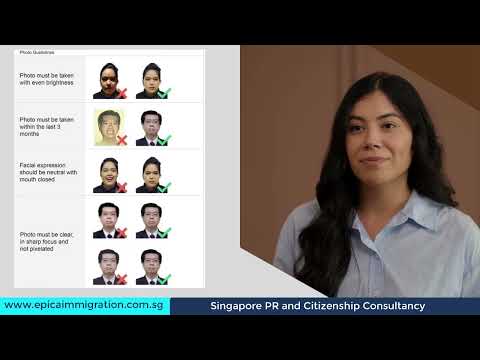
To pass the first gate, your file needs to meet specific hard specs. If you're off by even a few pixels, you're flagging yourself for a manual rejection. Following ICA Official Photo Guidelines is mandatory for a successful application.
Dimensions, Pixels, and DPI: The 400x514 Rule #
For digital submissions, the ICA requires a file that is exactly 400 pixels wide by 514 pixels high.
- SG Passport Photo Size: 35mm wide by 45mm high (for physical prints) or 400x514 pixels (online).
- Resolution: Minimum 600 DPI to maintain biometric clarity.
- File Format: JPG or PNG.
- File Size: No larger than 2MB.
A common mistake is taking a massive 20-megapixel photo and hitting upload. While the portal might try to auto-crop it, the results are often blurry. Your passport photo maker tool should handle these conversions automatically.
The 25mm to 35mm Crown-to-Chin Ratio #
This is where most DIY attempts fail. The ICA specifies that your face—from the crown (top of the head) to the chin—must occupy between 25mm and 35mm of the vertical space. These rules align with international ICAO Document 9303 (Biometrics) standards for travel documents.
The 'Rejection Triggers' You Didn't See Coming #
Most rejections stem from issues that seem trivial to us but are "illegal" to a biometric scanner.
The Eyebrow Paradox: Why Hair Placement Matters #
This is the leading cause of rejections for women in Singapore. You might have a stylish fringe, but the rules are clear: eyebrows must be fully visible. The distance between your eyebrows and eyes is a unique biometric identifier. If you have a fringe, pin it back.
Spectacle Glare and 'Ghost' Shadows #
If you wear glasses, I recommend taking them off. While allowed, there can be no reflection on the lenses, and frames cannot obscure the eyes. More subtle are "ghost shadows" caused by standing too close to a wall. You need a flat, matte white background to ensure the AI doesn't misinterpret your head shape.
The Home Studio Blueprint: Using a Passport Photo App for Pro-Level Results #
You don't need a professional DSLR, but you do need to understand your smartphone's optics to create a valid image.
Optics 101: Why You Should Never Use a Selfie #
Smartphone front cameras usually have wide-angle lenses. When you hold the phone at arm's length, this causes "barrel distortion," making your nose look larger and your ears disappear. This distorts your facial geometry.
The Fix: Have someone else take the photo using the rear camera. Stand about 2 meters away and use the 2x zoom. This flattens your features and provides a much more accurate representation for the ABIS system.
The Three-Point Lighting Hack for HDB Flats #
Standard overhead lighting in Singapore flats creates deep shadows under your eyes.
- Face a Window: Use natural, indirect daylight.
- The Paper Reflector: Hold a piece of white A4 paper just out of frame on the dark side of your face to bounce light back.
- Kill the Flash: Phone flashes create "hot spots" on the forehead. Stick to ambient light.
Troubleshooting Tough Demographics: Newborn Passport Photo and Elderly Tips #
The 'White Sheet' Method for Newborns #
Capturing a newborn passport photo is notoriously difficult. Lay a plain white sheet on a firm mattress and place the baby on their back. Stand safely above them. Use a toy near the lens to get them to look up with a neutral expression. No pacifiers or hands should be visible.
Assisting Elderly Applicants #
For those with mobility challenges, use a chair with a low back so it doesn't appear in the photo. Take multiple shots in "burst mode" to catch the moment of perfect head alignment.
Cost-Benefit Analysis: AI Passport Photo Maker vs. Photo Booths vs. Studios #
When deciding where to take passport photo Singapore residents have three main options:
| Feature | Photo Booth | Professional Studio | IC Photo Singapore (AI App) |
|---|---|---|---|
| Cost | ~$10 | $30 - $60 | Competitive / Free Basic |
| Convenience | High (in malls) | Low (appointment needed) | Highest (anywhere/anytime) |
| ICA Compliance | Moderate | High | 100% Guaranteed |
| Digital File | Extra Charge | Included | Included |
If you are looking to make passport size photo online free, many basic editors exist, but they lack the biometric validation required to prevent rejections. Using a dedicated free passport photo app with a professional upgrade option ensures you don't waste time on a failed application.
Regional Context: Malaysia and Beyond #
If you're a frequent traveler, remember that rules vary:
- Malaysia: Requires a blue background and a 35mm x 50mm size.
- USA: Requires a square 2x2 inch format.
Our passport size photo editor allows you to select the country and document type, and the AI automatically adjusts the crop and background based on current 2025 guidelines.
Frequently Asked Questions #
What is the SG passport photo size in pixels? #
The digital requirement for ICA online submission is exactly 400x514 pixels at 600 DPI.
Can I take my own passport photo with a phone? #
Yes, provided you use the rear camera (not a selfie) and ensure a plain white background with no shadows.
How to make passport size photo online free? #
You can use basic online editors to crop your photo, but for ICA compliance, it is recommended to use a tool that performs biometric checks.
Where can I find a passport photo shop near me? #
Most shopping malls in Singapore have photo studios or booths, but using an AI-powered app is often faster and more reliable for digital submissions.
Why IC Photo Singapore is the Logical Choice #
You want your passport application to be invisible. You want to submit it and forget about it. We built IC Photo Singapore to be the ultimate passport photo app that removes the guesswork. We check for over 20 points of failure—from pupillary distance to lighting balance—using the same logic as the ICA’s own systems.
Our Lifetime remake guarantee means if the ICA changes their specs or rejects your photo for any reason, we fix it for free. Don't let a minor lighting error cause a month-long delay.
Ready to submit with confidence? Upload your photo to our ICA-compliant passport, IC, visa, and newborn photos editor here and get your 100% compliance check in under 2 minutes.
Ready to Create Your Photo?
Get your perfect passport, IC, or visa photo in minutes. AI-powered, ICA-compliant, instant download.
Create Your Photo Now