2026 Guide to ICA Passport Photos: DIY Success Strategies
ICA passport photo requirements for 2026: biometric specs, newborn photo tips and how to avoid MyICA portal rejections when shooting at home.
If you’re reading this, you’re likely staring at a notification from the MyICA portal or preparing for a passport renewal that will stay with you for the next decade. In Singapore, passports are now valid for 10 years for those aged 16 and above. That’s 3,650 days of having your face scrutinized by customs officers and automated gates from Changi to Heathrow.
But here’s the catch: the Immigration & Checkpoints Authority (ICA) has reached a new level of precision. As we move through 2026, the AI integration at our borders—specifically the New Clearance Concept (NCC)—means your photo isn't just a picture; it’s a high-dimensional biometric data set. If that data set is messy, your application gets bounced. Using a reliable passport photo app is no longer just about convenience; it's about technical compliance. I’ve seen perfectly 'nice' portraits rejected because of a stray hair or a faint shadow that a human wouldn't notice, but a computer finds unforgivable.
Technical Specs: Decoding the Digital Requirements
Most people know the standard physical size: 35mm wide by 45mm high. However, when you’re uploading to the MyICA website, physical dimensions matter far less than pixel density and aspect ratios. Understanding these helps you choose the right passport size photo editor for the job.
The Digital Dimension: 400 x 514 Pixels
For a digital upload, the ICA mandates a file that is exactly 400 pixels wide by 514 pixels high. If you try to upload a square photo or a high-res shot from a modern smartphone without resizing it correctly, the portal’s auto-crop tool often butchers the composition.
- Width: 400 pixels
- Height: 514 pixels
- File Format: jpg, jpeg, heic, heif or png
- File Size: 8MB or less
The Biometric Map: Framing and Ratios
This is where most DIY attempts fail. Your face—from the chin to the crown of your head—must occupy between 25mm and 35mm of the vertical space. In digital terms, your head should take up about 50% to 70% of the image height. If you’re too far away, the biometric software can’t map your features. If you’re too close, the distortion from the camera lens can change the perceived distance between your eyes, a key marker for ICAO Document 9303 standards.
Why ICA Rejects Photos: The 'Invisible' Triggers
Rejections almost always fall into technical categories that the official ICA portal mentions but doesn't explain in depth. Identifying these triggers early is key to finding the best passport photo maker.
The Shadow Behind the Ears
ICA requires a "uniformly lit" background. Most people stand directly against a white wall and snap a photo with a flash. This creates a harsh 'drop shadow' behind the ears. To an AI scanner, that shadow can be misinterpreted as part of your head shape, throwing off your biometric silhouette.
The Fix: Stand about 1 meter away from the wall. This allows light to wrap around you and eliminates the dark outline. Use natural light from a window facing you rather than a harsh overhead bulb.
Hair Fringes and Eyebrow Visibility
This is a frequent point of failure in Singapore. If you have a fringe covering your eyebrows, your photo will be rejected. The distance between your eyebrows and other facial landmarks is a primary biometric identifier. Even a few stray strands across an eye can cause the system to flag the image as non-compliant, much like the strict standards for MOM Work Permit Photos.
The Newborn Survival Guide: Snapping a Compliant Infant Photo
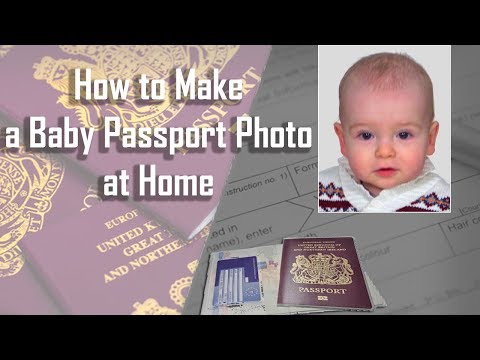
Taking a passport photo of a newborn is one of the most stressful tasks for new parents. You can’t use a standard passport photo booth, and professional studios can be overwhelming for a baby.
The 'White Sheet' Gravity Trick
Don't try to hold the baby up. The ICA rules are clear: no hands, toys, or chair backs can be visible.
- Lay a plain white bedsheet on a firm mattress or the floor.
- Place the baby on the sheet.
- Stand directly above them and capture the photo looking down.
This method keeps the baby comfortable and ensures a clean, white background. Check HealthHub Singapore for more on infant documentation if you're navigating other birth-related paperwork.
Wardrobe and Grooming: Dressing for the Scanner
What you wear dictates how well the AI can 'find' you. Since the background must be white, a white shirt is a mistake. You’ll look like a floating head, and the scanner will struggle to identify where your shoulders end.
- Wear Dark Colors: Navy blue, black, or dark charcoal provide the best contrast.
- Avoid Glossy Makeup: Highlighters and 'dewy' foundations reflect light, creating 'hot spots.' These are often flagged as overexposed areas that obscure skin texture.
- The Spectacles Dilemma: The official ICA Passport Photo Guidelines now strongly advise taking photos without glasses. Even with non-reflective lenses, frames can obscure the eyelids.
DIY Home Studio Mastery: Using Your Phone
You don't need a professional DSLR, but you do need to ditch the selfie if you want to make passport size photo online free of errors.
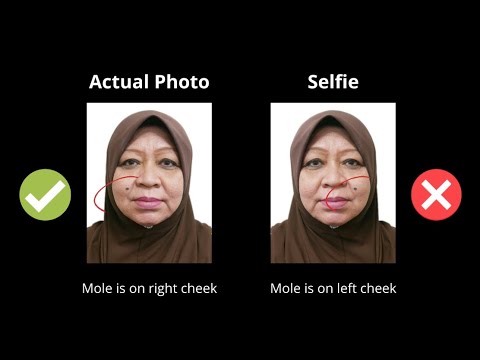
- No Selfies: Front-facing cameras have a wide-angle lens that distorts facial features. Use the back camera and have someone else take the photo.
- Optical Zoom: The photographer should stand 2 meters away and use a 2x zoom. This 'flattens' the face, which is much more accurate for biometric mapping.
- Eye Level: The camera must be at the same height as your eyes. If it's tilted up or down, the facial geometry changes, leading to an instant rejection.
AI Validation vs. Manual Editing
We often think we can just 'Photoshop out' a blemish or use a generic background eraser. This is risky. The ICA’s system detects 'pixel manipulation.' Specialized tools like IC Photo Singapore are different. Our AI doesn't 'beautify' or change your face; it validates 50+ compliance points—head tilt, shadow density, and pupil visibility—and simply handles the technical formatting. It is essentially a professional-grade free passport photo app for validation before you commit to the upload.
The 3-Minute Workflow: Zero Rejections
Here is the most efficient way to handle your Singapore passport photo today:
- Setup: Find natural light and wear a dark shirt.
- Snap: Have a friend use your phone's back camera from 2 meters away.
- Upload: Send the image to the IC Photo Singapore engine.
- Validate: The AI will instantly flag issues like "eyes closed" or "uneven lighting."
- Download: Once you get the green light, download the file formatted to the 400x514 ratio.
- Apply: Upload to the MyICA portal with total confidence.
Frequently Asked Questions
Where can I take a passport photo in Singapore?
While you can visit a traditional passport photo shop near me, many residents now prefer the convenience of an online passport photo app to ensure ICA compliance from home.
Can I smile in my ICA passport photo?
No. The ICA requires a neutral facial expression with the mouth closed. Smiling can alter facial geometry, which interferes with the biometric scanners at Changi Airport.
What is the Singapore passport photo size in cm?
The physical size is 3.5cm wide by 4.5cm high. However, for digital applications, ensure your file meets the 400 x 514 pixel requirement.
Closing Thoughts: Future-Proofing Your Identity
In 2026, your passport photo is more than just a picture; it’s your digital key to the world. As Singapore ramps up biometric boarding, a high-quality photo ensures a seamless travel experience. Don't leave it to a shaky photo booth. Using a dedicated passport photo app ensures you do it right the first time, enjoying a decade of hassle-free travel.
Ready to Create Your Photo?
Get your perfect passport, IC, or visa photo in minutes. AI-powered, ICA-compliant, instant download.
Create Your Photo Now