Singapore ICA Passport Photo Guide 2026: Pass AI Checks
How the MyICA photo upload works, why AI rejections happen, and how to take a compliant Singapore passport or IC photo at home.
You’re sitting at your laptop, trying to finish a Singapore passport renewal before the holiday rush. You’ve uploaded your photo, but that red error message keeps popping up on the MyICA portal: "The photo uploaded does not meet the requirements."
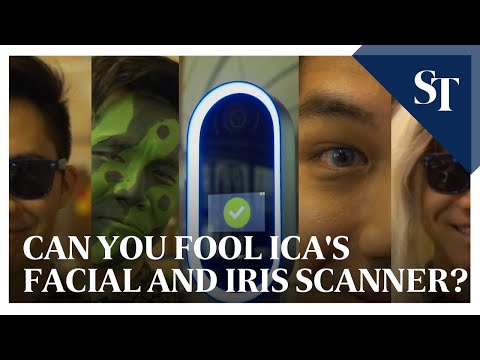
You’ve tried three different photos and adjusted the crop, but the system—an increasingly sophisticated AI gatekeeper—keeps saying no. By 2026, the Immigration & Checkpoints Authority (ICA) has reached a level of biometric precision that makes old mall photo booths look like museum exhibits.
Using a modern passport photo app or passport size photo editor is no longer just a convenience; it's a necessity for navigating Changi Airport’s automated gates. If you’re tired of the "try again" loop, this guide breaks down the technical mechanics of why photos fail and how to use a passport photo maker at home for guaranteed success.
Section 1: The Official 2026 ICA Blueprint
ICA’s requirements are non-negotiable. If you're off by a few pixels or a couple of millimeters, the AI will flag it before a human officer ever sees your application. According to the ICA Official Photo Guidelines, precision is the standard for 2026.
Dimensions, Pixels, and Ratios
For digital submissions, the standard is exactly 400 by 514 pixels. This isn't a random size; it’s a specific aspect ratio designed to fit the biometric data fields on your passport’s physical chip, as specified in the ICAO Document 9303 international standards.
When you use a tool like IC Photo Singapore, the software ensures the file stays under ICA's 8MB limit while maintaining a high DPI (dots per inch). A common mistake is emailing a photo to yourself and selecting "small" or "medium," which destroys the fine detail needed to map your features.
The 3-Month Freshness Rule
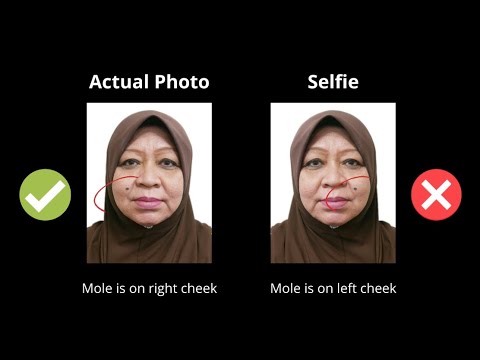
ICA is strict: the photo must be taken within the last three months. The system compares your new upload against your previous IC or passport photo. If the file’s metadata is old, or if you look significantly different compared to the last record, you’ll trigger a manual review, adding weeks to your processing time.
Section 2: The Science of Rejection (Why the AI Says No)
The AI doesn't care about aesthetics; it focuses on contrast and biometric landmarks. Understanding these failure points is key to finding the right passport photo shop near me or choosing a digital solution.
Shadows and the 'Depth' Problem
This is the #1 reason for rejection in Singapore. If your light source comes from the side, it casts a shadow on one side of your nose. To the ICA AI, this changes the perceived shape of your nose, ruining the biometric map. The Biometrics Institute notes that uneven lighting is the primary cause of facial recognition failure in automated systems.
The Eyebrow Rule: 2mm of Compliance
Your eyebrows must be fully visible. In biometrics, the distance between your eyes and your eyebrows is a primary identifier. If you have bangs covering even 2mm of your brows, the AI will likely kick the photo back.
Section 3: The DIY Home Studio Masterclass
You don’t need to search for a "passport photo shop near me" when you have a smartphone. In fact, many professional photos get rejected because they use "beauty" lighting that washes out facial features. To make passport size photo online free or using a specialized app, follow these steps:
Lighting: Your Secret Weapon
Skip ceiling lights—they create "raccoon shadows." Instead, find a large window during the day (10 AM to 4 PM). Stand about one meter away from the window, facing it directly. This provides "flat lighting," filling in shadows on your face.
Background Hacks
You need a pure white background. If you don't have a white wall, tape a white poster board to a door. Stand about half a meter away from the wall to prevent casting a shadow on the background—an instant rejection.
Section 4: The 'Newborn Challenge'
Photographing a infant for a newborn passport photo is a unique challenge. They can’t hold their head up, and they rarely look at the camera on command.
- The White Sheet Method: Lay a plain white sheet on a firm mattress and place the baby on their back. This keeps the background compliant and the baby safe.
- Capturing the Gaze: Wait until after a feed when the baby is "quietly alert." Use a squeaky toy held right above the camera lens.
- No Hands: Ensure no hands are visible in the frame. If you must support the baby's neck, do so under the sheet.
Section 5: Common Pitfalls & Specialized Requirements
Glasses: Just Take Them Off
While the Ministry of Home Affairs (MHA) Singapore technically allows glasses, we recommend removing them. AI is sensitive to lens flare. If the light reflects in your lenses and obscures any part of your iris, it’s a rejection.
Religious Headgear
ICA respects religious requirements. The rule is simple: the headgear must not cover any part of the face from the bottom of the chin to the top of the forehead. Choose a solid, dark color for your headgear to provide contrast against the white background.
Section 6: Technology Comparison
| Feature | Photo Booth (Mall) | Professional Studio | IC Photo Singapore (AI App) |
|---|---|---|---|
| Cost | $8 - $12 | $30 - $60 | Free / Low Cost |
| Convenience | Travel required | Requires appointment | 2 mins at home |
| Success Rate | Moderate | High | Guaranteed (AI Check) |
| Digital Copy | Often low-res | Extra $10+ fee | Included instantly |
Traditional booths are struggling to meet the DPI and color-space requirements of the latest MyICA updates. A free passport photo app or AI-powered service is now the standard for success.
Section 7: Step-by-Step Upload Guide to MyICA
Once you have your photo from an AI passport size photo maker, follow these steps to ensure a smooth upload to the MyICA portal:
- Don't Screenshot: Never upload a screenshot. It strips metadata and lowers resolution. Use the original file.
- The Crop Tool: If you’ve used a specialized passport photo app, the photo is already proportioned. Don't "zoom in" further on the ICA site to avoid pixelation.
- Check the File Name: Keep it simple, like
Singapore_Passport_Photo_2026.jpg.
Successful submission ensures you can use the Changi Airport Group automated FAST gates without issue.
Frequently Asked Questions
What is the Singapore passport photo size for 2026?
The required size is 35mm wide by 45mm high for physical photos, or exactly 400x514 pixels for digital uploads to the MyICA portal.
Can I take my own passport photo with a phone?
Yes, you can take a photo at home using a passport photo app like IC Photo Singapore, which uses AI to check for ICA compliance before you upload.
Why does MyICA keep rejecting my photo?
Common reasons include side shadows, hair covering the eyebrows, glasses glare, or an off-white background. The AI requires clear biometric landmarks to function.
Conclusion: Your Path to a Stress-Free Application
Getting your Singapore passport photo right shouldn't be a struggle. By focusing on flat lighting, clear features, and using a high-quality passport size photo editor, you can bypass the frustration of rejection. The shift toward AI biometrics is designed to speed up your travel—you just need to provide the right data. Get your ICA-compliant photo today and focus on your next journey.
Ready to Create Your Photo?
Get your perfect passport, IC, or visa photo in minutes. AI-powered, ICA-compliant, instant download.
Create Your Photo Now