Singapore Passport Photo Guide 2026: MyICA Digital Uploads
Singapore's digital-first passport application explained: ICA photo specs, home studio tips and how to prepare your photo for a MyICA upload.
Getting a passport photo in Singapore used to be a five-minute errand at an MRT station booth. You'd spin a stool, squint at a flash, and walk away with a strip of glossy prints. But as we move through 2026, the rules have shifted significantly. With the Immigration & Checkpoints Agency (ICA) moving toward a digital-only submission model and the 10-year passport validity becoming the standard, selecting the right passport photo app or editor is now a decade-long commitment.
The photo you submit today will be your face at immigration counters from London to Tokyo until 2036. If the MyICA system rejects your photo, you're stuck in an administrative loop. If you submit a photo you hate, you're stuck with it for 3,650 days. The difference between a successful application and a rejection often comes down to technical nuances that a human might miss, but an AI algorithm will flag instantly.
The 10-Year Commitment: Why Your Passport Photo Just Became High-Stakes
When Singapore extended passport validity to ten years, it was a major win for convenience, but it also raised the bar for photo quality. According to The Straits Times, this change specifically affects citizens aged 16 and above, making the longevity of your image a primary concern.
The Shift to Digital-First Applications
By 2026, the ICA's New Services Centre (NSC) has fully integrated a digital-first workflow. Physical counters for passport applications are largely a thing of the past. Your primary interaction is now through the MyICA portal or mobile app. This system is efficient because it's automated. When you upload a photo, it's checked by a 'rejection bot'—a sophisticated AI that ensures your image meets strict biometric standards for the Automated Border Control System (ABCS) at Changi Airport.
Why a 'Good Enough' Photo Isn't Enough Anymore
In the old 5-year era, a slightly soft focus or a minor shadow might have slipped through. Not anymore. Modern biometric software requires a precise map of your facial features. 'Good enough' is now the primary cause of the dreaded 'Photo Not Acceptable' notification. Beyond the technicality, there's the vanity factor. This ID is your calling card at hotels, banks, and borders worldwide.
Why MyICA Rejects Photos: The Biometric Science
To pass the ICA’s automated check, you need to understand how the software reads your face. The system doesn't look at your photo as a portrait; it views it as a data set.
Facial Geometry and Data Points
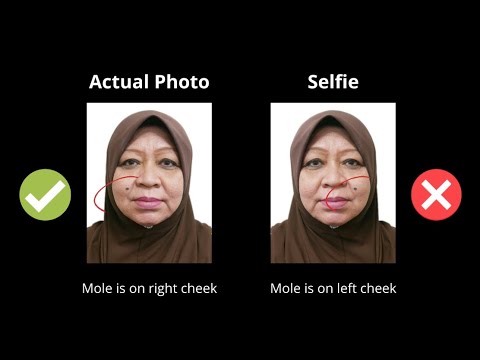
Biometric systems create a mathematical map of your face. According to standards set by the International Civil Aviation Organization (ICAO), the photo must allow for clear identification of 'landmarks.' The AI measures the distance between your pupils, the width of your mouth, and the distance from your chin to your hairline. If your hair covers your eyebrows or if you’re smiling too widely, you’ve essentially scrambled the map, making it impossible for the AI to verify your identity.
The Shadow Problem: Biometric Enemy #1
Shadows are the single most common reason for rejection in Singapore. The AI interprets a shadow as a physical feature or a change in facial contour. A dark shadow under the nose or a 'halo' cast behind the head can break the recognition scan. The ICA Official Photo Guidelines require even lighting, meaning your face must be illuminated from both sides to eliminate these digital 'ghosts.'
The 2026 Technical Spec Sheet: Pixels, DPI, and Dimensions
If you're uploading to MyICA, stop thinking in millimeters and start thinking in pixels. This is where most DIY attempts and generic passport size photo editor tools fail if they aren't specifically calibrated for Singapore.
The 400x514 Rule
For digital submissions, Singapore requires a photo that is exactly 400 pixels wide by 514 pixels high. This 7:9 aspect ratio is mandatory. If you try to upload a standard 4:3 smartphone portrait or a square 1:1 photo, the MyICA system will reject it. This pixel count is the digital equivalent of the 35mm x 45mm print at approximately 300 DPI.
File Constraints and Compression Risks
Your file can be up to 8MB, in jpg, jpeg, heic, heif or png format. Don't fall into the 'WhatsApp trap'—sending a photo via messaging apps compresses the file so much that it becomes pixelated. When the image loses sharpness, the biometric software can't find the 'edges' of your features. You need a high-resolution original that has been correctly resized using a dedicated passport photo maker.
The Home Studio Masterclass: Professional Results with Your Smartphone
You don't need a professional studio. Modern smartphone cameras are more than capable of capturing ICA-compliant images, provided you control the environment.
Lighting: The Natural Window Hack
Avoid overhead ceiling lights; they create dark 'raccoon eyes' by casting shadows into your sockets. Instead, stand about one meter away from a large window during the day. Face the window directly. This 'diffused light' fills in shadows and provides a clear, even tone across your face. If one side of your face is still slightly dark, have someone hold a piece of white foam board to reflect light back onto you.
The Background: More Than Just 'White'
The ICA demands a matt white background. Avoid glossy paint that might reflect a flash. A common mistake is leaning directly against the wall, which creates a harsh silhouette shadow. Step about 50cm forward. This small gap allows light to wrap around you, removing the shadow and making the background look clean and professional.
Camera Positioning: Avoiding 'Selfie Distortion'
Never use the selfie camera. The wide-angle lens on the front of your phone distorts your face. Use the back camera (the main lens). The photographer should stand about 1.5 to 2 meters away and use a slight zoom to frame your head and shoulders. This preserves your natural facial proportions.
The Newborn Challenge: A Parent’s Survival Guide
Taking a compliant photo of a restless three-week-old is a rite of passage for Singaporean parents. While you can try to make passport size photo online free using various tools, the preparation is key.
The 'Lying Down' Technique
Don't try to hold the baby against a wall. Instead, lay a plain white sheet on a firm mattress or the floor and place the baby on top. Stand directly over them to take the photo. This ensures their head is flat and facing the camera without your hands getting into the frame.
Common Baby Photo Rejections
- Hands in frame: If the AI sees your fingers supporting the baby's head, it's a rejection.
- Eyes closed: You'll need to catch that brief window right after a nap when they are alert.
- Pacifiers/Toys: These must be removed. The face must be completely unobstructed.
Navigating Appearance Rules: Glasses, Hair, and Makeup
This is where 'human error' usually happens. We want to look our best, but the Singapore Passport Act 2007 and associated regulations have strict definitions for 'acceptable.'
The Glasses Dilemma: To Wear or Not to Wear?
While guidelines technically allow glasses, my expert advice is to take them off. The rules for glasses are a minefield: no tinted lenses, no frames covering the eyes, and absolutely no glare. Even a tiny white reflection on the lens will trigger a rejection. Unless you have a medical necessity, remove them for the photo to save yourself the headache.
Religious Headgear and Forehead Visibility
Religious headgear is permitted. However, the 'face oval'—from the tip of the chin to the top of the forehead—must be visible. Ensure the headgear doesn't cast shadows across your eyes or brow. Darker headgear often works best as it provides a clear contrast against the white background.
Makeup and Hair: Enhancing vs. Altering
Keep makeup matte. Avoid highlighters or shimmery products, as these can appear as 'hot spots' of light that the AI flags as errors. For hair, the most important rule is that your eyebrows must be visible. If you have long bangs, sweep them to the side.
AI vs. Physical Booths: Why the Old Way is Failing
I’m often asked if the mall photo shop is still a viable option. It is, but it’s a gamble in a digital-first world.
The DPI Trap of Scanned Photos
If a shop gives you physical prints and you scan them at home, you're introducing 'noise.' The ICA system can detect the texture of the photo paper in a scan, which often muddies the biometric data. A native digital file is always superior to a scanned physical print.
Human Error vs. Algorithmic Precision
A shop assistant might think a photo looks fine, but they aren't running it through a biometric validator. Services like IC Photo Singapore use the same AI logic as the ICA. We catch the shadows, the 'raccoon eyes,' and the pixelation issues before you pay your application fee.
The MyICA Upload Process: A Step-by-Step Walkthrough
Once you have your verified digital file, the submission is straightforward:
- Login: Access MyICA via Singpass.
- Select Service: Choose 'Apply for Passport.'
- Upload Original: Select the original high-res file from your device.
- Review the Crop: The system will show a preview. If your head is too small or off-center, you’ll need to adjust and re-upload.
Frequently Asked Questions
What is the best passport photo app for Singapore?
A high-quality app for Singapore must specifically support the 400x514 pixel requirement and include an AI-powered ICA compliance check. Look for apps that offer a remake guarantee.
Can I take my own passport photo in Singapore?
Yes, you can take your own photo using a smartphone. Ensure you use the back camera, stand against a white background, and use natural lighting to meet ICA's biometric standards.
Why was my passport photo rejected by MyICA?
Common reasons include shadows on the face or background, hair covering the eyebrows, mouth being open (smiling with teeth), or the photo being the wrong pixel dimensions (not 400x514).
Where can I find a passport photo shop near me?
While physical shops still exist in many malls, most residents now prefer digital editors or apps that allow for home photography, which is more convenient for the digital-only MyICA submission process.
Conclusion: Confidence in Submission
Navigating Singapore’s passport requirements in 2026 isn't about luck; it's about technical compliance. By using a modern passport photo app or AI-powered editor, you gain the time to get the perfect shot—one that satisfies both the biometric 'rejection bot' and your own standards for a 10-year ID.
Don't leave your travel plans to chance at an aging photo booth. Use the lighting and positioning techniques we've discussed, and you'll find the MyICA process takes only minutes. Safe travels!
Authoritative Sources & Further Reading:
- ICA Official Photo Guidelines
- Singapore Passport Act 2007
- ICAO Document 9303: Biometric Standards
- The Straits Times: 10-Year Passport Validity FAQ
- CNA: ICA's New Digital Services Centre
Ready to Create Your Photo?
Get your perfect passport, IC, or visa photo in minutes. AI-powered, ICA-compliant, instant download.
Create Your Photo Now