Singapore ICA Photo Compliance Guide: Avoid Rejections
The technical requirements behind Singapore ID photos and how to avoid the most common ICA rejections when you shoot and upload at home.
If you’ve ever renewed a Singapore passport or applied for Permanent Residency (PR), you know that sinking feeling when you hit 'upload' on the MyICA portal. You wait for those few seconds, staring at the progress bar, praying you won’t see the dreaded red text telling you your photo doesn't meet requirements. To avoid these issues, many travelers now turn to a reliable passport photo app or a professional passport size photo editor to ensure compliance before submission.
In Singapore, where efficiency is the baseline, a photo rejection isn't just a small annoyance. It can delay travel, push back citizenship ceremonies, or mess up a work pass timeline. The Immigration & Checkpoints Agency (ICA) uses some of the world’s most advanced biometric screening. They aren’t just looking at whether you look like 'you'; they’re checking if your digital file matches a strict set of algorithmic markers. Whether you use a passport size photo editor or visit a local studio, understanding these rules is vital.
I’ve seen people spend half a day searching for a passport photo shop near me or a dusty MRT photo booth, only to have their photos rejected because the lighting was 'flat' or the facial ratio was off by a few pixels. This guide is here to stop that. We’re going to dive into the technical nuances of ICA compliance for 2024 and 2025—from the hidden metadata in your file to the trick for photographing a newborn at home.
The Real Cost of a Photo Rejection
Most people think a photo rejection is about the image looking 'bad.' It’s actually much more technical. When you upload to MyICA, the system runs an automated validation. If it flags anything—even a tiny shadow—a human officer has to step in. This immediately moves your application from the 'fast track' to a manual queue, adding days or weeks to the process.
Why 2025 is a Turning Point for ICA Submissions
ICA has recently overhauled its backend systems. The 2024/2025 standards are no longer just about 'no smiling' and 'white backgrounds.' The current algorithms check for digital manipulation, pixel density, and even the 'age' of the photo through the file's metadata. These strict rules ensure that facial recognition gates at Changi Airport Biometric Systems work the first time. If your photo is subpar, you're the one who’ll be stuck at the automated gate while everyone else breezes through.
The Anatomy of a Perfect ICA Photo
Let’s look at the hard numbers. While physical size is often listed as 35mm x 45mm, the digital requirements for the online portal are what matter most today. Following the ICA Official Photo Guidelines is the only way to guarantee a smooth process.
The 400x514 Rule: Why Pixels Beat Millimeters
When you upload to the ICA website, the system looks for an image that is exactly 400 by 514 pixels. If you upload a square photo or a massive 50MB file from a high-end camera, the portal will often crop it poorly or throw a 'file too large' error. ICA accepts files of up to 8MB. Very small, heavily compressed files are too grainy for biometric scanning.
The 70–80% Facial Ratio
This is the biggest reason for DIY photo failures. ICA requires your face (chin to the crown of the head) to take up between 70% and 80% of the vertical frame. This alignment is critical for international IATA Passport Standards which Singapore strictly follows.
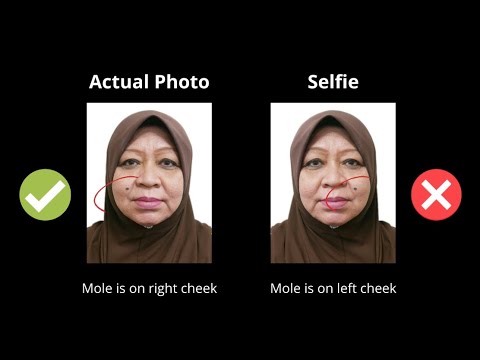
Stand too far back, and the sensors can’t map your features. Get too close, and your hair gets cut off. This 'Goldilocks' zone is tough to hit with a selfie because phone lenses often distort features when held too close. Using a dedicated passport photo maker can automatically adjust these ratios for you.
Lighting and Background: Solving the 'True White' Dilemma
We all know the background must be white. But for an AI validator, 'white' is a very specific digital value.
Why Your Living Room Wall Isn't Actually White
That wall in your HDB might look white to you, but your camera’s 'auto-white balance' often sees it as cream, light grey, or even blue. ICA frequently rejects photos with these 'off-white' tones.
Also, standing too close to the wall creates a 'halo' shadow. That shadow is an automatic rejection. The background must be evenly lit and neutral. This is where a passport size photo editor helps—the AI can strip out that HDB-cream wall and replace it with a compliant, pure-white digital background.
Avoiding the 'Halo' Shadow
You need 'flat' lighting. The best way to get this at home is to face a large window during the day (avoiding direct, harsh sunlight). This fills in the shadows under your eyes and nose—the 'T-zone'—which helps ICA’s software identify your bone structure clearly.
The Metadata Factor: How ICA Knows Your Photo is Old
Here’s a detail you won't find on most instruction sheets: every digital photo contains 'EXIF data.' This is hidden info that shows the date and time the photo was taken, and even the device used. Reusing files is a common reason people look for ways to make passport size photo online free, but metadata can still betray an old image.
Digital Timestamps and the 'Recent' Trap
ICA guidelines state the photo must be taken within the last three months. If you upload a file saved on your PC in 2022, the portal can read the 'Date Taken' tag. Even if you haven't aged a day, the system can flag it under the Singapore Passport Act.
When you use IC Photo Singapore, we ensure the final file is optimized for current submission, but the best rule is always to take a fresh photo. Don't risk a two-week delay for the sake of a five-minute photo session.
The Newborn Protocol: A Masterclass for Parents
Getting a newborn passport photo is a challenge. They can’t hold their heads up, their eyes stay shut, and they don't take directions. ICA is slightly more lenient with infants, but they still won't accept a photo with your hands in the frame.
The Lay-Down Method vs. The Car Seat Hack
- The Lay-Down Method: Place a crisp, white sheet on the floor or a firm mattress. Lay the baby down and take the photo from directly above. This is the easiest way to get a neutral background without the struggle of holding them upright.
- The Car Seat Hack: If the baby is moving too much, cover a car seat with a white sheet and place the baby in it. The incline of the seat supports their head naturally. Just make sure the seat straps are hidden under the sheet.
Getting the Eyes Open
A sleeping baby photo is often rejected. Try taking the photo right after a nap and a feed. Use a high-contrast toy or a squeaky object right next to the camera lens to grab their attention for that split second. It’s a game of patience, but it’s worth it to avoid a resubmission.
PR, LTVP, and Work Pass Specifics
For those applying for Permanent Residency (e-PR) or a Long-Term Visit Pass, the requirements are mostly the same, but the portal can be even more finicky about contrast. You should also consult the MOM Work Pass Photo Requirements if you are an expatriate.
Contrast Requirements: What to Wear
'Poor contrast' is a frequent rejection reason for PR photos. If you wear a white shirt against a white background, you look like a 'floating head.' The automated system needs to see the outline of your shoulders to verify your silhouette.
Wear dark colors. Navy, dark grey, or black is perfect. It creates a sharp contrast against the white background. Also, avoid 'busy' patterns or jewelry that can reflect light and create 'hot spots' on the image.
The Spectacles Dilemma: Glasses On or Off?
You can wear glasses, but I usually recommend taking them off.
Frame Coverage and Tinted Lenses
If you keep them on, there must be zero glare on the lenses. More importantly, the frames cannot cover any part of your eyes. Since ICA doesn't require you to wear glasses in the photo even if you wear them daily, removing them is the 'path of least resistance.'
AI Validation vs. The Traditional Photo Booth
Traditional photo booths at MRT stations are becoming a liability for modern digital applications. If you are searching for where to take passport photo Singapore, consider that a digital-first approach is often more reliable.
Why Physical Booths Often Fail Modern Portals
Many booths use outdated lighting that creates a greenish color cast. They also can’t tell you if your facial ratio is 68% instead of the required 70%. They just take the picture and take your money. Using a free passport photo app might seem tempting, but many lack the specialized AI needed for Singapore's strict standards.
Using an AI-powered service like IC Photo Singapore is different. Our system validates the photo against the exact biometric standards used by ICA. It’s a pre-screening before you even touch the MyICA portal.
The IC Photo Singapore Advantage
We built this tool because we saw too many people getting rejected for technicalities. Our AI is specifically trained on Singapore ICA and MOM requirements. When you upload, we check the 'T-zone' lighting, pixel dimensions, and background purity. As a premium passport photo maker, we ensure every detail is perfect.
We’re so confident in our process that we offer a lifetime remake guarantee. If requirements change or if the ICA rejects a photo processed by us, we’ll fix it or provide a new one at no cost.
Frequently Asked Questions
What is the digital photo size for ICA?
For online submissions, your photo should be 400x514 pixels in jpg, jpeg, heic, heif or png format, with a file size of up to 8MB.
Can I take my own Singapore passport photo at home?
Yes, you can take it at home using a smartphone. However, you must ensure a pure white background, no shadows, and correct facial proportions (70-80% of the frame). Using a passport size photo editor is highly recommended to ensure compliance.
How recent must my Singapore passport photo be?
ICA requires the photo to have been taken within the last 3 months. The system can detect the age of the photo through digital metadata.
Can I wear a white shirt for my PR photo?
It is not recommended. A white shirt blends into the white background, causing 'poor contrast' rejections. Wear dark colors like navy or black for the best results.
Your Final Checklist
Before you hit submit on your application, run through this:
- Recency: Taken in the last 3 months? No old files.
- Background: Is it pure white? No 'HDB-cream' or shadows.
- Face: Is it clear? No hair over eyebrows, no glare, no selfie distortion.
- Contrast: Are you wearing dark clothes?
- Format: 400x514 pixels; jpg, jpeg, heic, heif or png; 8MB or less.
If you’re unsure, don’t leave it to chance. Use a professional tool to validate your image. Your time is worth more than the cost of a photo.
Ready to Create Your Photo?
Get your perfect passport, IC, or visa photo in minutes. AI-powered, ICA-compliant, instant download.
Create Your Photo Now