Taking ICA-Compliant Singapore Passport Photos at Home
Singapore passport photo requirements explained: biometric screening, lighting tips for HDB flats and the pitfalls behind ICA rejections.
If you've recently renewed your Singapore passport, you've likely felt that spike of adrenaline after hitting 'submit' on the ICA portal. You took a decent selfie, used a basic passport photo app, and called it a day. Then, forty-eight hours later, it arrives: the clinical, automated rejection email stating your photo does not meet the requirements.
In 2025, the Immigration & Checkpoints Authority (ICA) has shifted almost entirely to AI-driven biometric screening. They aren't just looking at your face; they are scanning for thousands of data points that feed into Changi Airport’s automated gates. If your photo fails a single technical trigger, the system rejects it before a human officer even sees it. This guide explores how to leverage a professional passport size photo editor to ensure your application is successful the first time.
The Shift to AI-First Screening
ICA’s backend is now synchronized with the latest International Civil Aviation Organization (ICAO) standards. The goal is facial mapping rather than simple identification. When you use an online passport photo maker, the resulting image must maintain a strict "luminosity balance"—ensuring light is even across the T-zone of your face. If you’re just 'eyeballing' your photo without biometric validation, you’re playing a losing game against an algorithm.
Decoding the Specs: More Than Just a 35x45mm Crop
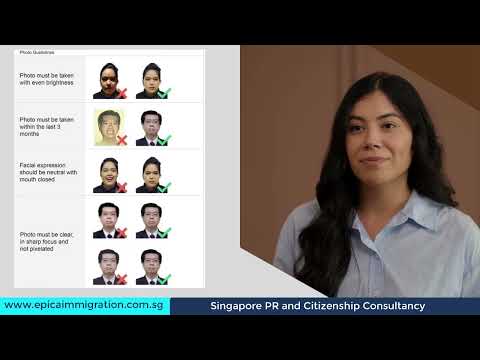
Most people know the ICA photo requirements include a 35mm by 45mm dimension. However, the size of the file is secondary to the dimensions of your face within that frame. The number one reason for rejection isn't the outer crop; it's the head-to-frame ratio.
The 25mm–35mm Rule You’re Probably Breaking
Official ICA photo guidelines are pedantic about the "crown-to-chin" ratio. Your head must take up between 25mm and 35mm of the vertical height of the photo.
- Insufficient Data: If your head is under 25mm, the AI rejects it for lacking biometric detail.
- Security Overlay Issues: If it’s over 35mm, there isn't enough space for the security features printed on the passport page.
Pro Tip: Avoid standing too close to the camera. This causes "barrel distortion," making your nose appear larger and ears seem smaller. Stand 1.5 meters away and zoom in—this keeps your facial proportions flat and accurate for the sg passport photo size requirements.
Resolution and File Size: The Digital Sweet Spot
For digital uploads, the ICA portal requires a resolution of at least 400 x 514 pixels. While many seek to make passport size photo online free, be careful with digital compression. Never send your photo via WhatsApp to yourself; its compression destroys the metadata and clarity required for compliance. Keep your file size within ICA's 8MB limit while maintaining high pixel density.
The Physics of Lighting: How to Beat the 'HDB Yellow Tint'
Lighting in a standard Singaporean home is often the natural enemy of a successful passport application. Most HDB flats use centralized ceiling lights that create "raccoon eyes"—deep shadows in the eye sockets and under the chin.
Why Your Ceiling Fan is Ruining Your Passport
Overhead lighting creates uneven shadows that biometric scanners interpret as physical obstructions. Additionally, common home LED bulbs often have a low Color Rendering Index (CRI), casting a heavy yellow or blue tint. ICA requires a neutral color balance. A yellow face against a white background creates contrast issues that trigger AI rejection flags.
The Window Light + White Cardboard Strategy
To achieve professional results at home without a physical passport photo booth, follow this technique:
- Find a North- or South-facing window during the day (10 AM or 3 PM is ideal).
- Stand 1 meter away, facing the window.
- The Shadow Hack: If light comes from one side, have someone hold a piece of white cardboard on the shadowed side of your face just out of the frame. This bounces light back, creating the "flat" lighting ICA demands.
The Newborn Masterclass: Photographing Infants
Taking a baby to a physical passport photo shop near me is often a nightmare. Newborn passport photo requirements are strict, but infants rarely cooperate with automated machines.
The 'White Sheet' Technique
Lay a crisp, white bedsheet on a firm mattress and lay the baby on top. This ensures a clean, compliant white background while keeping the infant comfortable. Stand directly over them to take the shot, ensuring there are no shadows cast by your body over the baby.
The 'No Hands' Rule
A common rejection point for parents is a visible hand in the frame. Even a single fingertip on the baby’s shoulder will result in a rejection. If you need to steady the child, do it from underneath the sheet or use rolled-up white towels to prop their head into position.
The Rejection Roadmap: 5 Reasons Your DIY Photo Will Fail
Beyond basic dimensions, "micro-requirements" often catch travelers off guard. High-quality passport photos for other regions follow similar biometric logic.
- Spectacles and Glare: While ICA allows glasses, any reflection on the lens results in an instant fail. We strongly suggest removing them entirely.
- Hair and Forehead Exposure: Your hair must not cover your eyebrows. For those wearing a hijab, the face from the bottom of the chin to the top of the forehead must be visible.
- The "Neutral Expression" Myth: Neutral doesn't mean looking miserable. It means your mouth is closed and your eyes are open. Avoid showing teeth or squinting.
- Background Luminosity: Using a flash too close to a white wall creates a "halo effect," blurring the edges of your hair and making it impossible for AI to define your head shape.
- Digital Filters: Never use 'beauty mode' or skin-smoothing filters. AI needs to see skin texture to verify a real human face.
Regional Cross-Over: SG, Malaysia, and the US
If you are an expat or frequent traveler, do not assume one photo works for all documents:
- Malaysia Passport: While Singapore is strictly white, check the latest e-Passports requirements for Malaysia, as they have specific background and size nuances.
- US Visa (DS-160): The Americans use a 2x2 inch square format and have a 100% ban on spectacles. Review the US Visa (DS-160) guidelines specifically.
Using a Passport Photo Maker for AI Validation
You could follow every tip here and still fail due to a technicality invisible to the human eye. This is why IC Photo Singapore exists. We don't just crop images; we run them through a validation engine that mimics the ICA’s own backend. We check for biometric alignment, strip out home backgrounds, and ensure the pixel integrity is perfect for the portal. It is technical insurance for your travel plans.
Frequently Asked Questions
Where can I take a passport photo in Singapore?
While you can find a passport photo machine at many MRT stations or visit a physical studio, most residents now prefer using a digital free passport photo app or a professional online service like IC Photo Singapore for convenience and guaranteed compliance.
What is the Singapore passport photo size in pixels?
For ICA online applications, the digital photo should be at least 400 x 514 pixels. The file size must be 8MB or less. The physical passport size photo dimensions remain 35mm wide by 45mm high.
Can I take my own passport photo with a phone?
Yes, taking a photo at home with a smartphone is common. However, you must ensure natural lighting, a plain white background, and correct head proportions (25mm to 35mm from crown to chin) to meet the ica passport photo requirements.
Conclusion
Taking your own passport photo is about more than just finding a passport photo maker; it’s about understanding the biometric standards of the modern travel era. By mastering lighting and using a dedicated passport photo app, you can avoid the frustration of automated rejections. Don't leave your holiday to an algorithm’s coin flip—get it right the first time.
Ready to Create Your Photo?
Get your perfect passport, IC, or visa photo in minutes. AI-powered, ICA-compliant, instant download.
Create Your Photo Now