The Science of Acceptance: ICA-Compliant Passport Photos
Singapore passport photo requirements explained: pixel density, lighting and the 'floating head' problem, so your ICA application goes through.
You’ve spent forty minutes meticulously filling out your passport renewal or Permanent Residency application. You’ve double-checked your IC number, uploaded your documents, and paid the fee. Then, three weeks later, that dreaded email hits your inbox: "Your photo does not meet ICA requirements. Please re-submit."
In 2026, a rejected photo isn't just a minor annoyance; it’s a bottleneck that can push your travel plans back by months. The Immigration & Checkpoints Authority (ICA) has moved almost entirely to AI-driven verification. Their systems aren't looking for a 'nice' photo of you—they’re scanning for a specific set of biometric data points that match your facial geometry. To navigate this, many residents are turning to a reliable passport photo app to ensure their submissions meet these stringent digital standards. This isn't your standard list of dimensions; this is the science of getting accepted on the first try.
The Real Price of a 'Good Enough' Photo
Most people think of the passport photo as a quick DIY task. Stand against a white wall, snap a selfie, and hope for the best. But let’s look at the actual stakes.
The $70 Gamble
The current Singapore Passport Application Fees sit at $70 for online applications. While you won't lose the fee if your photo is rejected, you lose something much harder to replace: time. A rejection resets your processing clock. During peak seasons—like the lead-up to the June or December holidays—a rejection can mean your passport won't arrive for another 6 to 8 weeks. I’ve spoken with travelers who had to cancel non-refundable flights because their DIY photo was rejected for something as trivial as a shadow on their left cheek.
ICA Technical Specs Decoded: Why Most DIY Photos Fail
If you ask anyone the size of a passport photo, they’ll say "35mm wide by 45mm high." That’s basic knowledge. However, the ICA’s 2026 digital requirements focus on pixel density and aspect ratios that many smartphones struggle to output correctly without a professional passport photo maker tool.
The 400x514 Pixel Rule
When you upload a photo to the MyICA portal, the system doesn't see millimeters; it sees pixels. The standard digital spec is exactly 400 pixels wide by 514 pixels high. If your file is over 8MB, the portal will reject it as too large. If it’s under 10KB, it's too grainy for the AI to map your features. Per ICA's official photo guidelines, your image must be in jpg, jpeg, heic, heif or png format and taken within the last three months.
The Brow Ridge Rule
Biometric systems identify you by measuring the distance between specific landmarks: your pupils, the corners of your mouth, and your brow ridge. Even a few stray strands of hair can obscure these 'anchor points.' This is why the AI flags photos as 'non-compliant' if the eyebrows are covered. It’s about making your facial geometry visible to a machine.

Biometrics 101: Your Face as a Data Point
Why is the ICA so strict? It’s because of ICAO Document 9303, the global standard for machine-readable travel documents. When you walk through the automated gates at Changi Airport, the camera scans your face and compares it to the digital map stored in your passport's chip.
To ensure your face is a perfect data point, you must:
- Keep a Neutral Expression: No smiling or showing teeth. A smile shifts the distance between your nose and mouth.
- Level Your Eyes: Looking slightly up or down changes the shape of your eye sockets.
- Center Your Head: You need a 10mm gap between the top of your hair and the top of the frame. Your face should occupy 70% to 80% of the vertical space.
The 'Floating Head' Problem: Contrast and Clothing Logic
One of the most common reasons for rejection is the 'Floating Head' effect. This happens when there isn’t enough contrast between you and the background.
The White-on-White Disaster
ICA requires a matte white background. If you wear a light-colored top, your shoulders disappear. The AI sees a floating head with no defined structure. The best results come from wearing dark, solid colors like navy blue or black. This helps the AI define your silhouette, ensuring the 'head-to-shoulder' ratio is correct. Avoid busy prints, which create 'noise' in the digital scan.
Lighting Physics: Building a 'Studio' in Your HDB
For a passport photo, "good lighting" means even lighting. The goal is to eliminate shadows under the nose, chin, and eyes. You don't need professional gear; you can follow the Three-Point Lighting principles using a simple window and a white board.
The Three-Point Lighting Hack
- The Key Light: Stand facing a large window during the day (not in direct sunlight) for soft, filling light.
- The Fill: If one side of your face has a shadow, have someone hold a white piece of cardboard on the opposite side to bounce light back.
- The Background Light: Move about 50cm away from the wall to keep your shadow off the background.
Pro Tip: Never use your phone’s flash. It creates 'hot spots' on your forehead and deep shadows behind you, which are instant grounds for rejection.
The Newborn Challenge: Small Humans, Big Rules
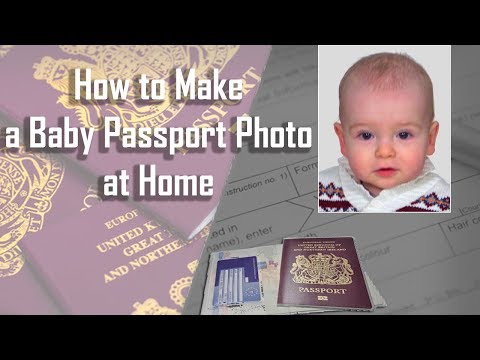
Taking a passport photo of a three-week-old baby is incredibly difficult. The ICA doesn't relax the rules for infants; eyes must be open, the head straight, and no hands can be in the frame.
The Floor Method for Infants
Lay a white bedsheet on the floor and place your baby on it. It’s much easier than propping them up. Use burst mode on your phone to capture the split second their eyes are open and mouth is closed. If your baby’s head tilts, tuck rolled-up towels under the white sheet to create a subtle cradle.
Special Cases: Religious Attire and Glasses
- Hijabs and Tudungs: These are permitted, but the entire face—from the bottom of the chin to the top of the forehead—must be visible. Use a dark-colored hijab for contrast.
- Turbans: These should not cast shadows over your forehead or eyes.
- Glasses: While allowed, I strongly recommend removing them. Most rejections are caused by glare or frames obscuring the eyes. The AI is much more likely to accept a photo without them.
Frequently Asked Questions
What is the Singapore passport photo size in pixels?
The digital requirement for the MyICA portal is 400 pixels wide by 514 pixels high, with a file size of up to 8MB.
Can I use a selfie for my passport photo?
Technically yes, but using a passport size photo editor or having someone else use the back camera is better. Selfie cameras use wide-angle lenses that can distort facial features.
What should I wear for my Singapore IC photo?
Wear a dark-colored, plain shirt (like black or navy) to provide high contrast against the white background. Avoid white or light grey clothing.
Why "Free" Online Tools Often Fail
There are dozens of "free passport photo makers" online. Most are simple cropping tools that don't understand the nuances of biometric mapping. They might resize your photo, but they won't warn you if your eyebrows are hidden or if your contrast is too low. This is where IC Photo Singapore is different. Our AI acts as a validator, running your photo through checks that mimic the ICA's own algorithms.
Conclusion: Your 30-Second Pre-Submission Checklist
Getting your photo right with a reliable passport photo app isn’t about vanity; it’s about efficiency. Before you hit 'upload,' run through this final checklist:
- Lighting: Is the light even on both sides? No shadows under my nose?
- Contrast: Can I clearly see my shoulders against the white background?
- Eyes: Are both eyes open and looking directly at the camera?
- Expression: Is my mouth closed and my face neutral?
- Obstructions: Is my hair away from my eyebrows?
Follow these steps, and your next journey will start exactly when you planned.
Ready to Create Your Photo?
Get your perfect passport, IC, or visa photo in minutes. AI-powered, ICA-compliant, instant download.
Create Your Photo Now