2025 ICA Passport Photo Guide: How to Skip the Studio
How to create ICA-compliant passport photos at home with a passport photo app, avoid common rejections and handle SG and Malaysia specs.
You’ve spent twenty minutes navigating the MyICA portal, paid the fees, and finally hit submit. Then, a few days later, the dreaded email arrives: "Your photo does not meet the requirements. Please re-upload."
It’s a common headache for busy professionals and families. The Immigration & Checkpoints Authority (ICA) manages one of the world's most advanced biometric security systems. When your photo is rejected, it’s usually because an algorithm—not a person—couldn't "read" your face correctly. In 2025, using a reliable passport photo app is the most efficient way to ensure your image functions as a valid data packet for digital clearance. If the biometric data is messy, the system rejects it automatically.
This guide cuts through the technical jargon to show you how to take a pro-grade, ICA-compliant photo at home using your phone. No expensive studios, no depressing mall booths, and no more rejections.
The High Stakes of a 35x45mm Biometric Image
Why 'Good Enough' Doesn't Cut It in 2025
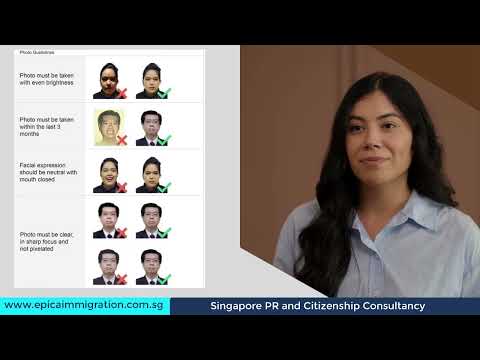
In years past, a slightly dim photo might have slipped through. Today, the process is almost entirely automated. When you upload your image, it’s immediately analyzed by facial recognition software looking for specific landmarks: the exact distance between your pupils and the contrast between your hair and the background.
According to the International Civil Aviation Organization (ICAO) standards, these photos must be clear enough to work with the latest e-gates. A bad photo doesn't just delay your application; it might actually prevent you from using passport-less clearance at Changi Airport, a cornerstone of Singapore's digital travel initiatives.
The Algorithm vs. Your Selfie
To the ICA algorithm, a shadow under your chin might look like facial hair, or a reflection on your glasses could be mistaken for an extra set of eyes. This is why "artistic" lighting is a disaster for passports. We need flat, even lighting. Singapore’s security standards are high because our passport is one of the world's most powerful; your passport size photo editor must reflect that technical precision.
Decoding ICA Technical Requirements
Size, Scale, and the 'Crown-to-Chin' Rule
The most frequent reason for rejection isn't the camera quality—it’s the scale. For Singapore, the photo must be 35mm wide by 45mm high. However, the sg passport photo size also mandates a specific face proportion: your head must occupy 25mm to 35mm from the crown (top of the head) to the chin.
If you're standing too far away, your facial features won't have enough resolution for the scan. If you're too close, your head gets cropped. Using a dedicated passport photo maker helps automate this scaling, ensuring you don't accidentally distort your features during a manual crop which would trigger an immediate system rejection.
The RGB Problem: Background Pitfalls
ICA specifies a "white background." However, many "white" walls in Singapore homes are actually cream, eggshell, or light grey. In a digital file, these show up as yellow or blue tints. Technically, the system looks for high, balanced RGB (Red, Green, Blue) values—usually 240 or higher across all three. If your background is too dark or tinted, the algorithm can't define the edges of your hair, leading to an "edge detection failure."
The DIY Home Studio Blueprint
Lighting: The 45-Degree Rule
Don't use your phone's flash. It creates a "hot spot" on your forehead and a harsh shadow behind you—both are automatic grounds for rejection. Natural light is your best friend. Find a large window during the day, but don't stand in direct, harsh sunlight. You want bright, diffused light.
The Professional Setup:
- Stand about 50cm away from a white wall to keep shadows from falling directly behind you.
- Position yourself so the window is in front of you or slightly to the side.
- If one side of your face has a shadow, have someone hold a white piece of cardboard (or even a white towel) on the dark side to bounce light back. This is the "45-degree bounce" that helps you meet every ica passport photo requirement.
Equipment: Why Your Phone Beats a Mall Booth
Those old photo booths in shopping malls often use low-resolution cameras and harsh bulbs. Your current smartphone has a much better sensor. Do not use the selfie camera. The front-facing lens on most phones is wide-angle and distorts facial features (the "big nose" effect). Use the back lens. Have a friend or family member take the photo from about 1.5 meters away, then zoom in slightly to frame the shot.
The Newborn and Toddler Challenge
Taking a newborn passport photo Singapore is famously stressful. Getting a two-week-old to look at a lens with a neutral expression requires a specialized approach.
The 'White Sheet' Car-Seat Method
Instead of trying to hold the baby against a wall, drape a plain white bedsheet over a car seat or bouncer. The seat’s shape supports the baby’s head naturally. Place the seat on the floor in a well-lit room and take the photo from directly above. The background stays uniform, and the baby stays comfortable.
While the ICA Photo Guidelines are slightly more relaxed for infants (they don't need a perfectly neutral expression), their face must still be clear. No pacifiers, no toys, and no visible parental support hands can be in the frame.
Singapore vs. Malaysia vs. The World
If you're a PR or a Malaysian resident in Singapore, pay close attention to the dimensions. They are not the same.
- Singapore: 35mm x 45mm.
- Malaysia: 35mm x 50mm.
That extra 5mm of height is mandatory for Malaysia. If you submit a 45mm photo to the Official Malaysian Immigration Portal, it will be rejected because the head-to-frame ratio won't match. Similarly, a USA Visa requires a 2x2 inch (51x51mm) square format. Never assume one photo fits all; each country’s AI is calibrated differently.
Why AI Verification is Your Safety Net
Why does a professional passport photo app succeed where a standard DIY photo fails? It’s because our engine replicates the ICA’s own checks. We don't just "look" at your photo; we measure it. Our system calculates the exact pixel distance from your chin to your crown and checks the RGB balance of your background. If the lighting is too dim or the scale is off, the AI catches it before you ever hit the MyICA portal. This is why tools like IC Photo Singapore can offer a remake guarantee.
Troubleshooting MyICA Uploads
Even with a perfect photo, the portal can be finicky. Keep these technical rules in mind, which align with global U.S. Department of State Photo Tips:
- File Size: ICA accepts files of up to 8MB, so a normal phone photo is fine. Avoid compressing it until it looks blurry.
- File Format: Use jpg, jpeg, heic, heif or png. ICA accepts all five formats (see the ICA photo guidelines).
- Pixel Dimensions: For the best results, aim for 400 x 514 pixels for Singapore documents.
Frequently Asked Questions
What is the most common reason for Singapore passport photo rejection?
Most rejections are due to poor lighting (shadows on the face or background) and incorrect facial proportions (the head being too large or too small within the 35x45mm frame).
Can I use a regular selfie for my ICA application?
No. Selfies are taken with wide-angle front cameras that distort facial features. Additionally, the background and lighting rarely meet the strict biometric standards required for the Singapore passport.
Do I need to go to a professional studio for a passport photo?
No. With a modern smartphone and an AI-powered passport photo maker, you can achieve professional results at home that are fully compliant with ICA regulations.
The 10-Point Pre-Upload Audit
Run through this checklist before submitting. If you answer "No" to any, take another shot.
- Is the background pure white? (No cream tints or grey shadows).
- Are your eyebrows visible? (Hair should not be obscuring your eyes).
- Are your eyes level? (Don't tilt your head).
- Is the lighting even? (Check for "panda eyes" caused by overhead lights).
- Are you looking at the lens? (Focus on the camera, not the screen).
- Is your expression neutral? (No teeth showing, no wide grins).
- Are there reflections on your glasses? (If yes, take them off—it's safer).
- Is the image sharp? (No motion blur or beauty filters).
- Are your shoulders level? (Avoid sitting at an angle).
- Is the file 8MB or less?
Final Thoughts: Expertise Over Luck
Getting your passport photo right on the first try isn't about luck; it's about following a technical blueprint. By taking the photo at home, you have the time to get it right. You can take fifty shots until you find the one with perfect lighting. By using an AI-powered passport size photo editor, you're essentially doing a "pre-flight check." It’s better to find out a photo is 2mm off while you're still on your couch than to wait weeks for a rejection letter. Grab your phone, find a white wall, and get it done right the first time.
Authoritative Sources:
- ICA Singapore Official Photo Guidelines
- ICAO Biometric Standards (Doc 9303)
- Official Malaysian Immigration Portal
- U.S. Department of State - Passport Photo Benchmarks
- The Straits Times - Changi Passport-less Clearance
Ready to Create Your Photo?
Get your perfect passport, IC, or visa photo in minutes. AI-powered, ICA-compliant, instant download.
Create Your Photo Now