Ultimate 2026 Guide: Singapore Passport Photo ICA Approval
Singapore's 2026 biometric passport photo standards in practice: what ICA checks, common mistakes and how to take a compliant photo.
If you’re looking for a reliable passport photo app in 2026, you've likely realized that standard selfies no longer cut it for the Immigration & Checkpoints Authority (ICA). The days of cramped, poorly lit photo booths in neighborhood malls are fading. Today, getting your travel documents ready is about meeting clinical biometric data points that a computer reads in milliseconds at Changi’s automated gates.
I’ve seen countless travelers get stuck in the 'rejection loop'—that frustrating cycle of submitting a photo, waiting weeks, getting rejected, and starting over. This guide is designed to break that cycle. We will explore why standards have shifted, why a dedicated passport size photo editor is now more reliable than human judgment, and how you can achieve 100% compliance from your living room.
The Evolution of Singapore’s Passport Photo Standards
Singapore possesses one of the world's most powerful passports, which necessitates rigorous security. The ICA doesn't just look at your photo; they use it to create a biometric profile. If your photo has a slight shadow or your hair obscures your eyebrows, the facial recognition software used at the New Clearance Concept (NCC) gates—which aim for passport-less travel—might fail to match your face to your digital record.
The New Clearance Concept (NCC) and Your Photo
By 2026, Changi Airport has fully implemented its 'New Clearance Concept.' This means your iris and facial biometrics are the primary keys to your travel. When you upload a photo to MyICA e-Service, it serves as the baseline for this system. If the baseline is flawed, you aren't just looking at a rejected application; you're looking at potential delays at every border crossing.
The High Cost of the 'Rejection Loop'
In 2026, the pre-check AI on the ICA portal is faster but stricter. Many DIY photos fail because of 'pixel noise' or 'background luminance' invisible to the naked eye. This leads to wasted fees and missed travel windows. A professional AI-driven passport photo maker ensures you only submit once.
Decoding the ICA Technical Specifications
To successfully make passport size photo online free of errors, you must understand the technical requirements. According to the official ICA guidelines, your photo must be taken within the last three months and reflect your current appearance.
Dimensions and Proportions: The 25-35mm Rule
The standard dimensions are 35mm wide by 45mm high. However, the critical metric is the head size. Your face—from the chin to the crown—must occupy between 25mm and 35mm of the vertical space. If the face is too small, biometrics lack detail; if too large, it gets cropped at the gate. This precision is hard to achieve manually but is a standard feature in a high-quality passport photo app.
The Background Mystery: Why 'Home White' Isn’t Enough
The ICA requires a white background with a matte finish. Most home walls are 'off-white,' which appear yellow or grey under a camera lens. Furthermore, standing too close to a wall creates 'halo shadows.' Specialized AI tools segment your body from the background and replace it with 'ICA-compliant white' while maintaining natural edges around the hair, adhering to the ISO/IEC 19794-5 biometric standards.
The 'Eyebrow Rule' and Biometric Mapping Secrets
This is the leading cause of rejections in 2026. The ICA is incredibly strict about facial feature visibility to ensure accurate mapping.
- The Eyebrow Rule: Your eyebrows must be fully visible. Fringes must be swept aside. Even stray hairs covering the arch of your eyebrow can cause a biometric mismatch.
- The Neutral Expression: You must have a neutral expression with your mouth closed. Smiling alters the distance between your nose and chin—a key biometric checkpoint.
- Religious Headgear: For those wearing a tudung or turban, the face must be visible from the chin to the top of the forehead. Contrast is key; dark headgear is preferred against the white background.
Why Traditional Photo Booths Are Failing in 2026
Many neighborhood booths use aging sensors that produce high-contrast photos. These 'blown-out' highlights obscure skin texture, which 2026 scanners need to verify authenticity. This is why many residents now search for a free passport photo app that uses modern smartphone optics instead.
How AI Validates Compliance in Milliseconds
Modern AI tools like IC Photo Singapore scan your photo for:
- Face Centering: Detecting even a one-degree head tilt.
- Luminance: Ensuring even lighting across both sides of the face.
- Sharpness: Verifying focus at the pixel level to meet Biometric Update industry standards.
The Parent’s Survival Guide: Newborns and Toddlers
Capturing a newborn passport photo is notoriously difficult. How do you get an infant to maintain a neutral expression?
Practical Tips for Infant Photos
- The White Sheet Hack: Lay a plain white sheet on a bed and place your baby on it. Take the photo from directly above.
- Lighting: Use a window to the side to provide soft, natural light without casting your own shadow over the child.
- ICA Leniency: For infants under one year, the ICA is slightly more lenient regarding open eyes, but no hands or pacifiers can be in the frame.
Step-by-Step: Taking a Compliant Photo at Home
You don't need a professional studio; your smartphone is a powerful passport photo maker if used correctly:
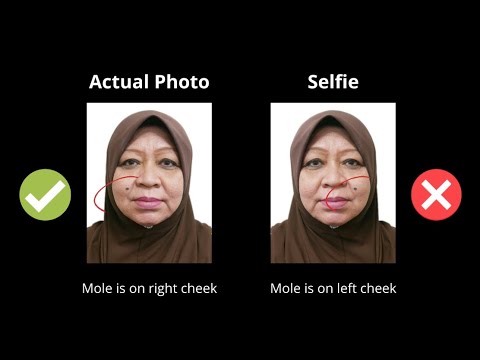
- Use the Rear Camera: Avoid the 'selfie' lens. Front cameras cause 'barrel distortion,' making your nose look larger and ears disappear, which ruins biometric mapping.
- Find Soft Light: Stand 1.5 meters from a window. Avoid direct sunlight which creates harsh glares.
- Positioning: Stand 0.5 meters from the wall to eliminate shadows.
- Verification: Upload your shot to our passport size photo editor. Our AI will resize, strip the background, and verify 2026 standards instantly.
Common Reasons for Rejection
| Issue | Why it fails | The Fix |
|---|---|---|
| Hair over brows | Blocks biometric markers | Use gel or clips; brows must be 100% clear. |
| Uneven Lighting | One side of face in shadow | Face the light source directly. |
| Flash Glare | Obscures skin/eyes | Disable flash; use natural daylight. |
| Selfie Distortion | Warped face shape | Use the rear camera from 2 meters away and zoom. |
Beyond Singapore: US and International Visas
While the sg passport photo size is 35x45mm, other countries differ. For example, a US Visa requires a 2x2 inch photo. Always consult the US Department of State Photo Examples if traveling abroad. Our tool includes presets for all major international requirements.
Frequently Asked Questions
Can I wear glasses in my Singapore passport photo?
Yes, but there must be no glare on the lenses and your eyes must be clearly visible. Frames should not obscure any part of your eyes. In 2026, the ICA recommends removing glasses if they are thick-rimmed to ensure 100% biometric accuracy.
What is the SG passport photo size in pixels?
For digital submission via MyICA, the photo should be 400 x 514 pixels. However, using a high-resolution passport photo app ensures that the image remains sharp even after the AI crops it to these specific dimensions.
Can I wear a white shirt for the photo?
While not strictly forbidden, a white shirt may blend into the white background, making it difficult for the AI to distinguish your shoulders. We recommend wearing dark-colored clothing to provide a clear contrast.
How long is an ICA passport photo valid?
The photo must be taken within the last three months. If your appearance has changed significantly (e.g., major surgery or facial tattoos), you should take a new one regardless of the timeframe.
Conclusion
In the era of the New Clearance Concept, your photo is more than an image—it's your digital key to the world. Using a specialized passport photo app like IC Photo Singapore bridges the gap between home convenience and machine-led security. We provide a lifetime remake guarantee to ensure your peace of mind. Don't leave your travel plans to chance at a neighborhood booth; embrace the precision of AI and get your 100% ICA-compliant photo today.
Ready to Create Your Photo?
Get your perfect passport, IC, or visa photo in minutes. AI-powered, ICA-compliant, instant download.
Create Your Photo Now