Passport Photo App: Create ICA-Approved Photos at Home
How to make passport and IC photos at home that meet ICA standards: 400x514 px specs, rejection triggers, newborn tips and apps vs photo booths.
If you have renewed your Singapore passport, identity card, or Long-Term Visit Pass over the last few years, you already know the days of lining up at the ICA Building on Kallang Road with physical photo slips in hand are basically over. The entire application system runs through the MyICA online portal. You fill out your details, pay online, and upload a digital image.
Yet, despite this digital shift, photo rejection remains one of the single biggest causes of application delays. When ICA's automated screening engine flags an image, your application drops out of the automated lane into manual review. That turns what should be a three-working-day approval into a four-week waiting game of resubmissions, follow-up emails, and missed travel dates.
You do not need to hunt down a specialized photo studio or gamble ten dollars on a mechanical booth at an MRT station. Modern smartphone cameras capture more than enough optical resolution to satisfy biometric standards. The secret lies in understanding how biometric verification engines evaluate your face, and how to use a dedicated passport photo app or online editor to handle the sizing, background isolation, and contrast adjustments automatically.
Here is how to take a flawless passport photo at home that passes ICA inspection on the very first try.
The Reality of Digital Passport Submissions in Singapore
Singapore transitioned toward fully paperless identification processes years ago. According to the Immigration & Checkpoints Authority (ICA), all passport and NRIC renewals must include a photograph taken within the last three months that conforms strictly to international biometric standards established by the International Civil Aviation Organization (ICAO Doc 9303) and the ISO/IEC 19794-5 biometric standard.
When you upload your photo on the MyICA portal, it does not immediately go to a human immigration officer. Instead, it gets scanned by an algorithmic inspection pipeline. This system checks for pixel dimensions, aspect ratio, background luminance, facial tilt, eye visibility, and shadow distribution. If any metric falls outside predetermined safety boundaries, your upload is either rejected instantly at the portal interface or deferred to a human officer who issues an official rejection notice days later.
Why Traditional Photo Booths and Neighborhood Studios Fall Short
For decades, the default choice for Singaporeans was either an automated photo machine sitting outside an MRT station ticket concourse or a mom-and-pop studio tucked inside an HDB heartland shopping complex. Both options present noticeable drawbacks in a digital-first era:
- Photo-Me MRT Booths: These self-contained cubicles cost between $8 and $12. While they provide printed passport stickers on glossy paper, getting a compliant, uncompressed digital file on your phone often requires paying extra or scanning a QR code that downloads a low-resolution thumbnail. The fixed lighting inside these booths also casts dark neck shadows under strong overhead bulbs.
- HDB Photo Studios: Traditional studios know the framing rules well, but they charge anywhere from $15 to $35 for a quick shoot. Worse, many still print physical photos and charge an extra $5 to $10 surcharge simply to email you the JPEG file.
- Generic Mobile Filters: Trying to crop a casual selfie using your phone's built-in photo gallery almost always results in non-compliant aspect ratios, unnatural facial distortion from wide-angle lenses, or telltale compression artifacts that trigger automated rejections.
This is where a specialized passport size photo editor fills the gap. By combining your phone's high-resolution sensor with AI-assisted background removal and dimension framing, you get studio-level compliance from your living room in under two minutes.
Decoding ICA Photo Specifications: What the System Actually Looks For
To pass automated verification, you need to understand both the physical metrics and the digital metadata requirements set by ICA.
Digital Dimensions vs. Print Measurements
Most people look at the official guidelines and see "35 mm wide by 45 mm high." While that matters if you are pasting a photo onto a physical paper form, digital uploads operate on pixels, file size, and aspect ratios:
- Digital Pixel Dimensions: ICA mandates a minimum resolution of 400 pixels wide by 514 pixels high.
- Aspect Ratio: The exact width-to-height ratio is approximately 1:1.285. If you upload a square 1:1 image or a 4:3 smartphone snapshot, the portal will reject it outright or crop it unpredictably, cutting off your hair or chin.
- File Format: jpg, jpeg, heic, heif or png.
- File Size: Maximum file size of 8MB (standard outputs sit comfortably between 150 KB and 800 KB).
- Color Space: Standard W3C sRGB Color Space standard. Greyscale, monochrome, or sepia photos are strictly forbidden.
Facial Biometrics: The 70% to 80% Rule
Your face cannot sit as a tiny dot in the center of the frame, nor can it be blown up so large that your hairline touches the top border. ICA requires that your face—measured from the base of your chin to the top of your head (crown), including your hair—must occupy between 25 mm and 35 mm of the vertical 45 mm frame. In digital terms, your head height must cover between 55% and 77% (ideally around 70% to 80%) of the total image height.
Additionally, both eyes must sit along an imaginary horizontal line situated roughly between 50% and 65% from the bottom of the photo. If your head tilts even five degrees to either side, the biometric software will flag an asymmetry error.
Background Color: Pure White (#FFFFFF) vs. Off-White Walls
This is the single most common stumbling block for people taking photos at home. ICA's rule states: "Taken against a plain white background without shadows."
Most white walls in Singapore homes—whether painted in Nippon Paint's "Sail White" or Dulux's "Off-White"—are not actually white when captured by a camera sensor. Ambient room light, yellow LED bulbs, and wall textures turn that white paint into light grey, beige, or pale yellow in your photograph. When the ICA automated engine tests the background pixels, it checks for a pure white baseline (RGB value of 255, 255, 255, or hex #FFFFFF). If the background registers average RGB values of 230, 225, 220, the image registers as having an invalid, tinted background.
A dedicated passport photo app or online editor fixes this by isolating the human subject using edge-detection algorithms and swapping the natural wall out for an authentic, pure #FFFFFF background while preserving natural hair strands and ear borders.
The 7 Most Common Reasons ICA Rejects Photos (and How to Avoid Them)
ICA's official portal processes tens of thousands of identity documents every month. Over the years, specific recurring errors trigger the vast majority of rejections. Here is the checklist you need to run through before hitting submit:
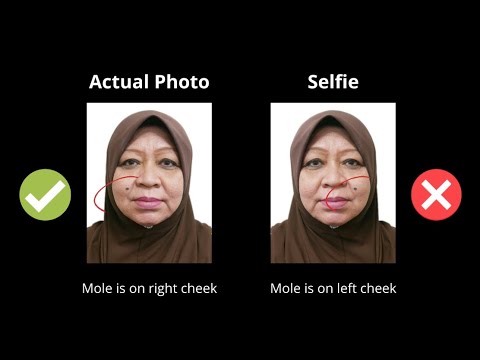
| Rejection Cause | Why the ICA System Flags It | How to Prevent / Fix It |
|---|---|---|
| Ceiling Downlight Shadows | Overhead spotlights cast dark triangles below the nose, chin, and under the eyes. | Stand facing a large window with natural daylight; turn off overhead ceiling downlights. |
| Wall Shadows Behind Subject | Standing too close to a wall casts a dark silhouette around shoulders and ears. | Stand at least 1 to 1.5 meters away from the wall behind you, or use an AI tool that strips background shadows completely. |
| Spectacle Lens Glare | Anti-reflective coatings or flash reflections obscure the pupils or iris patterns. | Remove your spectacles completely for the photo. ICA does not require glasses in passport photos. |
| Heavy Spectacle Frames | Thick plastic rims cover part of the upper eyelid, pupil, or eyebrow line. | Take the photo without glasses. You avoid all frame-related rejections instantly. |
| Fringe Covering Eyebrows | Biometric facial recognition requires clear visibility of both eyebrows and eye contours. | Comb your fringe back, pin it behind your ears, or use hair spray. Both eyebrows must be fully visible. |
| White or Light Cream Tops | Wearing white clothes against a pure white background causes your shoulders to blend into the canvas. | Wear a dark-colored shirt (navy, black, dark green, or charcoal) to create clean contrast at the neckline. |
| Smartphone Portrait Mode / Beauty Blur | Algorithmic depth-of-field blurs ear tips and shoulders; beauty smoothing wipes out skin pore biometrics. | Disable Portrait Mode and skin-smoothing filters. Biometric systems require crisp, authentic facial texture. |
Subtle Shadows Behind Ears and Across the Jawline
When you stand in a hallway lit by a single overhead fluorescent tube or LED downlight, the light falls almost vertically. This creates deep shadows beneath your chin and behind your earlobes. Biometric software reads these dark patches as false facial contours, altering your facial geometry in the system's database. To fix this, always shoot with the light source coming from directly in front of you at eye level, not from above.
Spectacle Reflections and Frame Blockages
While ICA guidelines technically permit glasses if they have clear lenses and do not obscure your eyes, wearing them introduces unnecessary risk. Much like the strict policies enforced by the U.S. Department of State Passport Photo Guidelines, even minor reflections from an open window can create a white flare across your pupil. Furthermore, thick designer frames frequently cast shadows across the inner eye socket. Unless you have a medical condition requiring eye coverings, take your glasses off for the photo. ICA does not penalize you for taking off glasses, even if you wear them every day.
Hair Encroachment on Brows and Eyes
If you have a layered hairstyle, wispy bangs, or a long fringe, make sure it is swept aside. ICA officers are famously strict about eyebrow visibility. Both eyebrows must be visible from start to finish. If your hair covers even a third of an eyebrow arch, your submission stands a high chance of being kicked back for manual resubmission.
Over-Smoothing, Skin Filters, and AI Hallucinations
Many modern smartphones (particularly models from Samsung, Xiaomi, and Vivo) enable subtle "beauty modes" by default. These algorithms soften skin texture, reduce pore visibility, and subtly enlarge eyes. In biometric terms, this degrades the unique mathematical features of your face. Similarly, running your photo through generic generative AI image enhancers can hallucinate hair strands, alter earlobes, or smooth out natural nasolabial lines. Your photo must be a true, unembellished likeness.
Passport Photo App & Online Editor vs Booth vs Studio
Should you use an online editor, visit a physical studio, or drop into an MRT booth? Let us look at the real-world trade-offs across cost, turnaround, convenience, and compliance.
| Factor | Online AI Photo Editor (e.g., IC Photo Singapore) | MRT Photo Booth (Photo-Me) | Traditional HDB Studio | High-End Portrait Studio |
|---|---|---|---|---|
| Typical Cost | Free basic tools; $4–$9 for certified outputs | $8 – $12 | $15 – $25 | $35 – $70 |
| Turnaround Time | 60 to 120 seconds | 5 to 10 minutes | Same day or next day | 1 to 3 days |
| Digital File Format | Pre-cropped 400x514 px JPEG ready for MyICA | Hardcopy prints; digital file often requires extra fee or low-res scan | Digital file via email (often with an extra $5–$10 fee) | High-res digital file provided |
| Retake Allowance | Unlimited free retakes on your phone | 2 to 3 attempts inside booth before printing | Limited retakes based on photographer's patience | Multiple retakes with professional coaching |
| Baby / Infant Friendly | Highly convenient; take photos while baby rests at home | Nearly impossible (infants cannot sit unsupported) | Moderate (photographer must manage baby) | Good (specialized infant lighting setups) |
| Rejection Guarantee | Yes (reputable tools offer lifetime remake guarantees) | No refund if ICA rejects physical or scanned print | Some offer free reshoots upon showing rejection notice | Free reshoot guaranteed |
If you are comfortable spending 90 seconds taking a photo in front of a window, an online editor offers the fastest path with zero travel required.
Step-by-Step Blueprint: Taking an ICA-Ready Photo with Your Phone
You do not need a multi-thousand-dollar DSLR. The main camera on any smartphone released after 2020 possesses plenty of dynamic range and resolving power. The secret lies in your shooting technique.
Step 1: Camera Setup and Focal Length Selection
Never take a passport photo as a handheld selfie.
When you hold your phone at arm's length (about 50 to 60 cm away), the phone's front-facing selfie camera uses a wide-angle lens (typically 24mm to 28mm equivalent). At close distances, wide-angle lenses cause perspective distortion—your nose appears 15% to 20% larger, your cheeks look pinched, and your ears appear to fall away behind your head. Biometric recognition engines will flag this distorted facial geometry.
Here is how to set up the camera correctly:
- Have a family member or friend hold the phone, or place your phone on a tripod or stable shelf.
- Position the camera 1.5 to 2 meters away from your face at exact eye level.
- Use the rear camera, which has significantly higher sensor quality than the selfie camera.
- If your phone has a 2x or 3x telephoto camera mode, switch to 2x. Telephoto compression flattens facial features naturally, presenting an anatomically accurate representation of your face.
Step 2: Lighting Your Face Without Harsh Shadows
Lighting is 80% of biometric photo quality. You want soft, diffuse, even illumination across both sides of your face.
- The Best Setup: Stand facing a large window during daytime (between 9:00 AM and 4:30 PM). Let the indirect daylight illuminate your face evenly. Ensure direct sunlight is not hitting your skin, as direct sun creates sharp, blown-out highlights and squinting eyes.
- Turn Off Overhead Lights: Switch off ceiling lights directly above your head. Mixed lighting (warm yellow ceiling bulbs combined with cool daylight from a window) confuses camera white balance and creates unflattering color casts.
- Check Both Sides of the Face: Verify that your left cheek and right cheek have equal brightness. There should be no dark shadows along the side of the nose opposite the light source.
Step 3: Wardrobe and Contrast Choices
Because the background will be stark, pure white (#FFFFFF), you need adequate contrast at your shoulders and neck.
- What to wear: Solid, dark-colored clothing. Dark navy, forest green, maroon, deep grey, or black work best. Collared shirts or crew-neck t-shirts are ideal.
- What to avoid: Do not wear white, light cream, pastel beige, or pale yellow tops. If you wear white, your shoulders blend into the canvas, leaving you looking like a floating head. Avoid scoop-neck tops or off-shoulder blouses that make you look unclothed in a tight head-and-shoulders crop.
- Religious Headgear: ICA explicitly permits religious headgear (such as the tudung or turban), provided it does not cover any part of your face from the tip of your chin to the top of your forehead, and casts no shadow on your face. The headgear should also ideally contrast clearly against a white background.
Step 4: Running the Image Through an AI Passport Size Photo Editor
Once you have captured a sharp, evenly lit image with a neutral expression (mouth closed, eyes looking directly into the lens), you can let software handle the tedious technical compliance work.
When you upload your raw capture to an AI tool like IC Photo Singapore, the platform runs several automated passes:
- Background Segmentation: It removes the domestic wall, furniture, or shadows behind you and replaces them with an ICA-mandated
#FFFFFFpure white canvas while cleanly isolating your hair outline. - Biometric Alignment: It detects your eye line and chin, scaling your head so that it occupies the required 70% to 80% vertical coverage.
- Dimensional Cropping: It formats the image to the required 400x514 pixel ratio.
- Compression and Quality Check: It compresses the file to sit safely below ICA's 8MB upload ceiling while preserving 8-bit true color depth.
You download the processed JPEG file directly to your phone or laptop and upload it straight into MyICA.
How to Take ICA-Compliant Newborn and Toddler Passport Photos
Taking a passport photo of an adult is straightforward. Taking one of a three-week-old newborn or an active eighteen-month-old toddler is an entirely different adventure. You cannot take an infant who cannot support their own neck to an MRT booth, and many commercial studios struggle to capture a calm infant within their booked appointment window.
Fortunately, ICA provides slightly more flexible biometric standards for infants under three years old, recognizing that perfect posture is physically impossible.
The Flat-Lay Bed Sheet Technique for Infants
For babies younger than six months, the easiest, safest method is the bed flat-lay:
- Lay a plain, light-colored or white fitted sheet flat on a mattress or floor.
- Lay your baby on their back on top of the sheet.
- Position a soft light source (such as an open bedroom window) to the side or top of the bed. Make sure your own body does not cast a shadow over the baby's face.
- Stand directly over your baby, holding your phone parallel to their face at a distance of about 1 meter.
- Use continuous burst mode or capture multiple shots while catching your baby's attention with a gentle sound or rattle directly behind the camera lens.
Never attempt to hold the infant upright in your arms with your hands visible. ICA will reject any photo showing supporting hands, parents' shoulders, or baby rattles in the frame.
ICA Exemptions and Strict Rules for Children Under Three
For babies and young toddlers, ICA relaxes certain constraints:
- Eyes: For infants under one year old, eyes do not have to be looking directly into the lens, though they should ideally be open. Closed eyes are often accepted for very young newborns, but open eyes are strongly preferred.
- Mouth: A slightly open mouth is acceptable for young infants who cannot control their lips.
- Strict Non-Negotiables: No pacifiers, no bibs, no headbands, no bonnets, and absolutely no visible hands or fingers supporting the child's head.
Once you capture a clean, unobstructed shot of your baby's face on the bed sheet, run it through an online passport size photo editor to automatically strip out wrinkles in the sheet and produce a compliant white background.
Regional Cross-Border Differences: Singapore ICA vs. Malaysia MyOnline Passport
Many residents in Singapore regularly commute across the Causeway or hold Malaysian citizenship while working in the city-state. A frequent misconception is that passport photo guidelines are uniform across Southeast Asia. In reality, Singapore and Malaysia have distinct specifications that will cause rejections if mixed up.
According to the Official Portal of Immigration Department of Malaysia, the requirements for the Malaysian MyOnline Passport portal differ significantly from Singapore's ICA:
| Specification | Singapore ICA Requirements | Malaysia Immigration Requirements |
|---|---|---|
| Standard Print Size | 35 mm wide x 45 mm high | 35 mm wide x 50 mm high |
| Digital Pixel Specs | 400 x 514 pixels (approx. 1:1.285 ratio) | 350 x 450 pixels or 700 x 900 pixels (approx. 1:1.285 to 1:1.29) |
| Background Color | Pure White (#FFFFFF) | Pure White (formerly blue, now white for online applications) |
| Facial Coverage | 70% to 80% (25 mm to 35 mm head height) | 60% to 70% (25 mm to 30 mm head height from chin to crown) |
| Eyebrow Visibility | Strict: Both brows must be 100% uncovered | Strict: Full forehead and both brows visible |
| Clothing Tone | Dark colored; collared shirt preferred | Dark colored; must cover chest and shoulders completely |
| Glasses Policy | Discouraged; rejections common for reflections | Strict: Must be removed entirely for digital upload |
If you are renewing a Malaysian passport from Singapore through the High Commission or the MyOnline Passport system, do not submit a Singapore 35x45mm crop. Use a dedicated tool that lets you specifically select "Malaysia Passport" to ensure the 35x50mm proportion and correct head-ratio tolerances are applied.
Frequently Asked Questions
Can I take my Singapore passport photo with an iPhone or Android phone?
Yes. ICA does not mandate that photos be taken on professional studio equipment. As long as your smartphone image meets the resolution minimum (at least 400x514 pixels), features sharp focus, displays accurate skin tones, has no shadows, and uses a pure white background, it is fully accepted.
Are free passport photo apps safe to use for government submissions?
Many generic free apps monetize by injecting heavy watermarks, compressing your photo into a low-grade pixelated mess, or uploading your facial biometric data to questionable third-party cloud servers without clear retention policies. If you use a photo tool, ensure it operates with clear data privacy practices, does not store biometric data unnecessarily, and exports uncompressed high-resolution images that comply with official ICA parameters.
Can I smile in my Singapore passport photo?
ICA requires a neutral facial expression with your mouth closed. A wide smile that exposes your teeth or crinkles your eyes alters facial geometry, causing automated biometric facial matching systems to fail. You can have a relaxed, pleasant resting face, but keep your lips together and do not squint.
Can I wear contact lenses when taking my photo?
Clear, prescription contact lenses are completely acceptable. However, colored contact lenses, tinted lenses, or cosmetic "circle lenses" designed to enlarge the iris are strictly forbidden. Biometric scanners read your natural iris patterns; colored contacts obscure these unique markers and will lead to an immediate rejection.
How recent must my passport photo be?
ICA mandates that your photo must have been taken within the last three months. Do not attempt to reuse the photo from your current passport or your IC if it was taken years ago. The ICA portal cross-references your uploaded image against your historical database photos; if the system notices that you submitted the identical photograph you used five or ten years prior, your application will be flagged and rejected for an outdated image.
What happens if ICA rejects my photo after I submit my application?
If your photo is rejected during manual review, ICA sends an email notification containing a secure link to re-upload a compliant photo within a specified window (typically 14 days). Your application is placed on hold until the new photo is approved. You do not have to pay the passport application fee again, but your processing timeline resets, adding one to three weeks to your wait time.
Final Advice for a Fast Passport Approval
Renewing your passport or identity card in Singapore does not require an afternoon trip to a photo studio or feeding coins into an MRT photo booth. By understanding the mechanical rules that ICA's verification engine checks—even natural lighting, neutral expression, visible eyebrows, no glasses, dark clothing, and a pure #FFFFFF background—you can capture a compliant photo from your living room in minutes using a dedicated passport photo app.
If you want to eliminate the guesswork of manual cropping and background cleaning, upload your raw smartphone portrait to IC Photo Singapore. The platform tests your image against current biometric criteria, handles pixel formatting, provides instant compliance feedback, and backs your upload with a lifetime remake guarantee so your passport application sails through approval without delay.
Ready to Create Your Photo?
Get your perfect passport, IC, or visa photo in minutes. AI-powered, ICA-compliant, instant download.
Create Your Photo Now