Passport Photo App: Take ICA Singapore Photos at Home
Skip the studio queue. Take an ICA-compliant Singapore passport photo at home with your phone: lighting, biometric rules and newborn tips.
If you have ever tried renewing your Singapore passport right before the December holidays or a long weekend to Japan, you know the particular brand of anxiety that comes with submitting your application via the MyICA portal without a dedicated passport photo app. You fill out the details, enter your Singpass, pay the $70 fee, upload a photo you quickly took against a bedroom wall, and wait.
Then, four days later, the dreaded notification lands in your inbox: Your passport photo does not meet ICA requirements.
Your application goes back to square one, your planned flight departure date creeps closer, and you are left wondering whether you need to hunt down an old-school photo studio in a heartland mall or cram into an MRT photo booth smelling of stale air just to get a pass-grade picture.
Here is the truth: you do not need to pay $25 to $35 at a studio, and you certainly don't need to roll the dice on a rigid MRT photo booth. Taking an Immigration & Checkpoints Authority (ICA) compliant passport photo at home using your smartphone is entirely straightforward—provided you understand what ICA's biometric scanning algorithms actually look for, how to avoid common lighting mistakes in Singapore homes, and how to format your file correctly using a trusted passport size photo editor.
In this complete guide, we will break down the exact specifications demanded by ICA, walk you through setting up a foolproof home photoshoot in a standard HDB flat or condo, troubleshoot the tricky business of infant passport photography, and show you how an AI-powered passport size photo editor ensures your upload sails through on the first attempt.
Official ICA Passport Photo Requirements: The Exact Numbers You Cannot Fudge
Singapore has one of the world's most powerful travel documents, and its security begins with strict compliance with the international biometric standards established under ICAO Document 9303. When you submit a photo to the Immigration & Checkpoints Authority, it is not simply viewed by a human officer; it is first processed through an automated biometric verification engine.
If your head is tilted by three degrees, your fringe sits a millimeter below your eyebrow line, or your background has a subtle yellowish tint, the system flags and rejects it automatically. Below are the definitive technical specifications enforced by the Immigration & Checkpoints Authority (ICA) Photo Guidelines.
| Specification | Digital Upload (MyICA Portal) | Physical Hardcopy Print |
|---|---|---|
| Dimensions | 400 pixels wide by 514 pixels tall | 35 mm wide by 45 mm high |
| Aspect Ratio | Roughly 7:9 (specifically 35:45) | 35:45 |
| Head Height (Chin to Crown) | 25 mm to 35 mm equivalent (approx. 70% to 80% of image height) | 25 mm to 35 mm |
| Clearance Above Crown | Minimum 4 mm to 8 mm space above hair | 4 mm to 8 mm |
| File Format | JPEG / JPG | High-quality matte or semi-matte print |
| Maximum File Size | 8MB or less | N/A |
| Background Color | Plain, untextured, pure white | Plain, untextured, pure white |
| Recency | Taken within the last 3 months | Taken within the last 3 months |
The Critical Chin-to-Crown Measurement
The biggest stumbling block for home photographers is facial scaling. ICA requires your face—measured strictly from the tip of your chin to the top of your head (crown), not the top of your styled hair—to occupy between 25 mm and 35 mm of the 45 mm overall frame height.
If you crop too wide, showing your chest and shoulders, the automated facial recognition software will fail because your facial feature points (eyes, nose, mouth corners) lack sufficient pixel density. Crop too tight, cutting into your chin or the crown of your head, and your photo will be rejected instantly.
The Background: Pure White Means Pure White
ICA does not accept off-white, cream, ivory, light grey, or patterned backgrounds. Even if you stand against an HDB wall painted white, indoor ambient lighting will almost certainly turn that wall grey, yellow, or murky in your photograph. The background must register as uniform, shadowless white, with sharp contrast between the edge of your clothes, your hair, and the backdrop.
Setting Up Your DIY Home Studio in a Standard Singapore Flat
You do not need professional softboxes or strobe lights to get this right. Modern smartphone camera sensors are exceptionally capable. The real challenge in most Singapore homes is the indoor lighting architecture.
Step 1: Ditch the Ceiling Lights Completely
Most Singapore HDB flats and condominiums feature bright overhead fluorescent tubes, daylight LED ceiling panels, or warm downlights. While great for living spaces, overhead lighting is the number one enemy of a biometric passport photo.
When light strikes your head directly from above, it casts harsh, dark shadows under your eyebrows (making your eyes look sunken), beneath your nose, and across your neck. ICA's guidelines explicitly prohibit shadows on the face and neck. Turn off your overhead ceiling lights before you snap your photo.
Step 2: Use Indirect Natural Daylight
Natural daylight is soft, diffused, and flat—ideal for biometrics. The best spot in almost every Singapore flat is facing a large living room window or balcony door, between 9:30 AM and 11:30 AM or 2:30 PM and 4:30 PM on a clear or lightly overcast day.
Position yourself facing the window squarely so the daylight illuminates both sides of your face evenly. Avoid times when direct, scorching sunlight streams straight through the glass, as this produces harsh hot spots and specular highlights on your forehead and cheekbones.
           [ Large Window / Balcony ]  <-- Diffused Natural Daylight
                      |
                      v
           [ Camera on Tripod / Held by Friend ]
                      |
                      |  (1.5 to 2.0 meters distance)
                      v
                 [ Subject ]
                      |
                      |  (0.5 to 1.0 meter space)
                      v
           [ Plain Light Wall or White Door ]
Step 3: Create Background Separation
Do not press your spine or the back of your head directly against the wall behind you. When you lean against a wall, any forward-facing light source will throw a distinct silhouette shadow of your head and shoulders onto the surface behind your ears.
Step forward by roughly 0.5 to 1.0 meter from your wall or backdrop. This depth of field creates clean separation between you and the background, ensuring any minor ambient shadows fall to the floor before reaching the wall.
Framing and Camera Setup: Why Selfies Will Always Fail ICA Checks
Here is a firm rule: never take your passport photo using your phone's front-facing selfie camera held at arm's length.
Smartphones use wide-angle lenses on their front cameras (typically around 22mm to 26mm full-frame focal equivalent). When you hold a wide-angle lens 40 to 50 centimeters from your face, optical barrel distortion occurs. It exaggerates the size of your nose, narrows your temples, and makes your ears seem to disappear behind your cheeks. Biometric algorithms check the precise distance ratios between your pupils, nasal bridge, and earlobes. An arm-length selfie warps these spatial measurements.
The Proper Camera Setup
- Use the Main Rear Camera: The primary sensor on your smartphone has far superior optics, better dynamic range, and captures true-to-life color depth without heavy digital noise.
- Have Someone Else Take the Photo (or Use a Tripod): Mount your phone on a basic tripod or ask a family member to hold it. Position the camera exactly at your eye level. If the lens is tilted upward, you get a unflattering shot of your nostrils and your jaw appears exaggerated; if tilted downward, your forehead looks disproportionately large.
- Maintain a 1.5 to 2.0 Meter Distance: Stand roughly 6 feet away from the lens. If your smartphone camera offers a 2x optical zoom (around a 50mm portrait equivalent), switch to that mode. A 50mm focal length renders human facial proportions flat, natural, and accurately proportioned.
Grooming, Attire, and Expression Checklist
Before you press the shutter, run through this non-negotiable checklist:
- Clothing: Wear a dark or brightly colored top (navy blue, black, charcoal, dark green, or maroon). Do not wear white, light beige, or pastel grey tops; your shoulders will blend into the white background, creating a floating-head effect that ICA rejects automatically. Uniforms and military attire are not permitted unless religious.
- Hair and Eyebrows: Your hair must be combed away from your face. Your entire eyebrows and both eyes must be fully visible. If you have long bangs or a fringe, sweep them to the side or clip them down. If you have long hair falling forward, tuck it behind both ears so the full outer contours of your jawline and cheeks are unobstructed.
- Facial Expression: Keep a neutral expression. Mouth closed, teeth not showing, lips relaxed. No pouting, smirking, or squinting. Look directly into the camera lens with both eyes open and level.
- Spectacles and Contact Lenses: While ICA permits clear prescription glasses, reflections and glare on lenses are the single most frequent cause of rejection. Tinted lenses and colored or iris-enhancing contact lenses are strictly prohibited. The safest, most foolproof option is simply to remove your spectacles for the photograph. ICA does not mandate wearing glasses even if you wear them daily.
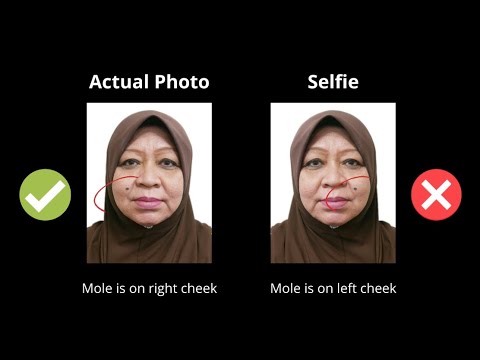
- Religious Headgear: Allowed for religious or cultural reasons (such as the tudung or turban), but the headgear must not obscure any facial features. The full oval of your face—from the tip of your chin to the top of your forehead, including both eyebrows—must be completely visible, and the headgear should contrast cleanly with the white background.
The Newborn and Infant Passport Photo Playbook
If you think taking a passport photo of an adult at home requires patience, taking one of a two-week-old newborn or a squirming ten-month-old toddler will test your resolve. Standard photo booths at MRT stations are functionally useless for infants—there is no way for a baby who cannot hold their head upright to sit safely on an adjustable swivel stool.
Taking your newborn passport photo at home is not only easier; it is vastly more comfortable for your child. While ICA allows some leniency regarding eye contact and head alignment for infants under one year old, the fundamental requirements—white background, no visible hands, open eyes, and neutral expression—still apply.
       [ Overhead Camera / Parent Standing ]
                        |
                        |  (1.0 to 1.2 meters directly above)
                        v
         +------------------------------+
         |  [ Soft Natural Room Light]  |
         |                              |
         |   (Baby lying on back)       |
         |      [ Baby's Head ]         |
         |       [ White Sheet ]        |
         +------------------------------+
The Flat-Bed White Muslin Sheet Method
- Lay a Plain White Sheet on a Flat Mattress: Place a freshly ironed, solid white cot sheet or smooth muslin swaddle over a firm mattress or flat playmat. Avoid waffle-knit blankets or towels with thick textures.
- Support Without Visible Hands: Lay your baby on their back on the white sheet. If the baby's head tends to roll to one side, roll up two small white hand towels and place them under the sheet on either side of the head to gently cradle it forward. Crucially: no parent's fingers, hands, toys, pacifiers, or bibs may be visible in the frame.
- Position Lighting at the Feet or Side: Make sure the room's main window light hits the baby evenly from the front or foot of the mattress, not from behind their head (which creates a shadow across their face).
- Shoot Directly from Above: Stand directly above the baby, holding your phone parallel to their face to avoid perspective distortion. Use continuous burst mode on your smartphone.
- Timing is Everything: Take the photo 20 to 30 minutes after a feed, when your baby is alert, calm, and neither crying nor falling asleep. Shake a soft rattle or make gentle clicking sounds directly behind your camera lens to encourage the baby to look straight up with both eyes open.
The 7 Most Common Reasons ICA Rejects Photos (and How an AI App Solves Them)
Every year, thousands of Singapore passport applications stall because applicants submit photos with subtle compliance flaws. Let's look at why these happen and how using an intelligent passport size photo editor eliminates the guesswork.
                      COMMON REJECTION TRIGGERS
  =================================================================
  [1. Muddy Background]  --> HDB wall paint reads grey/cream
  [2. Eyebrow Coverage]  --> Long bangs or fringe obscure brow line
  [3. Lens Reflection]   --> Flash/light glares off spectacle coatings
  [4. Filter Artifacts]  --> Smartphone 'Beauty Mode' erases skin texture
  [5. Off-Scale Ratio]   --> Head height is less than 25mm or over 35mm
  [6. Messaging Blur]    --> File compressed via WhatsApp before upload
  [7. Stale Recency]     --> Photo matches NRIC/passport from >3 mos ago
  =================================================================
1. Off-White or Shadowed Backgrounds
Even if you think your living room wall is white, digital cameras adjust white balance dynamically based on lighting temperature. The result is often an image with a light-tan, bluish, or grey cast that fails ICA's RGB threshold test.
The Fix: An AI-powered passport photo tool strips away the real-world background cleanly around every strand of hair and substitutes an exact, mathematically pure white backdrop (#FFFFFF / RGB 255, 255, 255) that meets ICA standards.
2. Eyebrows Obscured by Bangs
ICA's facial recognition system relies heavily on the supraorbital ridge and eyebrow shape to verify identity. If your hair covers even a portion of your eyebrows, an automated rejection is almost guaranteed.
The Fix: Pin your fringe back before shooting. Even slight coverage can trigger a manual review and subsequent failure.
3. Spectacle Glare and Reflections
Modern prescription lenses have anti-reflective or blue-light coatings that reflect daylight as a green, blue, or purple sheen across the pupil.
The Fix: Take off your glasses. The automated portal checks your biometrics, not your visual acuity.
4. Over-Smoothing and Beauty Filters
Smartphones from brands like Samsung, Xiaomi, and Apple frequently apply default skin-smoothing algorithms, sharpening filters, or HDR tone mapping that soften pore detail. ICA demands natural skin tones and textures. Heavily airbrushed images where facial moles, birthmarks, or natural lines are smoothed out are deemed manipulated and rejected.
The Fix: Turn off "Beauty Mode", "Portrait Lighting", and aggressive HDR settings in your default camera app before capturing your photo.
5. Incorrect Head Sizing and Framing
Cropping an image on your computer using generic photo viewers rarely lands you at the exact 70% to 80% chin-to-crown ratio required by ICA.
The Fix: A dedicated Singapore passport photo app uses computer vision to detect the top of your skull and the bottom of your chin, automatically positioning and cropping the image to the exact 400x514 pixel aspect ratio with the required 25mm to 35mm vertical head clearance.
6. Compression from Messaging Apps
A common mistake among Singaporeans is having a spouse or friend take the photo on their phone and then sending it over WhatsApp or Telegram. These apps apply aggressive image compression, stripping image metadata, reducing the resolution below 400x514 pixels, and introducing jagged JPEG artifacts around facial features.
The Fix: Transfer the raw, original photo via AirDrop, Google Drive, email (at original size), or upload it directly to your browser on the phone where it was taken.
7. The 3-Month Recency Rule
Do not try to reuse the photo from your company badge, your wedding album, or the passport photo you submitted for your previous renewal five years ago. ICA cross-checks new submissions against their internal historical biometric database and the National Registration Identity Card (NRIC) system administered under the National Registration Act. If your submitted picture matches an older record, it will be rejected for lack of recency.
Comparison: Photo Booth vs. Photo Studio vs. AI Passport Photo App
When it comes to getting your passport photo sorted in Singapore, you have three primary paths. Here is how they stack up in cost, convenience, and success rate:
| Evaluation Metric | MRT / Mall Photo Booth (Photo-Me) | Heartland Photo Studio | AI Passport Photo App (IC Photo SG) |
|---|---|---|---|
| Average Cost | $8.00 – $12.00 | $20.00 – $35.00 | Free basic check / Affordable instant export |
| Time Required | 15–30 mins (travel + queue) | 1–2 hours (travel, queue, wait for print/email) | Under 3 minutes from home |
| Retake Flexibility | Very limited (usually 2–3 attempts max) | Limited to photographer's patience | Unlimited free retakes until you look great |
| Newborn & Child Friendly | Impossible for infants; stressful for toddlers | Often challenging; depends on studio gear | Excellent; snap calmly during nap/feed gaps |
| ICA Compliance Guarantee | None (frequent rejections for lighting) | Good (manual photographer check) | Guaranteed with AI biometric validation |
| Digital File Format | Often extra cost ($5) or print-only | Extra charge for digital JPEG | Instant, pre-formatted 400x514 JPEG |
Photo booths are notoriously unforgiving. If you blink, your fringe slips, or your posture is slightly crooked, you only get two or three retakes before the machine prints whatever it captured. Neighborhood studios do a reliable job, but you are paying a hefty premium and spending half your Saturday afternoon commuting and waiting.
Using a smartphone paired with a dedicated AI passport photo app gives you the best of both worlds: studio-level technical compliance without leaving your living room couch, complete with unlimited retakes until you are satisfied with how you look.
Step-by-Step: Formatting and Submitting Your DIY Photo on MyICA
Once you have snapped a clear, evenly lit photo against your wall, getting it ready for the MyICA Portal takes less than two minutes using IC Photo Singapore.
   +-------------------------------------------------------------+
   |                DIY PASSPORT PHOTO WORKFLOW                  |
   +-------------------------------------------------------------+
   | 1. Capture Snap    --> Take photo in natural daylight       |
   | 2. AI Processing   --> Upload to IC Photo Singapore         |
   |                        - Removes background (pure white)    |
   |                        - Calculates chin-to-crown ratio     |
   |                        - Crops to 400 x 514 pixels          |
   | 3. Compliance Scan --> Validates eyebrows, glare, & posture |
   | 4. Download JPEG   --> Save final high-res file (< 8MB)     |
   | 5. MyICA Portal    --> Log in via Singpass & submit         |
   +-------------------------------------------------------------+
Step 1: Upload Your Raw Photo to IC Photo Singapore
Navigate to IC Photo Singapore on your mobile browser or computer. Upload the raw photo you took in natural daylight. You do not need to pre-crop, edit brightness, or attempt manual cutouts.
Step 2: Automated AI Background Removal and Sizing
The AI engine immediately runs three distinct operations:
- It isolates your silhouette and replaces whatever was behind you with a pure, solid white background meeting ICA's RGB luminance standards.
- It scans your facial landmarks, identifying the exact vertex of your crown and the tip of your chin, then adjusts the crop so your head occupies exactly 70% to 80% of the vertical frame.
- It sizes the output image to precisely 400 pixels wide by 514 pixels high, maintaining the required 35:45 aspect ratio.
Step 3: Biometric Compliance Validation
The platform checks your image against ICA and ICAO biometric guidelines. It verifies that your eyes are level, both ears or facial edges are clearly distinguishable, there is no excessive glare, and the contrast is sufficient for border gate facial recognition.
Step 4: Download and Submit to MyICA
Download the final compliance-verified JPEG. Log in to the official MyICA Portal using your Singpass, navigate to the Passport Application / Renewal section, and upload the image file.
Because the resolution, aspect ratio, file size, and background are already calibrated to ICA's digital ingestion specifications, the portal's upload preview tool will accept the file without prompting you to re-crop or adjust manual slider bars.
Frequently Asked Questions About Singapore Passport Photos
Can I smile in my Singapore passport photo?
No, you cannot show an open smile or flash your teeth. ICA mandates a neutral facial expression with your mouth closed and eyes looking straight into the lens. A very slight, natural closed-lip upturn of the mouth corners is usually tolerated, but an obvious smile changes your facial geometry and will trigger a rejection.
Are MRT photo booth photos guaranteed to pass ICA approval?
No. While photo booths brandish signs claiming compliance, they frequently fail due to worn lighting tubes, improper seating adjustments (resulting in incorrect head sizing), or harsh shadow lines behind the ears. If an MRT photo booth image is rejected by ICA, the booth operator does not refund your passport application fee or processing delays.
Can I wear spectacles if I have poor eyesight?
While ICA guidelines state spectacles can be worn provided there is no reflection or glare on the lenses and frames do not obscure the eyes, in practice, reflections are notoriously difficult to eliminate. We strongly recommend removing your spectacles for the photograph. Doing so will not affect your passport validity or border clearance at automated gates.
Can I wear earrings, nose studs, or facial jewelry?
Small, unobtrusive studs and earrings are acceptable as long as they do not cover any part of your face or reflect light flashes back into the lens. Large dangling earrings or bold facial piercings that disrupt your facial contour should be removed for the photo.
How long does ICA take to process a passport renewal once the photo is submitted?
Standard passport renewals submitted online via MyICA typically take 1 to 2 weeks for approval, assuming your submitted photo passes automated and manual verification. During peak travel periods (prior to June and December school holidays), processing times can extend to 3 to 4 weeks. Having a rejected photo will set your processing timeline back significantly.
Can I use the same photo for both my Singapore Passport and my IC (NRIC)?
Yes. Both the Singapore Passport and the NRIC follow identical biometric standards (plain white background, 35x45mm proportions / 400x514 pixels, full facial visibility, neutral expression, taken within the last 3 months). If you are updating both documents around the same time, a single compliant photo file generated with an AI passport photo app works seamlessly for both MyICA submissions.
Ready to Create Your Photo?
Get your perfect passport, IC, or visa photo in minutes. AI-powered, ICA-compliant, instant download.
Create Your Photo Now