Passport Photo App Guide 2026: Get Rejection-Proof SG Photos
2026 ICA biometric standards for Singapore passport and IC photos, with practical tips for taking compliant photos at home.
If you've ever uploaded a photo to the MyICA portal only to have it bounced back two days later with a generic “does not meet requirements” error, you’re not alone. It’s a frustrating, silent rejection. There’s no human on a helpline to tell you that your fringe was 2mm too low or that your shirt blended into the background. By 2026, the Singapore Immigration & Checkpoints Authority (ICA) has fully transitioned to an AI-first vetting system. This shift means that using a high-quality passport photo app is no longer just a convenience—it's a technical necessity to ensure your facial biometrics are mapped correctly.
When you hit submit, your face isn't just being looked at; it's being analyzed. Computer vision algorithms scan for hundreds of biometric anchors—specific points like the bridge of your nose, the distance between your pupils, and the curvature of your jaw. If the lighting is off or the contrast is weak, the system fails to "lock" onto these points, and you get rejected. This guide is your technical blueprint for navigating the logic of the machine and getting it right the first time.
The ICA Digital Standard in 2026: Why 'Close Enough' No Longer Works
Gone are the days when a "mom-and-pop" photo shop could simply eyeball a 35x45mm frame. Today, ICA adheres strictly to the ISO/IEC 19794-5 biometric standard. This international benchmark ensures that image data is clear enough for global facial recognition systems.
The Rise of the Algorithm
The ICA system checks for more than just a white background. It analyzes "inter-pupillary distance" (the space between your eyes) and "eye-to-chin height." If there’s a slight shadow on the side of your nose, the AI might misinterpret that shadow as a facial contour. According to NIST biometric research, even minor lighting variations can significantly impact the accuracy of automated matching. The computer doesn’t see a shadow; it sees an incorrectly shaped face. This is the primary reason why photos that look perfectly fine to a human eye get flagged by the system.
The Cost of Rejection
A rejected photo is more than a minor annoyance—it’s a bottleneck. For travelers, it means delayed passports and potentially missed flights. Most rejections happen because people still rely on outdated photo booths. Those machines often use decade-old sensors and harsh, direct flashes that flatten your features. Modern smartphone hardware, combined with a specialized passport size photo editor, provides far more depth and texture detail than an old-fashioned booth.
The Psychology of a Perfect ID Photo: Lighting and Contrast
Lighting is more important than megapixels. You don't need a professional camera; you need a basic understanding of how light hits your face to satisfy the ica passport photo requirement.
Butterfly Lighting at Home
Professional studios use "Butterfly Lighting." This involves a light source directly in front of and slightly above your face, creating a small, symmetrical shadow under the nose. It ensures both sides of your face are lit equally.
At home, you can achieve this by facing a large window on a bright, overcast day. Direct sunlight is too harsh and creates deep shadows. Stand 1 to 2 meters away from the window to achieve soft, diffused light that fills in your features and eliminates the side-shadows that AI systems hate.
The Edge-Bleed Problem
Contrast is the second biggest reason for digital rejection. If you have fair skin and wear a white shirt against a white wall, the ICA’s auto-cropping tool can’t tell where your shoulder ends and the wall begins. This is "edge bleed." When the software tries to strip the background, it “eats” into your silhouette. The fix? Always wear a dark, solid color to ensure your outline is sharp and distinct.
The DIY Studio Setup: Using a Passport Photo App for Professional Results
Many still search for a "passport photo shop near me" in a panic, but the camera in your pocket is likely superior to the industrial cameras found in most malls. By using a modern passport photo app, you can take advantage of advanced image signal processors that handle textures far more accurately than a booth.
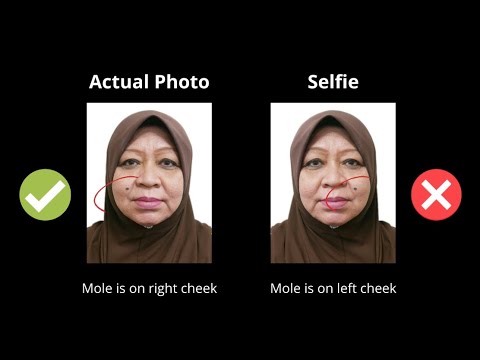
Positioning and Distance
Never take a selfie. Selfies use a wide-angle lens which causes "lens distortion," making your nose look larger. To an AI, this is an inaccurate biometric record.
The Right Way:
- Have someone else take the photo using the back camera.
- Stand at least 1.5 meters away from the lens.
- Use the 2x or 3x zoom to frame your head and shoulders. This flattens the image for a true-to-life representation.
- Use a passport photo maker to ensure the final image meets the exact ICA guidelines.
Clothing, Hair, and Accessories: Navigating the Fine Print
The White Shirt Trap
The ICA requires a white background. Wearing white or light grey is a recipe for rejection. Wear navy, black, or deep green. It makes the background removal process clean and ensures your shoulders are clearly defined.
The Brow-Line Rule
Your eyebrows are key biometric markers. If your fringe or "bangs" cover even a portion of your eyebrows, the photo will fail. You don't need a haircut—just use a bit of hairspray or a pin to keep them clear of your brow line.
Regarding glasses: In 2026, the safest move is to just take them off. While they are technically allowed, they are a leading cause of rejection due to frame interference or lens glare. ICA doesn't require you to wear them in the photo, even if you wear them daily.
Specialized Guides: Newborns and the Elderly
The Newborn 'Car-Seat Hack'
Taking a newborn passport photo is notoriously difficult. Don’t try to hold them up; you'll end up with your hands in the frame.
- Drape a plain white sheet over a car seat.
- Place the baby in the seat; the natural incline supports their head safely.
- Stand directly over them to take the shot.
- If they won't look at the lens, use a high-contrast toy held right next to the camera.
Dignified Home Capture for Seniors
For elderly family members, a trip to a photo booth is often physically taxing. Using an online tool at home allows you to take the photo in their favorite chair. If the background isn't perfect, AI-powered apps can intelligently swap it for a compliant white background while preserving facial integrity.
Global Travel Matrix: Regional Requirements
If you're an expat or frequent traveler, you know that one size doesn't fit all. Requirements for the Malaysia Passport or a US Visa differ significantly from Singapore's standards.
| Document Type | Dimensions | Background | Key Nuance |
|---|---|---|---|
| Singapore Passport | 35x45mm | White | Matt finish; no shadows allowed. |
| Malaysia Passport | 35x50mm | White | Recently updated to white background. |
| US Visa (DS-160) | 2x2 inches | White | Square format; head 50-69% of height. |
| China Visa | 33x48mm | White | Specific head-height (28mm-33mm). |
| Schengen Visa | 35x45mm | Light Grey | Eyes must be at a specific height. |
Booth vs. App vs. Studio: A Data-Driven Analysis
- Traditional Studio ($25–$50): Professional lighting but expensive and time-consuming. You often pay extra for digital files.
- MRT Photo Booths ($10–$15): Convenient, but poor lighting often leads to rejection.
- AI-Powered App ($0–$10): The most flexible option. You can take unlimited shots, get an instant compliance check, and ensure the sg passport photo size is pixel-perfect.
The 10-Point Rejection-Proof Checklist
Before you upload to MyICA, run this final check:
- Pure White Background: No shadows or off-white tints.
- Brows Visible: Hair is tucked back from the brow line.
- Eyes Level: Look directly at the camera, not the phone screen.
- Closed Mouth: No teeth showing; keep a neutral expression.
- Even Lighting: No shadows on one side of the face.
- Dark Clothing: High contrast against the white wall.
- No Glare: Especially important if you chose to keep your glasses on.
- Sharp Focus: No motion blur or "soft" features.
- Head Centered: Equal space on both sides of the shoulders.
- Correct File Size: Ensure it meets the resolution requirements (usually 400x514 pixels for SG).
Frequently Asked Questions
What is the Singapore passport photo size for 2026?
The official sg passport photo size remains 35mm wide by 45mm high. For digital uploads, the image should be at least 400 by 514 pixels in jpg, jpeg, heic, heif or png format and no more than 8MB in size.
Can I take my own passport photo with a smartphone?
Yes, you can. Using a dedicated passport photo app is often better than a booth because modern phone sensors capture higher-quality biometric data, provided you use the back camera and natural lighting.
Why was my passport photo rejected for 'lighting'?
Rejections for lighting usually mean there are uneven shadows on your face or "hot spots" (bright white glares). The ICA AI requires even illumination across both sides of the face to accurately map facial features.
Do I need to wear a collar for my passport photo?
While there is no official rule requiring a collar, wearing one helps define your neckline and shoulders against the white background, reducing the risk of 'edge-bleed' errors during automated cropping.
Navigating Singapore’s digital bureaucracy doesn’t have to be a gamble. When you understand that the "judge" of your photo is an algorithm, you can stop guessing and start providing the exact data points the system wants. By using a reliable passport photo app, you ensure your application moves through the system without delays, giving you more time to plan your next journey.
Ready to Create Your Photo?
Get your perfect passport, IC, or visa photo in minutes. AI-powered, ICA-compliant, instant download.
Create Your Photo Now