The Biometric Blueprint: ICA Passport Photo Compliance
The science behind Singapore passport photo requirements: what ICA's checks look for, lighting setups, and newborn and senior photo tips.
The Changi Era: Why Your Passport Photo is Now a Digital Key
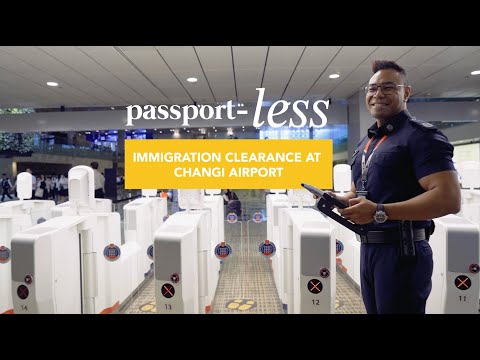
If you've walked through Changi Airport recently, you've likely noticed a significant shift. You no longer simply hand your travel documents to a human officer. Instead, you stand before an automated glass gate, face a high-definition camera, and wait for the system to verify your identity. This seamless travel experience relies entirely on the quality of the biometric data you submitted via your passport photo app or online application months ago.
In 2025, a "good enough" photo is a recipe for travel delays. With the full rollout of Singapore’s New Clearance Concept (NCC), your biometric photo has become your primary digital key. If your image contains poor contrast, subtle shadows, or obscured features, the automated gates at Changi or the Woodlands Checkpoint will fail to recognize you. This forces you into manual queues and can even lead to your passport application being rejected by the ICA before you've even started packing.
The Rise of Passport-less Clearance
Singapore is currently leading the global transition toward biometric border control. According to the latest Changi Airport travel guidelines, integrated facial and iris recognition systems are designed to reduce clearance times by up to 40%. These systems compare your live face against a high-fidelity reference image stored in the ICA database. When you use a passport photo maker, you aren't just creating a picture; you are generating a data set that must align perfectly with global security standards.
The Biometric Science: What ICA’s AI is Actually Looking For
When you look at your passport photo, you see your likeness. When the ICA’s algorithm processes it, it sees a mathematical map of your unique biology. Modern facial recognition follows strict ICAO Document 9303 standards, ensuring your Singaporean passport is machine-readable at scanning gates from London to Tokyo.
The 80 Nodal Points of the Human Face
The AI identifies approximately 80 nodal points—anatomical landmarks such as the distance between the eyes, the bridge of the nose, the shape of the cheekbones, and the depth of the jawline. A heavy shadow on one side of your face is more than a lighting flaw; it is "ghost" geometry. The software may misinterpret a shadow as a structural contour, causing a "hard fail" during the automated verification process.
Why Eyebrows are the Ultimate Biometric Marker
While a fringe or bangs might be your preferred style, they are a significant hurdle for biometric accuracy. The brow line is one of the most stable features of the human face. Unlike the mouth, which moves during speech or expression, the brow structure remains constant. ICA is notoriously strict about eyebrows; if hair covers even a small portion, the system loses a primary reference point for the eye sockets, often resulting in a rejection of your sg passport photo size submission.
Technical Setup: Turning Your Living Room into a Compliance Lab
You don't need a professional studio to make passport size photo online free, but you do need to understand light behavior. Avoid standing directly under a single bright ceiling light, as this creates "raccoon eyes"—harsh shadows under the brow and chin that prevent AI mapping.
The 'No-Shadow Triangle' Lighting Technique
To achieve the flat, even lighting required for the ica passport photo requirement, you must eliminate depth-creating shadows:
- Natural Light Source: Face a large window during daylight hours, but avoid direct, harsh sunlight.
- The Triangle Setup: If using artificial lights, place one light 45 degrees to your left and another 45 degrees to your right.
- The Result: These lights cancel out each other’s shadows, leaving your features clearly defined for the biometric sensors.
The White Shirt Trap and Background Contrast
A frequent technical error involves the "Floating Head" effect. ICA requires a plain white background. If you wear a white shirt, your shoulders blend into the background, making it impossible for edge-detection software to calculate your head size relative to the frame. Always wear high-contrast colors—such as navy, black, or deep green—to ensure a clean, recognizable silhouette.
The Critical Compliance Checklist (2025 Edition)
To ensure your photo passes the ICA's rigorous automated checks, follow these passport size photo dimensions and grooming rules:
- Facial Dimensions: The head must occupy 70% to 80% of the photo (25mm to 35mm from chin to crown).
- Image Size: Exactly 35mm wide by 45mm high.
- Resolution: Minimum 400 x 514 pixels.
- Neutral Expression: Mouth closed, eyes open and looking directly at the camera.
- Hair & Headgear: Hair must not cover eyes or eyebrows. Religious headgear is permitted but must not obscure facial features or create shadows.
The Newborn Masterclass: Photography Without the Tears
Capturing a newborn passport photo is a unique challenge. Infants cannot follow directions, and their erratic movements often lead to blurred images.
The Floor-Lay Method
Rather than trying to hold a baby against a wall—which often results in parent’s hands being visible in the frame—lay a flat, white sheet on a carpeted floor near a bright window. Place the baby on the sheet and photograph them from above. This ensures a compliant white background and allows the baby to remain comfortable and still. Ensure all pacifiers and toys are removed, as ICA will reject any photo containing external objects.
Senior and Accessibility Photography
For seniors or individuals with limited mobility, traveling to a traditional passport photo shop near me can be a significant hurdle. Using a mobile-based free passport photo app allows for a more comfortable environment. If a subject has a natural head tilt due to medical conditions, align the camera with their face rather than forcing a straight posture. The priority is a clear, front-facing view with no features obscured.
Common Rejection Deep-Dive: Resolution vs. Compression
Many high-quality photos are rejected not because of the subject, but because of the file technicalities:
- The Resolution Trap: While ICA requires a minimum of 400x514 pixels, uploading a massive 20MB file can be counterproductive. The ICA portal may compress large files so aggressively that they become "pixelated," creating artifacts that look like skin blemishes to an AI.
- Matte vs. Glossy: If you are submitting a physical photo, it must be printed on high-quality matte or semi-matte paper. Glossy prints often cause "specular highlights" (light reflections) that interfere with facial scanning. For official digital requirements, refer to the ICA official photo guidelines.
The Solution: Why AI-Powered Tools Outperform Photo Booths
Traditional neighborhood photo booths often use outdated templates that don't account for the nuances of modern biometric AI. This is where a dedicated passport size photo editor like IC Photo Singapore provides a superior advantage.
Our tool functions as a compliance engine, not just a cropper. It automatically adjusts the head-to-frame ratio, removes background shadows, and validates biometric markers—such as eyebrow visibility and light balance—before you ever submit your application. This eliminates the guesswork of where to take passport photo Singapore residents can trust.
Global Standards for Expats (Malaysia, US, China)
If you are an expatriate in Singapore, remember that requirements vary significantly by country. Do not assume your ICA-compliant photo will work for other visas:
- Malaysia: The Malaysian Immigration portal often requires specific background colors (often white, but previously blue) and different dimensions.
- USA: Requires a square 2x2 inch (51mm x 51mm) format. A standard Singaporean 35x45mm photo will be rejected. See the US Department of State Photo Examples for more details.
- China: Features unique specifications regarding the distance from the top of the head to the bottom of the photo.
Frequently Asked Questions
Can I wear makeup in my passport photo? Yes, but keep it natural. Avoid heavy contouring, as it alters the "nodal points" the AI uses to identify you. Also, avoid high-gloss lipsticks or highlighters, as they create "hot spots" that sensors flag as lighting errors.
Are colored contact lenses allowed? No. ICA guidelines strictly prohibit lenses that change your natural eye color or iris shape. Stick to clear prescription lenses or remove your contacts before the photo.
How old can my passport photo be? Your photo must be taken within the last three months. If your appearance has changed significantly—due to major weight loss, surgery, or aging—you should take a new photo regardless of the date.
The Bottom Line
Your passport photo is more than a portrait; it is a critical piece of technical data. By focusing on visible eyebrows, even lighting, and high-contrast clothing, you ensure your travel remains frictionless. For a guaranteed result, use the IC Photo Singapore editor to generate a perfectly compliant, biometric-ready photo in minutes. Stop searching for a passport photo shop near me and embrace the convenience of AI-powered compliance.
Ready to Create Your Photo?
Get your perfect passport, IC, or visa photo in minutes. AI-powered, ICA-compliant, instant download.
Create Your Photo Now