ICA Passport Photos for Adults, Children and Newborns
Singapore passport photo requirements for adults, children and newborns: biometric standards, religious headwear rules and newborn tips.
The trip is booked. The hotel in Tokyo is confirmed. Your annual leave is approved. You sit down at 10 PM to quickly renew your Singapore passport through the MyICA portal, snapping a quick photo against your white living room wall. You hit submit, feeling productive.
Then, three days later, the email arrives: "Your photo has been rejected due to poor image quality/shadows."
In an instant, your travel timeline is in jeopardy. This isn't just a minor administrative hiccup; it's a breakdown in the biometric handshake between you and the Singapore government. At IC Photo Singapore, we see this daily. The Immigration & Checkpoints Authority (ICA) maintains some of the most rigorous photo standards on the planet. Why? Because your photo isn't just a picture—it’s a data set that powers the automated gates at Changi Airport. Using a high-quality passport photo app can prevent these costly errors by ensuring your image meets technical math requirements before you ever click submit.
If the math in your photo is off by even a few millimeters, the facial recognition software used in the New Clearance Concept (NCC) can’t map your features accurately. This guide is designed to ensure you never see that rejection email again. We’re moving beyond the basics into a masterclass on biometric compliance.
Chapter 1: The Technical Blueprint—Beyond 35mm x 45mm
Most people can recite the standard dimensions: 35mm wide by 45mm high. But that’s only the physical footprint. The real reason the ICA rejects one in ten photos lies in the internal geometry of the image.
The 'Golden Ratio' for Your Face
The ICA doesn’t just look at the photo size; they look at the "Crown-to-Chin" ratio. According to official ICA guidelines, your head must occupy between 25mm and 35mm of the vertical space.
| Requirement | Specification |
|---|---|
| Photo Dimensions | 35mm (W) x 45mm (H) |
| Crown to Chin Distance | 25mm to 35mm |
| Eye Position (from bottom) | 20mm to 30mm |
| Background Color | Plain White (No shadows) |
If your face is too small, the software can't capture enough detail for a high-confidence match at the automated gates. If it's too large, the digital cropping tool has no room to maneuver. You also need to ensure your eyes are positioned between 20mm and 30mm from the bottom of the photo. It’s a game of precision that a standard selfie usually loses.
The White Background Myth
You’ve heard the background must be white. However, the ICA’s automated contrast checkers are incredibly sensitive. If you use a wall that’s slightly off-white, eggshell, or cream, the system may flag it as a "colored background."
Lighting is the secondary culprit here. Even if your wall is pure white, if you stand too close to it, you’ll cast a shadow. The ICA perceives these shadows as "artifacts"—extra data points that confuse the edge-detection algorithms used to separate your silhouette from the background.
Pixel Density and File Size Sabotage
Many applicants fail when they attempt to make passport size photo online free using low-quality converters. They take a high-resolution photo and send it via WhatsApp, which aggressively compresses the file. By the time you upload it to the MyICA portal, the file has lost its "edge sharpness." The ICA requires a file size of no more than 8MB, but it must maintain a resolution of at least 400 x 514 pixels. If the image looks "grainy" or "soft," it’s an automatic rejection for "Inappropriate Image Quality."
Chapter 2: The Modern Workflow—Why Photo Booths are Obsolete
Those classic photo booths in MRT stations feel like a safe bet, but they are increasingly ill-equipped for 2025 biometric standards. They are static machines trying to solve a dynamic problem. This is why a modern passport photo app has become the preferred choice for tech-savvy travelers.
The Lighting Problem in MRT Booths
Most booths use a single, harsh flash positioned directly above the camera. This creates two fatal flaws:
- The Forehead Glare: The flash creates a "hot spot" on your forehead. This destroys the skin texture data needed for automated immigration clearance.
- Neck Shadows: A top-down flash casts a heavy shadow under the chin. If this shadow is too dark, the software cannot find the bottom of your chin, making the 25mm–35mm ratio calculation impossible.
How AI Validation Actually Works
This is where an AI-powered online passport photo editor changes the game. Instead of a human guessing if a photo looks "okay," an AI engine treats your face as a 3D map. It checks for:
- Roll: Is your head tilted toward a shoulder?
- Pitch: Are you looking too high or too low?
- Yaw: Is your face turned slightly away from the lens?
If any of these are off by more than a few degrees, the AI identifies it instantly. A photo booth will take your money regardless; a dedicated passport size photo editor ensures the file is valid before you even hit "submit."
Chapter 3: The Newborn Protocol—A Guide for Stressed Parents
Taking a newborn passport photo is a unique challenge. You can't tell a two-week-old to "keep a neutral expression."
The Flat-Lay Technique
Don't try to hold your baby against a wall. Instead, use these steps:
- Lay a pure white, non-reflective sheet on a firm mattress.
- Place the baby on their back, ensuring they are comfortable.
- Stand directly over them with your phone/camera.
- Ensure no hands or supports are visible in the frame.
- Capture when eyes are open and mouth is closed.
The 'Burp-and-Snap' Timing
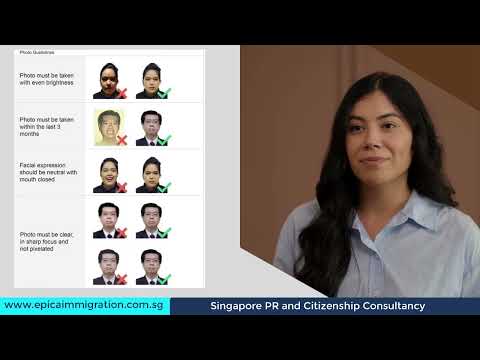
Timing is key. Avoid taking photos when the baby is hungry. The "sweet spot" is usually 15–20 minutes after a feed when they are alert but satisfied. For visual guidance on this difficult task, refer to the tutorial below:

Chapter 4: The 'Contrast Rule'—Wardrobe and Grooming
I see this error every week: an applicant takes a perfect photo while wearing a white t-shirt. Against a white background, they look like a "floating head."
Why You Should Never Wear a White Shirt
The ICA’s software uses edge-detection to verify the silhouette of the applicant. If your clothing matches the background, the software can't distinguish your shoulders. To avoid this, always wear a dark color—navy blue, black, or charcoal. This provides the necessary contrast to make the AI's job easy.
Hair, Hijabs, and Forehead Visibility
Your hair must not cover your eyebrows or eyes. Eyebrows are critical landmarks for facial recognition. For those wearing religious headwear:
- The headgear must be a dark, solid color.
- It must not cast any shadows onto the face.
- The entire face, from chin to forehead, must be visible.
Chapter 5: Spectacles and Shadows—The Technical 'Deal-Breakers'
In 2019, the ICA revised its stance on spectacles. While technically allowed, the conditions are so restrictive that my professional advice is: Take them off.
The ICA's New Stance on Glasses
If you choose to wear glasses, there can be absolutely no flash reflection, no tinted lenses, and the frames cannot cover any part of the eyes. Since you don't wear glasses for the iris and facial scanners at the automated gates anyway, there is no benefit to having them in your photo.
Micro-Shadows and How to Kill Them
Shadows are the primary reason for digital rejections. To eliminate them at home without professional studio gear, use indirect natural light. Stand facing a large window during the day. This provides "flat" lighting that fills in the shadows under your nose and eyes. Avoid overhead ceiling lights, which create dark "raccoon eyes."
Chapter 6: Cross-Border Compliance—Malaysia vs. Singapore Standards
For those who frequently cross the Causeway, it's vital to remember that Malaysian passport photo requirements are not identical to Singapore’s.
While Singapore is strictly white-background, Malaysia has historical requirements for blue backgrounds in some documents, though online renewals now often accept white. Furthermore, Malaysia's head-size ratio is often slightly different. Always verify the specific requirements of the Malaysian IMI portal before uploading.
Chapter 7: Troubleshooting Rejections—Reading the Fine Print
If you get rejected, the ICA provides a standardized reason. Here is how to decode them:
- "Inappropriate Image Quality": Your file is likely too compressed. Use the original file from your camera roll.
- "Uneven Lighting": You likely stood sideways to a window. Face the light source directly.
- "Eyes Not Looking at Camera": You were likely looking at the screen rather than the lens.
Frequently Asked Questions
What is the best passport photo maker for ICA compliance?
The best passport photo maker is one that utilizes AI validation specifically tuned to Singapore's ICA standards, ensuring crown-to-chin ratios and background contrast are perfect.
Can I use a free passport photo app for my application?
Yes, but be cautious. Many generic apps do not account for the specific 25mm-35mm facial ratio required by the ICA. Using a dedicated Singapore-specific tool is safer.
Where can I find a passport photo shop near me in Singapore?
While you can visit traditional studios, many residents now prefer the convenience of taking photos at home using their smartphones, which avoids the need to search for a physical shop.
What are the sg passport photo size requirements?
The sg passport photo size is 35mm wide by 45mm high, with the face occupying 70-80% of the vertical space.
Conclusion: Future-Proofing Your Identity
We are rapidly approaching a future where your face is your boarding pass. The Singapore government’s investment in biometrics means that your passport photo is no longer just a formality—it is a critical piece of digital infrastructure.
By following this masterclass—prioritizing contrast, mastering the newborn flat-lay, and avoiding the trap of white clothing—you ensure your travel remains frictionless. Using a dedicated passport photo app like IC Photo Singapore provides a vital safety net. With our Lifetime Remake Guarantee, if the ICA requirements evolve or your photo is rejected for any reason, we fix it at no cost.
Don’t let a 35mm x 45mm frame stand between you and your next adventure. Get it right the first time, and spend your time planning your itinerary, not waiting in line at the Kallang ICA building.
Ready to Create Your Photo?
Get your perfect passport, IC, or visa photo in minutes. AI-powered, ICA-compliant, instant download.
Create Your Photo Now