Passport Photo App Guide: Fix Singapore ICA Rejections at Home
Master the art of biometric photo compliance with this technical deep-dive. Learn how to defeat the physics of facial distortion and HDB lighting issues using a passport photo app to ensure your Singapore passport, PR, or visa application is accepted the first time.
Few things are as frustrating as receiving a rejection email from the Immigration & Checkpoints Authority (ICA) just weeks before a planned holiday. You spent twenty minutes standing against the whitest wall in your HDB flat, trying not to blink, only to be told your photo is "too dark" or your "shoulders are uneven."
ICA isn't being pedantic; they are adhering to strict international biometric standards. Your photo is processed by a biometric engine that measures precise facial geometry. When you use a casual passport photo app or DIY method that looks "fine" to the naked eye, it can still be a mathematical mess for the software. This guide explores the technical reasons behind rejections and how to optimize your digital application for success.
The Black Box of ICA Compliance #
ICA rejection isn't personal; it's algorithmic. The system checks for over 30 specific markers, including head-to-frame ratio, background uniformity, and "hot spots" caused by flash. To meet the ICA Photo Guidelines, every pixel must serve a purpose. Using a high-quality passport size photo editor ensures these markers are aligned before you hit submit.
The Physics of Facial Distortion: Why Selfies Fail #
If you take a photo of yourself using your phone's front camera at arm's length, you've likely already failed. It doesn't matter how good your lighting is.
The 2-Meter Rule and Focal Length #
Smartphone cameras usually have wide-angle lenses. When you shoot from only 50cm to 100cm away, you trigger "perspective distortion." This makes features closest to the lens—your nose—look larger, while your ears seem to vanish. For a biometric scan, this is a disaster because it alters the geometry of your face.
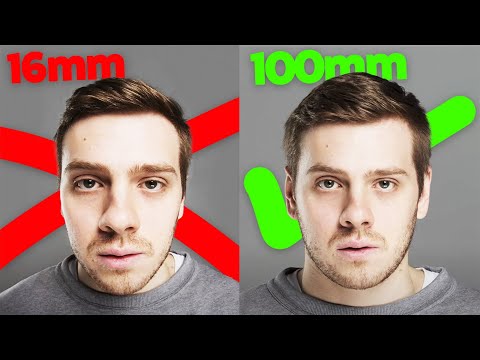
To get a compliant photo, stand at least 2 meters away from the camera and use your phone's optical zoom (2x or 3x). This flattens your facial features, bringing them into the correct proportions. This phenomenon is a well-documented part of Optical lens distortion research.
Barrel Distortion: The 'Big Nose' Effect #
Beyond distance, smartphone lenses often suffer from "barrel distortion," where straight lines bow outward. If your head is too close to the edge of the frame, your face can look warped. Always center yourself and leave plenty of white space around your head and shoulders. A professional passport photo maker will crop the image to the correct sg passport photo size without warping the pixels.
HDB Lighting Survival Guide: Defeating Shadows and Yellow Tones #
Most Singaporean homes present a lighting nightmare. We typically have warm, yellow-toned LED bulbs or harsh overhead lights that cast deep shadows under the eyes and chin.
The Warm Bulb Dilemma #
ICA requires a neutral color balance. If your photo looks like it was taken in a cozy cafe (3000K warm light), the system will struggle to distinguish your skin tone from the background. Turn off the indoor lights. Natural, indirect sunlight is your best friend. Stand facing a window during the day, but never in direct sunlight.
The Mahjong Paper Hack #
Shadows behind the ears or under the chin are the most frequent reasons for rejection. Professional studios use reflectors to fill these shadows. At home, you can use two sheets of white Mahjong paper. Have a family member hold them just below your chest (out of frame). This bounces light back up onto your neck, erasing the harsh shadows that trigger a ica passport photo requirement failure.

The Cross-Border Compliance Matrix #
One of the biggest mistakes travelers make is assuming a "passport photo" is a universal standard. If you use your Singapore Passport photo for a US Visa, it will be rejected due to different dimension requirements.
| Document Type | Dimensions | Background | Unique Requirement |
|---|---|---|---|
| Singapore Passport | 35mm x 45mm | White | Matte finish if printed |
| US Visa | 2 x 2 inches | White | Head must be 1-1.375 inches |
| Malaysia Passport | 35mm x 50mm | White | Strictly no glasses; dark clothes |
| India OCI/Visa | 2 x 2 inches | White | Square format, high head ratio |
| China Visa | 33mm x 48mm | White | Visible ears and eyebrows |
For those applying for foreign documents, always refer to the official U.S. Visa Photo Requirements or the Jabatan Imigresen Malaysia portal for the most recent updates.
The Newborn and Toddler Masterclass #
Taking newborn photos that meet ICA standards is an Olympic-level challenge. The baby must have eyes open, head straight, and no hands or pacifiers in the frame.
The White Bedsheet Technique #
Don't try to hold the baby up against a wall. Instead, lay a white bedsheet on a firm mattress and lay the baby on top. This ensures their head is flat and supported. Stand over them (safely) and use the 2-meter rule with zoom to avoid casting your own shadow on the child. This is the easiest way to make passport size photo online free of frustration.
Troubleshooting Niche Rejections #
White Hair on White Backgrounds #
If you have white hair, the top of your head can disappear into the mandatory white background. The fix is "rim lighting." Place a small lamp slightly behind you to create a subtle highlight on the edge of your hair. This provides the contrast needed for the AI to see your head's silhouette.
Religious Headgear and Turbans #
Religious headgear is allowed but must not hide facial features. For hijabs, ensure the fabric is pulled back to show the entire face from the chin to the forehead. For OCI applications, verify specific rules on the India OCI Photo Specifications page.
Glasses and the Glare Battle #
You can wear glasses for Singapore photos only if there is no glare. In practice, just take them off. Even a tiny reflection on the rim can trigger an automated rejection. Unless they are a permanent medical necessity, it is safer to go without.
AI vs. Manual Editing: Why 'Beauty' Filters Are Your Enemy #
In the age of Instagram, our instinct is to touch up a photo. Do not do this. ICA’s biometric software looks for the natural texture of the skin. If you use a filter that smooths out the philtrum (the groove under your nose), the photo will be flagged as "modified."
A specialized free passport photo app or professional AI service like IC Photo Singapore doesn't change your face; it performs biometric alignment. It identifies the pixels representing your pupils and ensures they are at the exact millimeter-height required by the ICA without touching the "math" of your face.
Frequently Asked Questions #
Why was my passport photo rejected for being 'too dark' when it looks bright to me? #
ICA's software analyzes the histogram of the image. If there isn't enough light on your face (underexposure) or if the background isn't a true hex-code white, it will fail the automated check.
Can I use a selfie for my Singapore passport application? #
Technically, yes, but a standard arm's-length selfie usually fails due to focal length distortion (making your nose look bigger and ears smaller). Using a tripod and a passport photo maker at 2 meters is highly recommended.
What should I wear for a Singapore passport photo? #
Wear dark-colored clothing to provide a clear contrast against the white background. Avoid white or very light pastel colors, as they can cause a "floating head" effect in the biometric scan.
Your Checklist for a First-Time-Perfect Application #
- Distance: Was the photo taken from 2 meters away using 2x/3x zoom?
- Expression: Is your mouth closed with a neutral expression?
- Lighting: Did you use the Mahjong paper hack to remove ear shadows?
- Clothing: Are you wearing a dark shirt?
- Tools: Did you use a verified passport photo app to check for ica passport photo requirements?
By following these technical steps, you move beyond guesswork and ensure your application is processed without delay. If you're still unsure, our AI handles the distortion correction and shadow removal automatically to ensure you stay compliant with all Singapore regulations.
Ready to Create Your Photo?
Get your perfect passport, IC, or visa photo in minutes. AI-powered, ICA-compliant, instant download.
Create Your Photo Now