Singapore Passport Photo Masterclass: ICA Approval at Home
Skip the photo booth. ICA's biometric photo standards explained, with troubleshooting tips for newborns, seniors and DIY photos at home.
The High Stakes of a 35mm x 45mm Frame
There’s a specific kind of dread that hits when you see an email from the Immigration & Checkpoints Authority (ICA) with the subject: "Update on your Passport Application." You open it, hoping for an approval, only to find the words: Photo Rejected.
Suddenly, your travel plans feel shaky. You find yourself searching for a passport photo shop near me or scrolling through Reddit, trying to figure out why your perfectly clear photo didn't make the cut. In Singapore, a passport photo isn't just a portrait; it’s a high-precision biometric data point. Since the launch of the New Generation Singapore Passport, standards have tightened.
Whether you are using a professional passport photo maker or attempting a DIY approach, understanding the rules is critical. This guide shows you how to use a passport photo app to get that "Approved" status on your first try without visiting a physical studio.
The ICA Code: Decoding the Technical Specs
Let’s start with the hard numbers. If you get the dimensions wrong, the MyICA e-Service portal won’t even let you finish the upload. It’s the first gatekeeper.
Pixels vs. Millimeters: The Digital Math
For a physical print, you need 35mm wide by 45mm high. However, for online submissions, the sg passport photo size is measured in pixels:
- Dimensions: Exactly 400 x 514 pixels.
- File Size: 8MB or less.
- Format: jpg, jpeg, heic, heif or png.
- Recency: Taken within the last 3 months.
Lighting: Why Your Living Room Lamp is Your Worst Enemy
Indoor lighting is the primary reason photos get rejected. Most HDB flats use warm LED bulbs that create a muddy, orange tint. Even worse is the "Top Lighting Shadow." If you stand directly under a ceiling light, you get shadows under your eyes and nose, which obscures biometric features.
The 'HDB Corridor' Hack
Instead of searching for where to take passport photo Singapore, look to your corridor. Position yourself facing a window or stand at your HDB corridor between 10:00 AM and 3:00 PM. You want indirect natural light to hit your face evenly from the front. If the sun is hitting one side of your face, the photo will fail the ICA's facial recognition check.
The 'Pure White' Background Myth
According to ICA photo guidelines, the background must be white, matte, and unpatterned. However, a white wall at home often looks grey on camera.
To avoid the "Halo Effect" (a fuzzy border around your hair), stand about half a meter away from the wall. This prevents shadows from falling onto the background. If you use a free passport photo app, ensure it has a high-quality background removal tool that doesn't distort your silhouette.
Facial Geometry: Eyes, Hair, and the Neutral Expression
- The Eyebrow Rule: This is non-negotiable. Your hair must not cover your eyebrows. Even a few strands of fringe touching the brow can lead to rejection because the distance between your eyebrows is a key biometric marker.
- Neutral Expression: No smiling and no teeth visible. Keep your mouth naturally closed and eyes looking directly into the lens.
- Head Tilt: Ensure your head is straight. A slight tilt can change the perceived geometry of your face.
Religious Headgear and Glasses: Navigating the Nuance
If you wear a Hijab, Turban, or Kippah, ensure it does not cast a shadow on your face. Your features from the chin to the top of the forehead must be visible.
What about glasses? While technically allowed, most experts recommend taking them off. Glare on the lenses or frames obscuring the eyes are top reasons for rejection. Since 2020, biometric standards have moved toward "no glasses" to improve facial recognition accuracy.
The Newborn Mission: Workflow for Parents
Taking a newborn passport photo is a challenge. You cannot tell an infant to look at the camera. Use the "Floor Method": lay a pure white sheet on the floor and place the baby on it. Position their head toward a window for even light. Avoid showing your hands in the frame, as this causes automatic rejection. Use a rattle near the lens to catch their attention for a split second.
Supporting Seniors and Persons with Disabilities
For seniors, mobility issues can make it hard to maintain the correct posture. Use a chair with back support and position the camera at eye level. Avoid standing over them, as this distorts facial features. If they have difficulty fixing their gaze, take multiple shots to ensure at least one captures a clear, front-facing view.
Common Rejection Reasons and How to Fix Them
Based on data from the ICA newsroom, here are the most common mistakes:
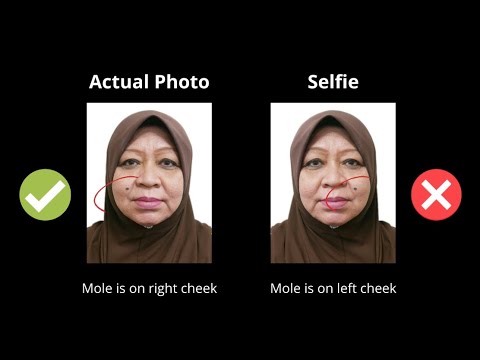
- The "Selfie Arm": Perspective distortion makes your nose look larger and ears disappear. Use a tripod or a friend.
- Blurred Biometrics: Caused by low light. Use a passport size photo editor only on sharp, well-lit originals.
- Red Eye: Caused by flash. Never use flash; stick to natural light.
Frequently Asked Questions
Can I take my own passport photo in Singapore?
Yes, you can take your own photo using a smartphone. Ensure you follow all ICA biometric standards regarding lighting, background, and facial expression.
What is the best passport photo app for Singapore?
An ideal app should offer AI-powered compliance checks specifically for ICA standards, including the 400x514 pixel crop and background whitening.
Can I make a passport size photo online for free?
While you can make passport size photo online free using basic editors, many lack the specialized biometric validation required by ICA. Professional tools like IC Photo Singapore provide a higher guarantee of approval.
Do I need to go to a photo booth?
No. With modern smartphones and a specialized passport photo maker, you can achieve professional results at home that are often superior to cramped, poorly lit photo booths.
The 7-Point Zero-Rejection Checklist
- [ ] Lighting: Even light, no shadows under nose/eyes.
- [ ] Background: Matte white, no shadows or "halo."
- [ ] Eyebrows: Both fully visible, no hair covering them.
- [ ] Expression: Neutral, mouth closed, no teeth.
- [ ] Glasses: Removed to avoid glare/obstruction.
- [ ] Framing: Head centered, looking directly at the camera.
- [ ] File Specs: Exactly 400x514 pixels, 8MB or less.
Conclusion: The Professional DIY Advantage
Taking your photo at home gives you the freedom to take 50 shots until you get the perfect one. However, the technical gap between a "selfie" and an ICA-compliant document is wide. By using a specialized passport photo app like IC Photo Singapore, you combine the convenience of DIY with the precision of a professional studio. If you are currently overseas, you can also consult MFA Singapore for additional guidance on renewing documents from abroad. Follow these steps, and your next application will be a breeze.
Ready to Create Your Photo?
Get your perfect passport, IC, or visa photo in minutes. AI-powered, ICA-compliant, instant download.
Create Your Photo Now